

Json Genie: JSON Editor/Viewer
Json Genie: JSON Editor/Viewer is made and published by Tommy Uytterhaegen. AppBrain is an independent app data site and isn't affiliated with Tommy Uytterhaegen. The app name, icon, screenshots and description belong to Tommy Uytterhaegen and are shown as published on the App Store.
AppBrain's verdict
- Rating on App Store
- 4.67
- 6 ratings
- Last updated
- September 19, 2026
It doesn't have enough ratings yet to judge what users think.
Rankings
App Store top chartsApp Store Rankings for Json Genie: JSON Editor/Viewer
Competitors
Similar apps and more from Tommy UytterhaegenAlternatives to Json Genie: JSON Editor/Viewer





More from Tommy Uytterhaegen



Also available on Google Play

Releases
Updates seen on the App Store- Version
- v3.5.4
- Launched
- May 2026
No changelog data
User feedback
Ratings and reviews on the App StoreComments on Json Genie: JSON Editor/Viewer for iOS
We don't have enough comments to show example comments. Please check back later.
Technology
Found in the app by AppBrain- Price
- Free
- App size
- 58.5 MB
- Content rating
- Everyone
Technologies used by Json Genie: JSON Editor/Viewer
About the app and developer
About Json Genie: JSON Editor/Viewer
Json Genie: JSON Editor/Viewer is an overall app developed by Tommy Uytterhaegen.
User Ratings
Json Genie: JSON Editor/Viewer is rated 4.67 out of 5 stars. The rating is based on 6 ratings.
App Information
Json Genie: JSON Editor/Viewer is freely available from the App Store. The app size is 58.49 MB. The latest version available is v3.5.4. The last update was on September 19, 2026.
Technical Requirements
The app has a content rating of Everyone. The app has been available on the App Store since May 2026.
Developer information for Tommy Uytterhaegen
Address:
Frequently asked questions about Json Genie: JSON Editor/Viewer
Is Json Genie: JSON Editor/Viewer free?
Yes. Json Genie: JSON Editor/Viewer is free on the App Store.
Is Json Genie: JSON Editor/Viewer still available?
Yes. Json Genie: JSON Editor/Viewer is on the App Store, and the last update we saw was on September 19, 2026.
How large is Json Genie: JSON Editor/Viewer?
Json Genie: JSON Editor/Viewer is 58.49 MB.
Is Json Genie: JSON Editor/Viewer suitable for children?
App Store rates the content of Json Genie: JSON Editor/Viewer as suitable for everyone.
How do people rate Json Genie: JSON Editor/Viewer?
Json Genie: JSON Editor/Viewer scores 4.67 out of 5 stars, from 6 ratings on the App Store.
Who made Json Genie: JSON Editor/Viewer?
Json Genie: JSON Editor/Viewer was developed by Tommy Uytterhaegen. It is listed in the overall category on the App Store.
What are the best alternatives to Json Genie: JSON Editor/Viewer?
People looking at Json Genie: JSON Editor/Viewer also look at these overall apps: Pdf Form Field Editor, Whatcode, Cmd+Ctrl: Command & Control, JSON View : Editor & Formatter, JSONSpruce.
Store listing
By Tommy Uytterhaegen, from the App Store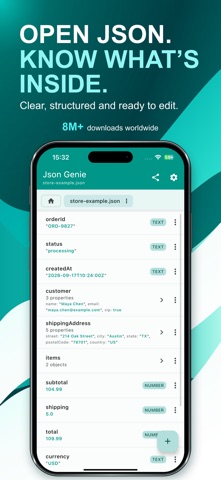


Description by Tommy Uytterhaegen Written by the developer, not by AppBrain. Click to read.
Open, understand and edit JSON on your iPhone or iPad without working through a wall of raw text.
Whether someone sent you a JSON file or you regularly work with API responses and configuration files, Json Genie makes it easy to explore your data, find what matters and make changes.
No coding needed. No account required. Your JSON is processed on your device.
**OPEN YOUR JSON, YOUR WAY**
Open JSON and JSONC from:
• Files on your device
• Mail, shared files and other apps
• Cloud storage apps
• Pasted text
• Web links and API URLs
• Supported ZIP archives
**EXPLORE WITHOUT GETTING LOST**
Browse your file in a clear, structured view. Open nested sections and lists (JSON objects and arrays) one level at a time, then easily find your way back.
Keep multiple files open in tabs and switch between them without reopening them.
**EDIT WITHOUT THE FUSS**
Change values in simple forms without manually managing commas, brackets or quotation marks.
• Edit text, numbers, true/false values and null
• Add, delete, clone, move and reorder entries
• Work with objects, arrays and individual values
• Copy and reuse data with paste history
**FIND IT. SKIP THE SCROLL.**
Search keys, values and paths across your file, then jump directly to matching results.
Need a more precise search? Use filters such as:
• id: 3
• game.id: 3
• city: "Austin"
**SEE EXACTLY WHAT CHANGED**
Compare two JSON files or open tabs. Inspect differences in objects, arrays and values with clear before-and-after details.
Check changes directly on your device without uploading your JSON to an online comparison tool.
**BRING YOUR FILES TOGETHER**
Merge JSON files into one new result while keeping your originals unchanged.
Review the merge summary, inspect the combined data, then save or share it.
**SAVE IT THE WAY YOU NEED IT**
Choose readable formatting for people or a compact file for sharing and other tools.
• Pretty-print and beautify JSON
• Minify JSON by removing unnecessary spacing
• Sort keys alphabetically
• View raw JSON text
• Save or share JSON as text or as a file
**YOUR JSON, PROCESSED LOCALLY**
Opening, viewing, editing, searching, comparing, merging and formatting happen on your device. Your JSON content is not uploaded to our servers for these operations.
No account required. You choose when to export or share your files.
**FREE TO USE. OPTIONAL PREMIUM.**
Start using Json Genie for free.
Premium removes ads, expands file and tab limits, increases history and unlocks extra themes.