Download Android Apps and Games
AppBrain
  • Apps
  • Apps being viewed right now Trending apps today Most popular apps All-time most downloaded apps Top rated apps
  • Intelligence ▾
    Intelligence overview → Track any Android app or your whole market
    Track & analyze
    Keyword Tracker & OptimizerTrack & improve Play rankings App Performance ReportOne-off PDF for any app StatisticsFree Android & Play market stats
    Promote your app
    Featured Apps App Links
  • Intelligence
  • Pricing
  • Dashboard
  • Sign up
  • Log in
Last updated on: 2026-08-08
App Store Apps > Productivity > Jumpshare - Screen Recorder
Jumpshare - Screen Recorder icon

Jumpshare - Screen Recorder

3.4.22
Jumpshare, Inc.
0.00
0 reviews
Free

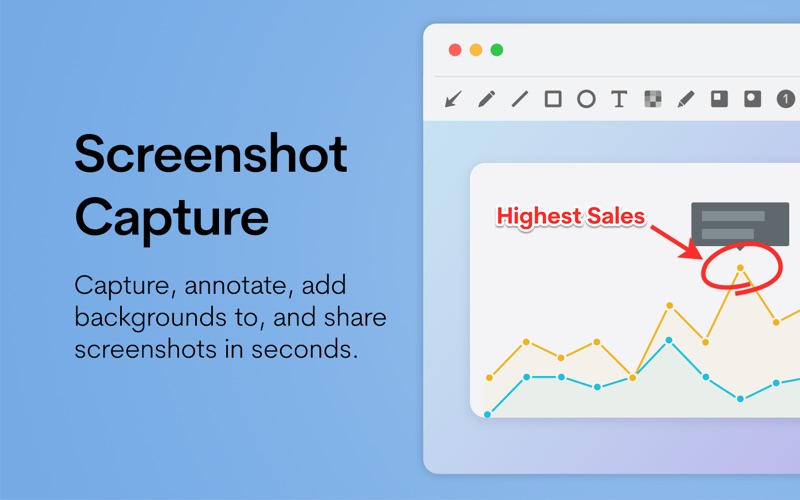
Jumpshare - Screen Recorder Screenshot 1 of 4
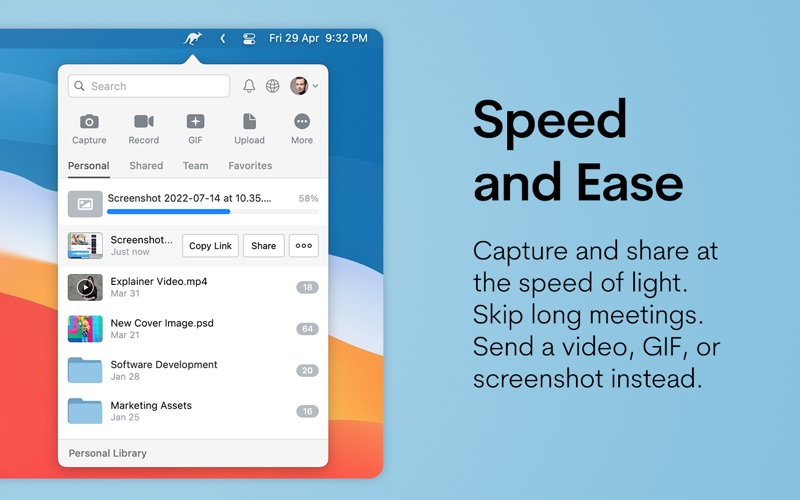
Jumpshare - Screen Recorder Screenshot 2 of 4
Jumpshare - Screen Recorder Screenshot 3 of 4
Jumpshare - Screen Recorder Screenshot 4 of 4
Download from the App Store

About Jumpshare - Screen Recorder

Jumpshare - Screen Recorder is an overall app developed by Jumpshare, Inc..

Download Statistics

User Ratings

The app has no ratings yet.

App Information

Jumpshare - Screen Recorder is FREE to download. The APK download size is 56.38 MB. The latest version available is 3.4.22. The last update was on January 24, 2026.

Technical Requirements

The app has a content rating of Everyone. The app has been available on Google Play August 2015.

Description
Jumpshare helps you share your work and ideas visually with screen recordings, screenshots, GIFs, and file sharing - all in one platform - so you can communicate better and be more productive.

By combining all tools in one software, Jumpshare helps you work better with your team, customers, and clients without having to juggle between different tools. Once you record a video, take a screenshot, or drag & drop the files to the menu bar, we automatically upload the content to Jumpshare and copy a secure private link that you can share with anyone quickly.

You can record a screencast as a video or GIF (with click tracking, audio voiceover, and webcam), capture screenshots and annotate (with text, draw, blur, and shapes), compose notes with syntax highlighting (text, markdown, or code), and voice clips right from the Jumpshare app.

Packed with powerful sharing features and a robust processing engine that can preview over 200 file formats online, Jumpshare is the fastest and easiest way to share your work and ideas.

"I use Jumpshare probably 30+ times EVERY DAY! It is so helpful, I wouldn't know what to do without it. I like how it just gets out of the way and I don't even have to think about it. I can easily send screenshots and video recordings to people on our team and to clients with ease." — Nicholas Scalice, Growth Marketer at Earnworthy

"I can't believe that I used to run my business without Jumpshare. My clients are VERY impressed that I can quickly record videos showing them what we need to do or giving them feedback on project requirements. In reality, it's just so much faster for me to record a video than type out an email and there are fewer mistakes so work gets done faster. It's a huge win for both of us." — Blake Beus, Founder at Blake Beus

Features:

• Record your screen as a video or GIF
• Record with click tracking, voiceover, system audio, and webcam
• Enable system audio recording to record your Zoom or Google Meet calls
• Draw over your screen during screen recordings
• Preview over 200 file formats online
• Get instant notifications when recipients view or download your files
• View how many people have accessed your videos, from where, when, and how?
• Quickly share screenshots, screen recordings, voice clips, and notes using customizable keyboard shortcuts
• Customize the theme of the file viewer
• Share links using short or long URLs (for increased security)
• Get instant notifications when recipients view or download your files
• Reshare, rename, or delete uploads from the menubar popover window
• Automatically detects your network settings to work behind a corporate proxy
• Quickly access important files by marking them as 'Favorite'
• Change notification sound

Get more with Jumpshare Plus:

• Get unlimited time for screen recordings
• Make use of 1TB (1,000GB) of online storage
• Share links that expire after the custom number of days, views, or downloads
• Disable downloads so recipients can only preview the file
• Schedule your work to be automatically shared via email at a certain time
• Lock your files with a password for extra security
• Set your files to self-destruct (auto-delete) after a set number of days
• View Advanced Analytics for each item - views, downloads, referrers, and more
• Share without a file size limit
• View version history and roll back to older versions of the same file
• Set up custom branding - have your own logo appear in our file viewer
• Set up a custom domain

Jumpshare is free to use. However, the Jumpshare Plus subscription costs $9.99/month or $99/year. Subscriptions will be charged to your credit card through your iTunes account. Your subscription will automatically renew unless canceled at least 24 hours before the end of the current period. You can cancel the subscription anytime from your iTunes account settings. Any unused portion of the subscription will not be refunded. For more information, see our Terms of Service and Privacy Policy.
Show more Show less

More data about Jumpshare - Screen Recorder

Price Free to download
Rating No ratings
Ranking Not ranked
Version 3.4.22
App download size 56.4 MB
Suitable for Everyone

More from Jumpshare, Inc.

Jumpshare: Secure File Sharing icon Jumpshare: Secure File Sharing
Jumpshare, Inc.
4.7
Free
469 ratings

Changelog of Jumpshare - Screen Recorder

No changelog data

Developer information for Jumpshare, Inc.

Jumpshare, Inc.

Address:

Share Jumpshare - Screen Recorder

Comments on Jumpshare - Screen Recorder for iOS

We don't have enough comments to show example comments. Please check back later.

App Store Rankings for Jumpshare - Screen Recorder

This app is not ranked

Technologies used by Jumpshare - Screen Recorder

Top new apps Today's trending apps Popular Overall Apps other people are watching Apps on sale
More hot apps 🔥

Back to top
AppBrain Intelligence premium content

Subscribe now to get full and unlimited access to AppBrain Intelligence. You'll have access to:

  • App Intelligence dashboard (performance timeline, competitor comparison, country rankings, insight cards)
  • Detailed ranking data per app
  • Full timeline per developer
  • Device market shares data per country
  • Unlimited keyword tracking
1 Month

$75/mo
(billed every month)

SAVE 0%
Subscribe
3 Months

$65/mo
($195 billed every 3 months)

SAVE 13%
Subscribe
1 Year

$57.50/mo
($690 billed every year)

SAVE 23%
Subscribe
Each subscription will automatically renew 3 days before the expiration date for the same time period. Subscriptions can be cancelled at any time before the renewal.

AppBrain is a directory focused on discovering great apps and games. We give statistics, rankings and search options that Google Play and the App Store don't have. All trademarks are owned by their respective owners. AppBrain doesn't offer APKs or binaries, and always lets users install the official version from Google Play or the App Store.

More apps

  • Top Android apps being viewed
  • View Save Baby James
  • NokoPrint - Print from Phone
  • Clash layout - COC base design

Android Statistics

  • Android statistics
  • Google Play Developer stats
  • Trending Android Apps
  • Top popular Apps
  • Buy the best Android phone

About AppBrain

  • Contact
  • Privacy
  • Documentation
  • DMCA takedowns
  • Articles
  • Blog
  • Monetization tips: Understanding your eCPM
© 2010-2026 - AppBrain