

K Cast is made and published by Randal Haehnel. AppBrain is an independent app data site and isn't affiliated with Randal Haehnel. The app name, icon, screenshots and description belong to Randal Haehnel and are shown as published on the App Store.
AppBrain's verdict
- Rating on App Store
- 4.57
- 7 ratings
- Last updated
- March 23, 2025
It doesn't have enough ratings yet to judge what users think.
Rankings
App Store top chartsApp Store Rankings for K Cast
Releases
Updates seen on the App Store- Version
- 1.3.3
- Launched
- April 2024
No changelog data
User feedback
Ratings and reviews on the App StoreComments on K Cast for iOS
We don't have enough comments to show example comments. Please check back later.
Technology
Found in the app by AppBrain- Price
- $3.99
- App size
- 1.48 MB
- Content rating
- Everyone
Technologies used by K Cast
About the app and developer
About K Cast
K Cast is a sports app developed by Randal Haehnel.
User Ratings
K Cast is rated 4.57 out of 5 stars. The rating is based on 7 ratings.
App Information
K Cast costs $3.99. The app size is 1.48 MB. The latest version available is 1.3.3. The last update was on March 23, 2025.
Technical Requirements
The app has a content rating of Everyone. The app has been available on the App Store since April 2024.
Developer information for Randal Haehnel
Address:
Store listing
By Randal Haehnel, from the App Store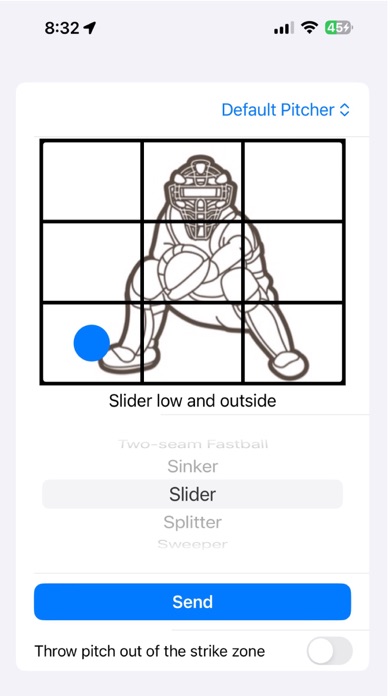
Description by Randal Haehnel Written by the developer, not by AppBrain. Click to read.
Give your catcher one AirPod that is already paired to your phone. We highly recommended you put the phone in transparency mode to let outside sound in. You can then give your pitcher an Apple Watch(worn on the glove hand under a black wrist band) with the Apple Watch K Cast app running to completely remove the need for the catcher to signal pitches to the pitcher. This will speed up games, eliminate pitcher/catchers getting crossed up on pitches and prevent those pesky runners on second base from stealing your pitches and signaling to their hitters.
Next, in the K Cast app, tap the location in or outside the strike zone where you want the pitcher to pitch the baseball, select the pitch type, and tap Send. That’s it. The application lets you know the pitch was transmitted to the catcher’s AirPod. The catcher then signals the pitch to the pitcher.
K Cast is secure and enables you to effortlessly send pitches to your catcher without having to use cumbersome signs or codes that can be stolen by overzealous coaches with too much time on their hands.
Tips:
- Make sure your phone is not muted and the volume is at a reasonable level. A muted phone will not speak the pitch or location to the catcher.
- If you have multiple catchers, you can give each their own AirPod tip.
- Put your phone in "Do Not Disturb" mode so any calls or texts don't disturb the catcher.
- If you are using the Apple Watch app, you probably want to have the pitcher take it off between innings and put it on a portable charger so that it doesnt run low on battery while pitching.