

Kakuremi - KeePass Manager
Kakuremi - KeePass Manager is made and published by SPRING HIKER CORP. AppBrain is an independent app data site and isn't affiliated with SPRING HIKER CORP. The app name, icon, screenshots and description belong to SPRING HIKER CORP. and are shown as published on the App Store.
AppBrain's verdict
- Rating on App Store
- 5.00
- 1 ratings
- Last updated
- October 7, 2026
It doesn't have enough ratings yet to judge what users think.
Rankings
App Store top chartsApp Store Rankings for Kakuremi - KeePass Manager
Competitors
Similar apps and more from SPRING HIKER CORP.Alternatives to Kakuremi - KeePass Manager


Releases
Updates seen on the App Store- Version
- 1.5.1
- Launched
- May 2026
No changelog data
User feedback
Ratings and reviews on the App StoreComments on Kakuremi - KeePass Manager for iOS
We don't have enough comments to show example comments. Please check back later.
Technology
Found in the app by AppBrain- Price
- Free
- App size
- 8.01 MB
- Content rating
- Everyone
Technologies used by Kakuremi - KeePass Manager
About the app and developer
About Kakuremi - KeePass Manager
Kakuremi - KeePass Manager is an utilities app developed by SPRING HIKER CORP.
User Ratings
Kakuremi - KeePass Manager is rated 5.00 out of 5 stars. The rating is based on one rating ratings.
App Information
Kakuremi - KeePass Manager is freely available from the App Store. The app size is 8.01 MB. The latest version available is 1.5.1. The last update was on October 7, 2026.
Technical Requirements
The app has a content rating of Everyone. The app has been available on the App Store since May 2026.
Developer information for SPRING HIKER CORP.
Address:
Store listing
By SPRING HIKER CORP., from the App Store




Description by SPRING HIKER CORP. Written by the developer, not by AppBrain. Click to read.
Kakuremi was built for one thing: a KeePass vault that stays yours.
**YubiKey Challenge-Response -- Free, No Subscription**
Enter your master password, then hold your YubiKey to the top of your iPhone over NFC -- the key is a second factor, not a replacement for your password. The hardware-key unlock is not time-limited, not gated, and not billed separately.
Kakuremi uses HMAC-SHA1 Challenge-Response, the same scheme as the KeePass desktop apps. It works with NFC-capable YubiKey 5 Series models and the YubiKey NEO once an HMAC-SHA1 slot is configured (via the YubiKey Manager / Authenticator app). FIDO2/passkey-only keys -- such as the Security Key Series -- cannot unlock a database, because they do not implement HMAC-SHA1 Challenge-Response.
**A KDBX Engine Written in Rust**
Kakuremi's KDBX parsing and serialization are written in Rust, a memory-safe language chosen to reduce the risk of buffer-overflow and use-after-free bugs.
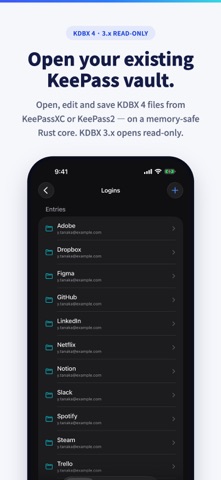
Open KDBX 3.x (read-only) and KDBX 4.x; create, edit, and save in KDBX 4. Compatible with KeePassXC, KeePass2, and other standard-compliant KeePass clients.
**AutoFill in Safari and in Apps**
Kakuremi ships a native Credential Provider extension that works with AutoFill on current and older versions of iOS. Tap the key icon, choose Kakuremi, and pick the login you need.
**Local-First -- No Accounts, No Cloud Sync**
Kakuremi has no accounts, no sync service of its own, no telemetry, and no analytics. Your database is decrypted in memory and released when the app locks. An encrypted copy of your logins (used by AutoFill) and recent copies of your vault file stay in the app's own storage -- you can clear both in Settings. Apart from Apple's own App Store purchase checks, the only network features are optional and off by default: website icons (only a site's domain is sent to Google's favicon service) and password breach-check (a partial, anonymized hash sent to Have I Been Pwned). Neither lookup sends your master password or an entry's password, username, or notes.
**What's Free**
- Create or open one KeePass database (KDBX 4; KDBX 3.x read-only)
- Create, edit, and organize entries, groups, and tags
- YubiKey NFC Challenge-Response unlock
- Face ID / Touch ID biometric unlock
- iOS AutoFill (Credential Provider)
- Store TOTP (2FA) secrets and view live one-time codes
- Password generator
- Search and Recycle Bin
- View attachments
- Password breach check (Have I Been Pwned)
- Themes (Light / Dark / Warm) and 6 accent colors
- Localized in 9 languages
**Kakuremi Pro**
For power users who want more:
- Use more than one database
- Add file attachments
- Backup history & restore
Pricing: a monthly or yearly subscription, or a one-time purchase. New subscribers get a 1-month free trial on the yearly plan; the subscription then renews at the yearly price unless it is canceled at least 24 hours before the trial ends. Prices for your region are shown on this page.
**Why "Kakuremi"?**
Kakuremi (Japanese: hidden form) refers to the art of concealment. Your secrets deserve to be invisible -- no account to sign into, no service of ours holding them, no fragile code to corrupt them. Just hidden in the file you chose.
Built by Springhiker Inc.
---
Terms of Use (EULA): https://www.apple.com/legal/internet-services/itunes/dev/stdeula/
Privacy Policy: https://kakuremi.com/privacy/