

Kalimba Studio: Tuner & Tabs
Kalimba Studio: Tuner & Tabs is made and published by Mitaanshu Agarwal. AppBrain is an independent app data site and isn't affiliated with Mitaanshu Agarwal. The app name, icon, screenshots and description belong to Mitaanshu Agarwal and are shown as published on the App Store.
AppBrain's verdict
- Rating on App Store
- 4.25
- 4 ratings
- Last updated
- October 1, 2026
It doesn't have enough ratings yet to judge what users think.
Rankings
App Store top chartsApp Store Rankings for Kalimba Studio: Tuner & Tabs
Competitors
Similar apps and more from Mitaanshu AgarwalAlternatives to Kalimba Studio: Tuner & Tabs


More from Mitaanshu Agarwal


Releases
Updates seen on the App Store- Version
- 1.7.0
- Launched
- June 2026
No changelog data
User feedback
Ratings and reviews on the App StoreComments on Kalimba Studio: Tuner & Tabs for iOS
We don't have enough comments to show example comments. Please check back later.
Technology
Found in the app by AppBrain- Price
- Free
- App size
- 13.8 MB
- Content rating
- Everyone
Technologies used by Kalimba Studio: Tuner & Tabs
About the app and developer
About Kalimba Studio: Tuner & Tabs
Kalimba Studio: Tuner & Tabs is a music app developed by Mitaanshu Agarwal.
What is the rating of Kalimba Studio: Tuner & Tabs?
Kalimba Studio: Tuner & Tabs is rated 4.25 out of 5 stars, based on 4 ratings.
Is Kalimba Studio: Tuner & Tabs free?
Kalimba Studio: Tuner & Tabs is free. The app size is 13.77 MB. The latest version available is 1.7.0. The last update was on October 1, 2026.
What are the requirements for Kalimba Studio: Tuner & Tabs?
The app has a content rating of Everyone. The app has been available on the App Store since June 2026.
Developer information for Mitaanshu Agarwal
Address:
Store listing
By Mitaanshu Agarwal, from the App Store


Description by Mitaanshu Agarwal Written by the developer, not by AppBrain. Click to read.
PLAY IT BACK IN THE ECHO GARDEN
• Kalimba Studio plays a few notes from a real song, then it's your turn: echo them on your kalimba.
• Every note it hears clearly blooms a flower. Phrases grow from two notes to five, so a run of echoes teaches the song's opening.
• The microphone is off while the app plays, so it never grades its own sound.
• An unclear pluck, a touch between two tines or an out-of-tune tine is pointed out, not marked wrong.
• No kalimba yet? Play on screen in a clearly labelled touch mode.
FIND YOUR FIRST THREE TINES
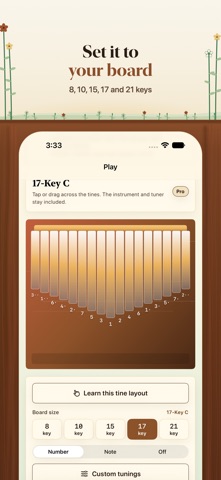
• Follow an illustrated guide for the built-in 8, 10, 15, 17 and 21-key boards.
• See the note, octave and position of each starting tine, then try the layout drill.
• Hear the note you tap as you work through the drill. Touch practice is separate from microphone grading.
• Custom tunings show your saved layout; check it against your physical instrument.
TUNE AND CARE FOR YOUR KALIMBA
• Read the detected note, cents offset and signal confidence.
• Get hammer guidance one tap at a time, only after a stable reading.
• Work through the buzz guide before reaching for more force.
• Use the tuner and care guide without Pro.
LEARN A PHRASE AT YOUR OWN PACE
• Read number tabs that show note duration, rests, chords and barlines.
• Hear a phrase first, slow it to 50%, move to the part you need, and repeat an A-B section.
• Practice with an audible metronome.
• Compare timing and tine-choice results separately in Play-Along.
WAIT MODE LISTENS FOR YOUR KALIMBA
• Advance when a clear pluck matches the expected note.
• When the signal is unclear, try another pluck; uncertainty is not marked as a wrong note.
• Microphone audio is processed on your device. It is not recorded, saved or uploaded.
• Guide playback and microphone grading stay separate. After an interruption or route change, start listening again when you are ready.
LESSONS THAT FIT YOUR BOARD
• Switch among 8, 10, 15, 17 and 21-key C layouts.
• Arrangements fit the available tines without replacing chromatic notes.
• On standard 17-key C, 68 of the 80 rights-reviewed melody lessons fit. The 12 incompatible melodies are withheld.
MAKE AND SHARE YOUR OWN TABS
• Write notes, rests, chords, bars and exact beat durations.
• Preview your work before saving it.
• Export rhythm-aware PNG and PDF sheets.
• Private tabs stay on this device unless you choose to share an export.
INCLUDED WITHOUT PRO
Echo Garden on the starter songs (10 echoes a day), the playable instrument, tine guide, cents tuner, care and buzz guide, layout drill, three starter lessons, three saved private tabs, and one PNG + PDF export.
KALIMBA PRO: PAY ONCE OR SUBSCRIBE
Pro unlocks every graded lesson and Echo Garden that fits your selected board, with no daily echo limit, collection-wide Wait Mode and A-B practice, and unlimited private tabs, custom tunings, and PNG + PDF exports. Kalimba Pro Lifetime is a single purchase that does not renew. Monthly and yearly subscriptions unlock the same on-device features. The App Store shows your local prices and any introductory offer you are eligible for before you buy. Existing subscribers keep access through their original products.
No account is required for local playing, tuning, lessons or tab making. Sign in with Apple is optional for account-backed session guidance. App Store restoration restores local Pro access. Linking a guest purchase to an optional Apple sign-in account is not supported in this version.
Subscriptions renew automatically unless canceled at least 24 hours before the current period ends. Manage or cancel in App Store account settings. Lifetime is charged once. Terms: https://kalimba.keenshift.ai/terms