




AppBrain's verdict
New- Rating on App Store
- 5.00
- 1 ratings
- Last updated
- November 13, 2026
- Size
- 42.0 MB
Kan: Offline File Converter came out 9 days ago. It doesn't have enough ratings yet to judge what users think.
User feedback
Ratings and reviews on the App StoreComments on Kan: Offline File Converter for iOS
We don't have enough comments to show example comments. Please check back later.
Store listing
By Dmitrii Kanatev, from the App StoreDescription by Dmitrii Kanatev Written by the developer, not by AppBrain. Click to read.
Looking for a fast, secure, and powerful way to manage your files? Meet Kan — the ultimate all-in-one media converter and document tool that works 100% offline!
No internet required, no cellular data usage, and absolute privacy. Because all processing happens strictly locally on your iPhone or iPad, your personal files never leave your device and are completely safe from leaks.
SMART SINGLE-WINDOW INPUT
Forget about complex menus. Just import any file from your Photo Gallery or Files app. Kan automatically detects the file format and instantly opens the exact tool you need!
BATCH PROCESSING UP TO 100 FILES
Save your time! Convert, resize, or compress up to 100 files simultaneously with incredible speed.
EXPLORE OUR FULLY-FEATURED TOOLKIT:
• MULTIMEDIA VIDEO EDITOR
- Format Changer: Convert between MP4, MOV, and high-quality GIFs.
- Advanced Settings: Choose resolutions (Original, 1080p, 720p, 480p), adjust bitrate (500–2000 Kbps), and set frame rates (24, 30, 60 FPS).
- Pro Video Codecs: Full support for H264/AVC and modern H265.
- Video Tools: Merge multiple clips, crop aspect ratios (9:16, 1:1, 4:5, 16:9), add custom background music, or extract audio tracks instantly.
- Speed Control: Adjust video playback speed from 0.5x to 2x.
• PROFESSIONAL AUDIO & RINGTONE MAKER
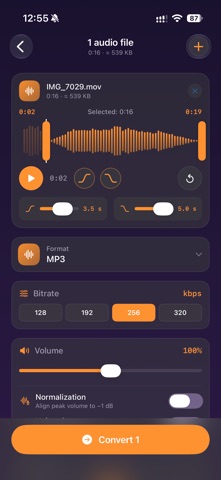
- Audio Converter: Supports MP3, M4A, WAV, AIFF, and CAFF.
- Custom Ringtones: Easily trim tracks and create custom iPhone ringtones.
- Sound Studio: Adjust bitrates, change speed (0.5x to 2x), set custom sample rates (44.1 kHz / 48 kHz), and choose between Mono or Stereo.
- Audio Enhancer: Clean up your tracks with built-in Audio Normalization and smart Noise Reduction.
• IMAGE & PHOTO COMPRESSOR
- Image Formats: Convert and optimize JPEG, PNG, HEIC, PDF, GIF, and TIFF.
- Resize & Edit: Flip, mirror, or rotate images. Use quick preset layout sizes or set your own custom resolution.
• PDF & DOCUMENT TOOLS
- Office Converter: Convert text documents between DOCX, TXT, RTF, and PDF.
- PDF Compressor: Choose from 3 compression modes (Light, Medium, Strong) to reduce file size while keeping text sharp.
- PDF Builder: Merge multiple files into a single PDF or extract specific pages.
- Camera Scanner: Scan paper documents to PDF on the go.
• SPREADSHEETS & PRESENTATIONS
- Data Tables: Seamless conversion for CSV, XLSX, and ODS.
- Slide Presentations: Turn PPTX and PPTM into PDFs or break them down into separate high-quality JPG images.
• ARCHIVES & E-BOOKS
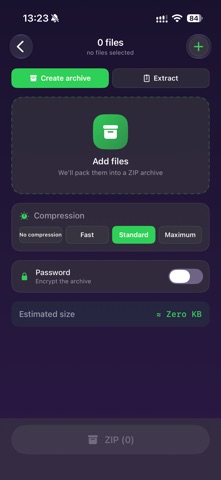
- Zip & Unzip: Compress or extract ZIP archives with custom compression speed and secure password encryption.
- Book Reader Converter: Convert EPUB, FB2, and TXT files for your mobile screen.
ADDITIONAL SYSTEM FEATURES:
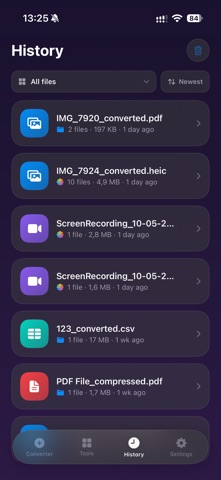
• Smart History: Easily find your past actions with filters by file type and operation time.
• Device Optimizer: Clear temporary cache files in one tap to free up storage space.
• Premium Interface: Fluid haptic feedback and native Dark / Light mode support.
Kan is completely free to use. Enjoy powerful desktop-grade conversion features right in your pocket, with total privacy and zero internet needed.
Download Kan now and experience the smartest way to convert files!
Safety and technology
Found in the app by AppBrain- Price
- Free
- App size
- 42.0 MB
- Content rating
- Medium
Technologies used by Kan: Offline File Converter
Releases
Updates seen on the App Store- Version
- 1.0
- Launched
- November 2026
No changelog data
Alternatives
Similar apps and more from Dmitrii KanatevAlternatives to Kan: Offline File Converter


More from Dmitrii Kanatev

Rankings
App Store top chartsApp Store Rankings for Kan: Offline File Converter
About the app and developer
About Kan: Offline File Converter
Kan: Offline File Converter is an utilities app developed by Dmitrii Kanatev.
What is the rating of Kan: Offline File Converter?
Kan: Offline File Converter is rated 5.00 out of 5 stars, based on one rating ratings.
Is Kan: Offline File Converter free?
Kan: Offline File Converter is free. The app size is 42.02 MB. The latest version available is 1.0. The last update was on November 13, 2026.
What are the requirements for Kan: Offline File Converter?
The app has a content rating of Medium Maturity. The app has been available on the App Store since November 2026.
Kan: Offline File Converter is made and published by Dmitrii Kanatev. AppBrain is an independent app data site and isn't affiliated with Dmitrii Kanatev. The app name, icon, screenshots and description belong to Dmitrii Kanatev and are shown as published on the App Store.
Developer information for Dmitrii Kanatev
Address:
Frequently asked questions about Kan: Offline File Converter
Is Kan: Offline File Converter free?
Yes. Kan: Offline File Converter is free on the App Store.
Is Kan: Offline File Converter still available?
Yes. Kan: Offline File Converter is on the App Store, and the last update we saw was on November 13, 2026.
How large is Kan: Offline File Converter?
Kan: Offline File Converter is 42.02 MB.
Is Kan: Offline File Converter suitable for children?
App Store gives Kan: Offline File Converter a medium maturity rating, so it is not meant for young children.
How do people rate Kan: Offline File Converter?
Kan: Offline File Converter has one rating of 5.00 stars on the App Store.
Who made Kan: Offline File Converter?
Kan: Offline File Converter was developed by Dmitrii Kanatev. It is listed in the utilities category on the App Store.
What are the best alternatives to Kan: Offline File Converter?
People looking at Kan: Offline File Converter also look at these utilities apps: Arise: AI Browser & Assistant, Open Remote For LG, QR maker - Wi-Fi, URL & Text, MaskCopy: Safe ID Copies, Tabletop: Mac Remote Desktop.