Download Android Apps and Games
AppBrain
  • Apps
  • Apps being viewed right now Trending apps today Most popular apps All-time most downloaded apps Top rated apps
  • Intelligence ▾
    Intelligence overview → Track any Android app or your whole market
    Track & analyze
    Keyword Tracker & OptimizerTrack & improve Play rankings App Performance ReportOne-off PDF for any app StatisticsFree Android & Play market stats
    Promote your app
    Featured Apps App Links
  • Intelligence
  • Pricing
  • Dashboard
  • Sign up
  • Log in
Last updated on: 2026-05-27
App Store Apps > Utilities > KartTracker CL
KartTracker CL icon

KartTracker CL

2.7
UVee
0.00
0 reviews
Free
Not recently updated — last update was on 2021-01-12. This app may no longer be actively maintained.
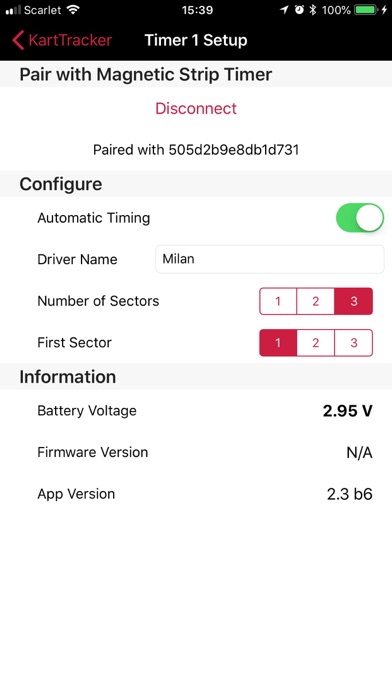
KartTracker CL Screenshot 1 of 3
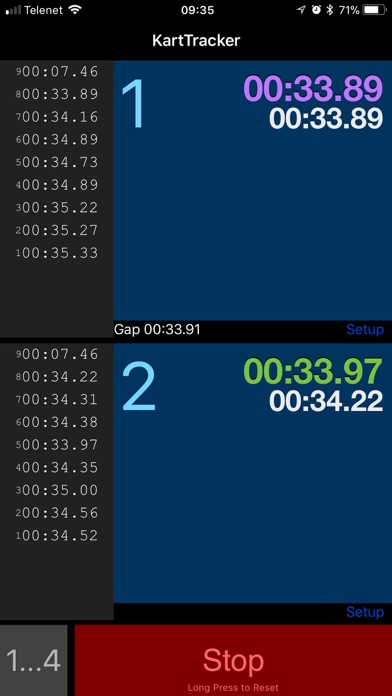
KartTracker CL Screenshot 2 of 3
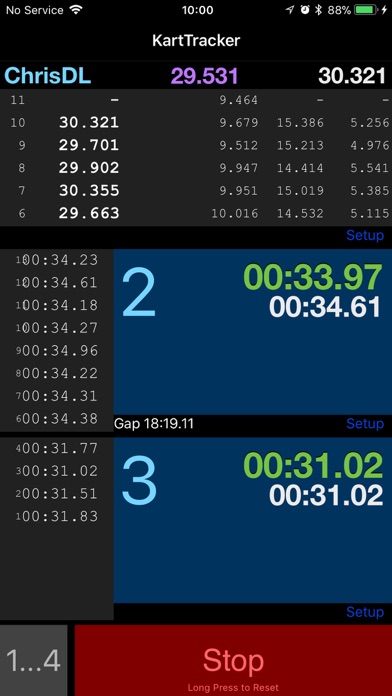
KartTracker CL Screenshot 3 of 3
Download from the App Store

Alternative downloads for the KartTracker CL app

Timely: Advanced Chess Clock icon Timely: Advanced Chess Clock
Diego Lavalle
0.0
Free
Flying Lap Race Timing icon Flying Lap Race Timing
Brendan Wright
5.0
Free
8 ratings
Minimum Timer icon Minimum Timer
Mihoko Araki
0.0
Free
Talent Pro icon Talent Pro
Shanghai Raymon IoT Technology Co., Ltd.
0.0
Free
DsStopWatch icon DsStopWatch
Ryuichi Kato
4.3
Free
3 ratings
Rollout Calculator - RC DD car icon Rollout Calculator - RC DD car
Takao Ichimura
4.9
Free
10 ratings
Wibeee Nest icon Wibeee Nest
Smilics Technologies
0.0
Free
Multi Stopwatches icon Multi Stopwatches
Evgeny Rubin
3.0
Free
2 ratings

About KartTracker CL

KartTracker CL is an overall app developed by UVee.

How many times has KartTracker CL been downloaded?

What is the rating of KartTracker CL?

KartTracker CL has no ratings yet.

Is KartTracker CL free?

KartTracker CL is free to download. The APK download size is 15.71 MB. The latest version available is 2.7. The last update was on January 12, 2021.

What are the requirements for KartTracker CL?

The app has a content rating of Everyone. The app has been available on Google Play August 2019.

Description
KartTracker Classic is the original version of our fully automated, wireless timing system for up to 4 karts. Laps and sectors are timed with 0.001s precision on your mobile without pressing a button or lifting a finger. Simply install one of our KartTracker timers on your kart and you're ready to go. KartTracker is compatible with standard magnetic timing strips as found on most karting tracks.

In addition, KartTracker Classic includes a manual lap timer which can be combined with the automatic timing system or used as a standalone timer. It is the easiest and most accurate on the market. Big buttons which instantly record the time. No more trying to hit the tiny Lap button of the built-in stopwatch. You can mix automatic timing (for your own drivers) with manual timing (for the competition ;-) ) so you can easily compare lap times.

Features:
* Time 1 to 4 different drivers, using large buttons which fill the screen
* Mix automatic (using KartTracker timers, available on our website) and manual timing to your heart's content
* Scrollable results list of recorded laps with lap number, lap time and sector times
* Automatically time laps and sectors with 0.001s precision. That's one thousandths of a second, folks.
* Displays the fastest lap for each driver (in green)
* Displays the fastest lap time of all drivers (in purple)
* Displays the last lap time for each driver (in white)
* Shows the time gap between adjacent drivers (to check if Driver 2 is closing in on Driver 1, for example) *currently only for manually timed laps
* Records time immediately and accurately when your finger hits the screen (not when your finger is lifted, like other timers)
* You can connect up to 4 KartTracker timers to automatically time four drivers at once!
* Updates your KartTracker Timer hardware to the latest firmware.

Manual Usage:
1. Press one of the big blue buttons to start timing (you can press all of them at once, if you like)
2. Press again when a driver has completed the lap (pro tip: use an easy visual reference point, far enough from your own position)
3. To stop recording, press Stop (when you've pressed Stop, the lap numbers will start at 1 again, but the previous lap times are retained)
4. To reset to zero, hold the Stop button for half a second
5. To cycle between 1, 2, 3, or 4 timers, press the "1...4" button
6. Optionally give each timer a name (only the initial letter will be shown)

Automatic Usage:
1. Buy a KartTracker timer on our website. You won't regret it!
2. Pair the KartTracker timer with the app (the KartTracker timer needs within a few inches / cm of your mobile)
3. Install the KartTracker timer on your kart (somewhere on the floor pan, low to the ground)
4. Choose the number of sectors for the track you'll be driving on (this corresponds to the number of magnetic strips)
5. Set which sector is the first sector of the track (that usually depends on where the strips are and where the pit-lane exit is)
6. Stand next to the track (closer than 20m / 60ft or at a higher vantage point) and magically see lap and sectors times appear on the app!
7. Optionally enter the name of the driver to easily recognize each kart

And don't worry. We had security in mind from the start. Nobody else can see your lap times. Unless you show them your screen and tell them how great KartTracker is, obviously. Feel free to tell you friends about us!

Enjoy!

Please send feedback and ideas to our contact email
Show more Show less

More data about KartTracker CL

Price Free to download
Rating No ratings
Ranking Not ranked
Version 2.7
App download size 15.7 MB
Suitable for Everyone

Changelog of KartTracker CL

No changelog data

Developer information for UVee

UVee

N/A

Share KartTracker CL

Comments on KartTracker CL for iOS

We don't have enough comments to show example comments. Please check back later.

App Store Rankings for KartTracker CL

This app is not ranked

Technologies used by KartTracker CL

Today's trending apps Popular Overall Apps other people are watching Top new apps Apps on sale
Timely: Advanced Chess Clock icon Timely: Advanced Chess Clock
Flying Lap Race Timing icon Flying Lap Race Timing
Minimum Timer icon Minimum Timer
Talent Pro icon Talent Pro
DsStopWatch icon DsStopWatch
Rollout Calculator - RC DD car icon Rollout Calculator - RC DD car
Wibeee Nest icon Wibeee Nest
Multi Stopwatches icon Multi Stopwatches

Back to top
AppBrain Intelligence premium content

Subscribe now to get full and unlimited access to AppBrain Intelligence. You'll have access to:

  • App Intelligence dashboard (performance timeline, competitor comparison, country rankings, insight cards)
  • Detailed ranking data per app
  • Full timeline per developer
  • Device market shares data per country
1 Month

$75/mo
(billed every month)

SAVE 0%
Subscribe
3 Months

$65/mo
($195 billed every 3 months)

SAVE 13%
Subscribe
1 Year

$57.50/mo
($690 billed every year)

SAVE 23%
Subscribe
Each subscription will automatically renew 3 days before the expiration date for the same time period. Subscriptions can be cancelled at any time before the renewal.

AppBrain is a directory focused on discovering great apps and games. We give statistics, rankings and search options that Google Play and the App Store don't have. All trademarks are owned by their respective owners. AppBrain doesn't offer APKs or binaries, and always lets users install the official version from Google Play or the App Store.

More apps

  • Top Android apps being viewed
  • Nursery Rhymes with LBB Lite
  • Desiree AI: AI Video & Photo
  • Make Me Bald Prank Android App

Android Statistics

  • Android statistics
  • Google Play Developer stats
  • Trending Android Apps
  • Top popular Apps
  • Buy the best Android phone

About AppBrain

  • Contact
  • Privacy
  • Documentation
  • DMCA takedowns
  • Articles
  • Blog
  • Android app Install tracking and attribution options for the AppBrain ad network
© 2010-2026 - AppBrain