AppBrain
AppBrain
  • Apps
  • Apps being viewed right now Trending apps today Most popular apps All-time most installed apps Top rated apps iPhone and iPad apps
  • Intelligence ▾
    Intelligence overview → Track any Android app or your whole market
    Track & analyze
    Keyword Tracker & OptimizerTrack & improve Play rankings App Performance ReportOne-off PDF for any app StatisticsFree Android & Play market stats
    Promote your app
    Featured Apps App Links
  • Intelligence
  • Pricing
  • Dashboard
  • Sign up
  • Log in
App Store Apps > Productivity > kaune: Shopping List & ToDo
App profile & analytics · Productivity · Data updated 2026-10-17
kaune: Shopping List & ToDo icon

kaune: Shopping List & ToDo

by Kimura Keisuke · Free · Version 3.2.0
Availability On the App Store since November 2025 ↗
Rating on App Store
–
Rating
–
0 reviews
Best rank
–
not in the top lists
Last updated
October 15, 2026
3.2.0

kaune: Shopping List & ToDo is made and published by Kimura Keisuke. AppBrain is an independent app data site and isn't affiliated with Kimura Keisuke. The app name, icon, screenshots and description belong to Kimura Keisuke and are shown as published on the App Store.

About kaune: Shopping List & ToDo

kaune: Shopping List & ToDo is a productivity app developed by Kimura Keisuke.

User Ratings

The app has no ratings yet.

App Information

kaune: Shopping List & ToDo is freely available from the App Store. The app size is 96.59 MB. The latest version available is 3.2.0. The last update was on October 15, 2026.

Technical Requirements

The app has a content rating of Everyone. The app has been available on the App Store since November 2025.

Description by Kimura Keisuke (from the App Store)
A shopping list you can share with family and friends. Paste shopping notes from chat to add every line at once, or let AI pull the items from a recipe screenshot or a photo. Check it right from a Home Screen widget. "kaune" is a simple and user-friendly Shopping & To-Do List app.

● Key Features of kaune
○ Share with Family and Friends: "Group Sharing"
Invite people to a group and share both lists and notes. Anything someone adds or checks off shows up on everyone's screen right away, so you can stop texting "can you grab milk?"

○ Check Without Opening the App: "Widgets"
See your remaining items at a glance on the Home Screen. Buttons on the Lock Screen and in Control Center open item entry or your list instantly.

○ Save Time with Copy & Paste: "Bulk Entry"
Simply copy and paste shopping memos or tasks sent via chat or email. Each line becomes one item, so your whole list is ready in just a few taps.

○ Add Items from Photos and Text: "AI Scan"
AI picks out just the item names from recipe screenshots, photos of shopping memos, or long messages. No more typing ingredients one by one.

○ Sorted by Store Aisle: "AI Sorting"
AI sorts your items by category in aisle order. Start from a supermarket, drugstore, home improvement, convenience, or dollar store template, then adjust the categories to fit your store.

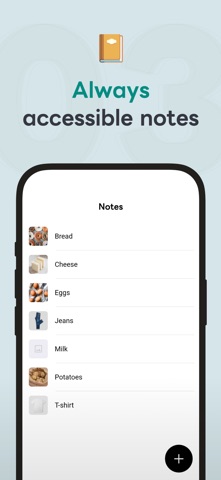
○ Linked to Your List: "Notes"
Save text and images in notes to keep favorite brands, clothing sizes, prices, and recipes at hand. If an item in your list has the same name, open the note with one tap. Add keywords so it links even when written differently, such as "scallions" and "green onions." Sort notes with tags, and add a note's "Items to Add to List" to a list all at once.

○ Never Lose Your Data: "Backup & Sync"
Sign in and your data is saved to the cloud, syncing in real time across your phone, tablet and other devices. When you switch to a new phone, everything comes with you.

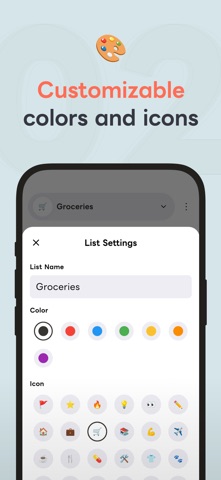
○ Easy to Read, Your Way: "Customize"
Set icons and colors for each list, such as "Groceries" or "Work Tasks." Choose from five text sizes and use Dark Mode at night.

○ Stay Organized: "Select Multiple Items"
Checked items gather at the end of the list. Select items to move or delete them at once, and completed items clear themselves after 14 days (you can turn this off).

● Recommended for:
・Those who want to stop forgetting items at the supermarket.
・People who want to share a shopping list with family or friends.
・Anyone tired of texting "can you pick this up on your way home?"
・Anyone who wants to turn a recipe's ingredients into a shopping list.
・Anyone who prefers large, easy-to-read text.
・Those who want to register items and let AI handle the sorting automatically.

● Pricing
The core features are free to use. kaune Premium (monthly or yearly) removes ads, lifts the limits on lists, notes, tags, sorting rules, and widgets, and raises the kaune AI (AI Sorting and AI Scan) usage limit.
When a group owner subscribes, everyone in the group gets the Premium benefits.
First-time subscribers can try the yearly plan free for 2 weeks.

* Prices may vary by region.
* Payment is charged to your store account (App Store).
* Subscriptions can be managed and canceled at any time in your store account settings.
* Unless canceled at least 24 hours before the renewal date or the end of the free trial, the subscription renews automatically.
* Family Sharing / Family Library is not supported.

● Origin of the App Name "kaune"
The name comes from the casual Japanese phrase "Kau ne" (買うね), meaning "I'll buy it!" It reflects our wish that you can add the shopping notes your family and friends share in one go, and shop without forgetting a thing.

● Other Information
・Contact Us
https://keichapp.com/en/app/kaune/contact/
・Privacy Policy
https://keichapp.com/en/app/kaune/privacy/
・Terms of Service
https://keichapp.com/en/app/kaune/terms/

This app is developed by an independent developer. Thank you for your support!
Show more Show less

Screenshots

kaune: Shopping List & ToDo Screenshot 1 of 6
kaune: Shopping List & ToDo Screenshot 2 of 6
kaune: Shopping List & ToDo Screenshot 3 of 6
kaune: Shopping List & ToDo Screenshot 4 of 6
kaune: Shopping List & ToDo Screenshot 5 of 6
kaune: Shopping List & ToDo Screenshot 6 of 6
Screenshots by Kimura Keisuke, from the the App Store listing
Official page on the App Store

Alternatives to kaune: Shopping List & ToDo

할일모아 icon 할일모아
JaeHong Lee
0.0
Free
DoDoRepeat icon DoDoRepeat
Jinyoung Kim
0.0
Free
마일투두 MileTodo icon 마일투두 MileTodo
YOUNKYUM JIN
0.0
Free
TaskEase icon TaskEase
雄皓 王
0.0
Free
소화기 - 일정, 할일 관리 icon 소화기 - 일정, 할일 관리
Nayeon Gu
0.0
Free
1画面メモ - Nocon icon 1画面メモ - Nocon
hiroki kaneko
0.0
Free
めもりー - 共有メモ・シンプルメモ icon めもりー - 共有メモ・シンプルメモ
Takuma Narita
0.0
Free
MYOM icon MYOM
Eunjin Song
0.0
Free

More from Kimura Keisuke

vooper - Create Looping Videos icon vooper - Create Looping Videos
Kimura Keisuke
0.0
Free

Changelog of kaune: Shopping List & ToDo

No changelog data

Developer information for Kimura Keisuke

Kimura Keisuke

Address:

Share kaune: Shopping List & ToDo

Comments on kaune: Shopping List & ToDo for iOS

We don't have enough comments to show example comments. Please check back later.

App Store Rankings for kaune: Shopping List & ToDo

This app is not ranked

Technologies used by kaune: Shopping List & ToDo

Frequently asked questions about kaune: Shopping List & ToDo

Is kaune: Shopping List & ToDo free?

Yes. kaune: Shopping List & ToDo is free on the App Store.

Is kaune: Shopping List & ToDo still available?

Yes. kaune: Shopping List & ToDo is on the App Store, and the last update we saw was on October 15, 2026.

How large is kaune: Shopping List & ToDo?

kaune: Shopping List & ToDo is 96.59 MB.

Is kaune: Shopping List & ToDo suitable for children?

App Store rates the content of kaune: Shopping List & ToDo as suitable for everyone.

Who made kaune: Shopping List & ToDo?

kaune: Shopping List & ToDo was developed by Kimura Keisuke. It is listed in the productivity category on the App Store.

What are the best alternatives to kaune: Shopping List & ToDo?

People looking at kaune: Shopping List & ToDo also look at these productivity apps: 할일모아, DoDoRepeat, 마일투두 MileTodo, TaskEase, 소화기 - 일정, 할일 관리.

Popular Productivity Apps Apps other people are watching Today's trending apps Price drops on Google Play Top new apps
할일모아 icon 할일모아
DoDoRepeat icon DoDoRepeat
마일투두 MileTodo icon 마일투두 MileTodo
TaskEase icon TaskEase
소화기 - 일정, 할일 관리 icon 소화기 - 일정, 할일 관리
1画面メモ - Nocon icon 1画面メモ - Nocon
めもりー - 共有メモ・シンプルメモ icon めもりー - 共有メモ・シンプルメモ
MYOM icon MYOM
Overview Alternatives Reviews Rankings Technology
AppBrain Intelligence premium content

Subscribe now to get full and unlimited access to AppBrain Intelligence. You'll have access to:

  • App Intelligence dashboard (performance timeline, competitor comparison, country rankings, insight cards)
  • Detailed ranking data per app
  • Full timeline per developer
  • Device market shares data per country
  • Unlimited keyword tracking
1 Month

$75/mo
(billed every month)

SAVE 0%
Subscribe
3 Months

$65/mo
($195 billed every 3 months)

SAVE 13%
Subscribe
1 Year

$57.50/mo
($690 billed every year)

SAVE 23%
Subscribe
Each subscription will automatically renew 3 days before the expiration date for the same time period. Subscriptions can be cancelled at any time before the renewal.

AppBrain is an app data site, we track rankings, ratings, installs for all apps and games on Google Play and the App Store. AppBrain doesn't host app files or APKs, all install links go directly to the official store. All trademarks are owned by their respective owners.

More apps

  • Top Android apps being viewed
  • View DRM Info
  • PyCode - IDE for Python
  • Shopee Indonesia

App statistics

  • Android statistics
  • Google Play Developer stats
  • Trending Android Apps
  • Trending iOS apps
  • Top popular Apps
  • Buy the best Android phone
  • Buy & sell app businesses

About AppBrain

  • Contact
  • Privacy
  • Documentation
  • DMCA takedowns
  • Articles
  • Blog
  • Tips to improve your Android promotional campaign
© 2010-2026 - AppBrain