AppBrain
AppBrain
  • Apps
  • Apps being viewed right now Trending apps today Most popular apps All-time most installed apps Top rated apps iPhone and iPad apps
  • Intelligence ▾
    Intelligence overview → Track any Android app or your whole market
    Track & analyze
    Keyword Tracker & OptimizerTrack & improve Play rankings App Performance ReportOne-off PDF for any app StatisticsFree Android & Play market stats
    Promote your app
    Featured Apps App Links
  • Intelligence
  • Pricing
  • Dashboard
  • Sign up
  • Log in
App Store Apps > Productivity > KeeForge: KeePass Manager
KeeForge: KeePass Manager icon

KeeForge: KeePass Manager

by Jia Tan · Productivity · Free
On the App Store since February 2026 · Data updated 2026-10-24

KeeForge: KeePass Manager is made and published by Jia Tan. AppBrain is an independent app data site and isn't affiliated with Jia Tan. The app name, icon, screenshots and description belong to Jia Tan and are shown as published on the App Store.

AppBrain's verdict

Rating on App Store
4.73
11 ratings
Last updated
October 19, 2026
Size
29.6 MB

It doesn't have enough ratings yet to judge what users think.

Official page on the App Store

User feedback

Ratings and reviews on the App Store

Comments on KeeForge: KeePass Manager for iOS

We don't have enough comments to show example comments. Please check back later.

Store listing

By Jia Tan, from the App Store
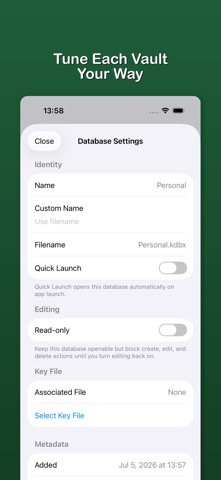
KeeForge: KeePass Manager Screenshot 1 of 8
KeeForge: KeePass Manager Screenshot 2 of 8
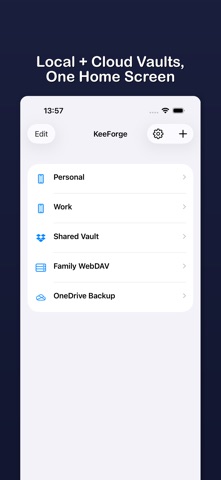
KeeForge: KeePass Manager Screenshot 3 of 8
KeeForge: KeePass Manager Screenshot 4 of 8
KeeForge: KeePass Manager Screenshot 5 of 8
KeeForge: KeePass Manager Screenshot 6 of 8
KeeForge: KeePass Manager Screenshot 7 of 8
KeeForge: KeePass Manager Screenshot 8 of 8
Screenshots by Jia Tan, from the the App Store listing
Description by Jia Tan Written by the developer, not by AppBrain. Click to read.
KeeForge is a native iOS password manager for KeePass (.kdbx) databases. Open vaults from iCloud, Dropbox, OneDrive, WebDAV, FTP, or local files. AutoFill passwords, passkeys, and TOTP codes with Face ID. No accounts, no tracking, no subscription — fully open source under GPLv3.

Why KeeForge:
- Native iOS app, not a port — built in Swift for iPhone, iPad, and Mac
- Your vault stays encrypted on your device; we never see it
- Zero accounts, zero telemetry, zero ads
- Compatible with KeePassXC, KeePass 2.x, KeePassium, and Strongbox

Vault Management
- Open .kdbx databases from local files, iCloud, Dropbox, OneDrive, WebDAV, FTP, or any Files app provider
- Manage multiple databases from a dedicated home screen
- Create new KDBX 4.x databases on-device or in Dropbox, OneDrive, WebDAV, FTP
- Browse groups and entries with instant search

Editing & Saving
- Create, edit, and delete entries with built-in password generation
- Autosave with timestamped backups and save-conflict detection
- Entry history, unknown fields, and third-party extensions preserved — no data loss when round-tripping with KeePassXC or other clients
- Read-only mode for shared databases

AutoFill
- AutoFill passwords, passkeys, and TOTP codes in Safari and apps
- QuickType bar suggestions — tap to fill with Face ID
- Save new credentials directly from AutoFill, even when offline

Security
- Face ID / Touch ID unlock with auto-lock inactivity timer
- Key file support — all KeePass formats (.key, .keyx, binary, hex)
- Screen recording detection blurs vault when capture is active
- Exponential lockout after failed unlock attempts
- Argon2 KDF, AES-GCM in-memory encryption of secrets
- Clipboard stays on-device — no Universal Clipboard sync

Open Source
- Fully open source under GPLv3
- Source on GitHub: github.com/KeeForge/KeeForge
- Independently audited; no network calls except to your own cloud storage and the optional in-app feedback form

Tip jar available if you'd like to support development. No subscription, no accounts, no upsell.

FTP connections are unencrypted. Use FTP only on networks you trust, and avoid editing the same FTP database from multiple apps or devices at once. FTPS and SFTP are not supported.
Official page on the App Store

Safety and technology

Found in the app by AppBrain
Price
Free
App size
29.6 MB
Content rating
Everyone

Technologies used by KeeForge: KeePass Manager

Releases

Updates seen on the App Store
Version
1.19.0
Launched
February 2026

No changelog data

Alternatives

Similar apps and more from Jia Tan

Alternatives to KeeForge: KeePass Manager

OneKeePass - Password Manager icon OneKeePass - Password Manager
Jeyasankar Thenmani
3.9
Free
13 ratings
KeePass - Password Manager icon KeePass - Password Manager
Ravi Kakadiya
4.1
Free
57 ratings
KeyPass – Passwords Manager icon KeyPass – Passwords Manager
NAVYNEXA TECHNOLOGIES LLP
4.5
Free
81 ratings
Strongbox - Password Manager icon Strongbox - Password Manager
Phoebe Code Limited
4.7
Free
4.1K ratings
KeePassium (KeePass passwords) icon KeePassium (KeePass passwords)
KeePassium Labs
4.7
Free
1.4K ratings
Synctrain icon Synctrain
T-Shaped
4.9
Free
142 ratings
KeePass Touch icon KeePass Touch
Innervate
3.7
Free
344 ratings
Bitwarden Authenticator icon Bitwarden Authenticator
Bitwarden Inc
3.5
Free
95 ratings

Rankings

App Store top charts

App Store Rankings for KeeForge: KeePass Manager

This app is not ranked

About the app and developer

About KeeForge: KeePass Manager

KeeForge: KeePass Manager is a productivity app developed by Jia Tan.

What is the rating of KeeForge: KeePass Manager?

KeeForge: KeePass Manager is rated 4.73 out of 5 stars, based on 11 ratings.

Is KeeForge: KeePass Manager free?

KeeForge: KeePass Manager is free. The app size is 29.57 MB. The latest version available is 1.19.0. The last update was on October 19, 2026.

What are the requirements for KeeForge: KeePass Manager?

The app has a content rating of Everyone. The app has been available on the App Store since February 2026.

Developer information for Jia Tan

Jia Tan

Address:

Share KeeForge: KeePass Manager

Top new apps Apps other people are watching Price drops on Google Play Popular Productivity Apps Today's trending apps
OneKeePass - Password Manager icon OneKeePass - Password Manager
KeePass - Password Manager icon KeePass - Password Manager
KeyPass – Passwords Manager icon KeyPass – Passwords Manager
Strongbox - Password Manager icon Strongbox - Password Manager
KeePassium (KeePass passwords) icon KeePassium (KeePass passwords)
Synctrain icon Synctrain
KeePass Touch icon KeePass Touch
Bitwarden Authenticator icon Bitwarden Authenticator
Overview Alternatives Reviews Rankings Technology
AppBrain Intelligence premium content

Subscribe now to get full and unlimited access to AppBrain Intelligence. You'll have access to:

  • App Intelligence dashboard (performance timeline, competitor comparison, country rankings, insight cards)
  • Detailed ranking data per app
  • Full timeline per developer
  • Device market shares data per country
  • Unlimited keyword tracking
1 Month

$75/mo
(billed every month)

SAVE 0%
Subscribe
3 Months

$65/mo
($195 billed every 3 months)

SAVE 13%
Subscribe
1 Year

$57.50/mo
($690 billed every year)

SAVE 23%
Subscribe
Each subscription will automatically renew 3 days before the expiration date for the same time period. Subscriptions can be cancelled at any time before the renewal.

AppBrain is an app data site, we track rankings, ratings, installs for all apps and games on Google Play and the App Store. AppBrain doesn't host app files or APKs, all install links go directly to the official store. All trademarks are owned by their respective owners.

More apps

  • Top Android apps being viewed
  • TapCook: Budget Meal Plans stats
  • GigaZone
  • MDV - Matrix Dicom Viewer

App statistics

  • Android statistics
  • Google Play Developer stats
  • Trending Android Apps
  • Trending iOS apps
  • Top popular Apps
  • Buy the best Android phone
  • Buy & sell app businesses

About AppBrain

  • Contact
  • Privacy
  • Documentation
  • DMCA takedowns
  • Blog
  • Free App-Ads.Txt Validation
© 2010-2026 - AppBrain