

Kep: Screenshot Organizer
Kep: Screenshot Organizer is made and published by Ekachai Limpisoot. AppBrain is an independent app data site and isn't affiliated with Ekachai Limpisoot. The app name, icon, screenshots and description belong to Ekachai Limpisoot and are shown as published on the App Store.
AppBrain's verdict
- Last updated
- October 29, 2026
- Size
- 6.76 MB
User feedback
Ratings and reviews on the App StoreComments on Kep: Screenshot Organizer for iOS
We don't have enough comments to show example comments. Please check back later.
Store listing
By Ekachai Limpisoot, from the App Store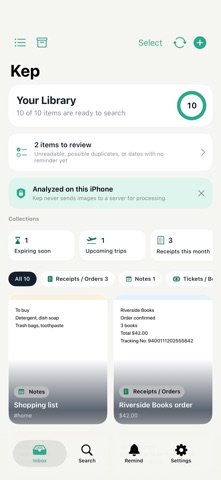


Description by Ekachai Limpisoot Written by the developer, not by AppBrain. Click to read.
Kep pulls out what you can act on and turns it into a button: links, phone numbers, addresses, totals, expiry dates, booking references, tracking numbers, and QR codes. Tap to open, call, show it in Maps, add it to Calendar, or copy it.
Search across text, category, tags, and meaning, with filters for date, source, status, and price — and results that show you where the words were found.
Can't read a hotel booking in Japanese? Kep Pro translates screenshots and PDFs on your device and keeps the translation beside the original. Compare them line by line, and find the item later by searching in either language — “check-in time” brings up that booking. Booking numbers, amounts, and times are checked against the original, and when you copy or share a translation, the original lines with those figures and dates come with it, so anyone can double-check. Requires iOS 18 or later.
Kep groups things for you without moving a single file: promotions about to expire, trips coming up, this month's receipts, places you want to go. When it finds a date, it suggests a reminder that fits — three days before a promotion ends, three hours before a flight — and you always make the call.
Or organize it your way with Kep Pro: create categories with an icon and color you pick, set rules like “contains Amazon → Receipts” so new items are filed the moment they're read, and use templates for receipts, tickets, recipes, and movie lists that fill in their fields from the text Kep read.
Pin what matters, select several items to file or archive at once, drag images and PDFs in from other apps, and save your clipboard to Kep from Shortcuts.
Your data stays yours. Export text as Markdown and item data as JSON or CSV, back up the whole library to a single file you can restore, lock Kep with Face ID, and make it searchable in Spotlight if you choose.
Everything stays on your device. Kep requires no account and never uploads your images or recognized text to a server. The free version stores up to 50 items and reads the first page of a PDF; Kep Pro unlocks unlimited storage, full-document PDF reading, on-device summaries, contextual search, on-device translation, your own categories with rules and templates, and widgets.
Kep Pro is available as a monthly or annual auto-renewable subscription, or as a one-time Lifetime purchase. Payment is charged to your Apple Account when you confirm the purchase. Subscriptions renew automatically unless canceled at least 24 hours before the end of the current period, and can be managed or canceled in your App Store account settings.
Terms of Use (EULA): https://www.apple.com/legal/internet-services/itunes/dev/stdeula/
Privacy Policy: https://ekachaimobile.github.io/kep-privacy/
Safety and technology
Found in the app by AppBrain- Price
- Free
- App size
- 6.76 MB
- Content rating
- Everyone
Technologies used by Kep: Screenshot Organizer
Releases
Updates seen on the App Store- Version
- 1.0
- Launched
- October 2026
No changelog data
Rankings
App Store top chartsApp Store Rankings for Kep: Screenshot Organizer
About the app and developer
About Kep: Screenshot Organizer
Kep: Screenshot Organizer is a productivity app developed by Ekachai Limpisoot.
User Ratings
The app has no ratings yet.
App Information
Kep: Screenshot Organizer is freely available from the App Store. The app size is 6.76 MB. The latest version available is 1.0. The last update was on October 29, 2026.
Technical Requirements
The app has a content rating of Everyone. The app has been available on the App Store since October 2026.
Developer information for Ekachai Limpisoot
Address:
Frequently asked questions about Kep: Screenshot Organizer
Is Kep: Screenshot Organizer free?
Yes. Kep: Screenshot Organizer is free on the App Store.
Is Kep: Screenshot Organizer still available?
Yes. Kep: Screenshot Organizer is on the App Store, and the last update we saw was on October 29, 2026.
How large is Kep: Screenshot Organizer?
Kep: Screenshot Organizer is 6.76 MB.
Is Kep: Screenshot Organizer suitable for children?
App Store rates the content of Kep: Screenshot Organizer as suitable for everyone.
Who made Kep: Screenshot Organizer?
Kep: Screenshot Organizer was developed by Ekachai Limpisoot. It is listed in the productivity category on the App Store.