Key - Screen Time App Blocker is a productivity app developed by Titun LLC.
User Ratings
The app has no ratings yet.
App Information
Key - Screen Time App Blocker is freely available from the App Store. The app size is 9.00 MB. The latest version available is 1.0.03. The last update was on August 17, 2026.
Technical Requirements
The app has a content rating of Everyone. The app has been available on the App Store since July 2026.
Description by Titun LLC(from the App Store)
Key blocks the apps that eat your time. To get them back, you scan a small physical token called a Key, kept somewhere inconvenient on purpose: a kitchen drawer, or a shelf in another room.
Locking takes one tap. Unlocking means standing up and walking to wherever you left your Key. That short walk gives you time to change your mind, and most of the time you do.
HOW IT WORKS 1. Pick the apps and websites you want out of reach. 2. Lock them by holding the button, or by tapping your Key to your phone. 3. To unlock, scan your Key. There is no unlock button on the screen.
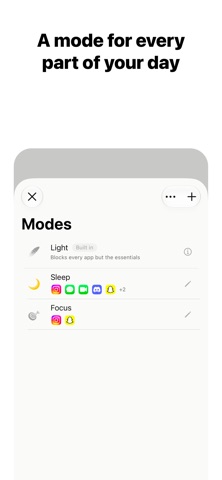
MODES You probably don't want the same rules at work and in bed. Modes are separate blocklists you can switch between: a Work mode can block social apps while a Sleep mode blocks nearly everything. There is also a Light mode that inverts the idea. It blocks every app except the few you name, which turns your phone into something close to a dumb phone.
SCHEDULES A schedule locks the phone for you at a set time. Sleep mode can start at 11 every night, work mode at 9 on weekdays. The lock ends when you scan your Key, or at an end time you choose.
EXTRAS Auto-relock arms itself after you scan: once you spend 5, 10 or 15 minutes in your unblocked apps, Key locks them again. If you tend to delete blockers in weak moments, Key can prevent app deletion while a lock is on. Websites can go on the blocklist along with apps.
FORCE UNLOCKS Sometimes you need your phone and your Key is at home. You get five force unlocks that open everything without scanning. Five is enough for real emergencies and too few to become a habit.
PRIVACY Key runs on Screen Time, Apple's own framework. Apple designed it so that apps like Key receive anonymous tokens instead of app names, which means Key never finds out which apps you chose to block. Your blocklist and your history stay on the phone. The account exists only to identify you; it's an email address, and nothing else syncs. There are no streaks or scores anywhere in the app, and it will never tell you to do better.
THE KEY The Key itself has no battery and nothing to set up. There is no pairing step either; any Key works with any phone. Keep one at home and one at the office if you like. The same Key works on multiple phones
You pay for the Key once. The app has no subscription.
Each subscription will automatically renew 3 days before the expiration date for
the same time period. Subscriptions can be cancelled at any time before the renewal.