

KeyBindControl
KeyBindControl is made and published by YUTAKA MIMURA. AppBrain is an independent app data site and isn't affiliated with YUTAKA MIMURA. The app name, icon, screenshots and description belong to YUTAKA MIMURA and are shown as published on the App Store.
AppBrain's verdict
- Last updated
- June 21, 2026
Rankings
App Store top chartsApp Store Rankings for KeyBindControl
Competitors
Similar apps and more from YUTAKA MIMURAMore from YUTAKA MIMURA


Releases
Updates seen on the App Store- Version
- 2.4
- Launched
- February 2026
No changelog data
User feedback
Ratings and reviews on the App StoreComments on KeyBindControl for iOS
We don't have enough comments to show example comments. Please check back later.
Technology
Found in the app by AppBrain- Price
- Free
- App size
- 7.66 MB
- Content rating
- Everyone
Technologies used by KeyBindControl
About the app and developer
About KeyBindControl
KeyBindControl is an utilities app developed by YUTAKA MIMURA.
User Ratings
The app has no ratings yet.
App Information
KeyBindControl is freely available from the App Store. The app size is 7.66 MB. The latest version available is 2.4. The last update was on June 21, 2026.
Technical Requirements
The app has a content rating of Everyone. The app has been available on the App Store since February 2026.
Developer information for YUTAKA MIMURA
Address:
Frequently asked questions about KeyBindControl
Is KeyBindControl free?
Yes. KeyBindControl is free on the App Store.
Is KeyBindControl still available?
Yes. KeyBindControl is on the App Store, and the last update we saw was on June 21, 2026.
How large is KeyBindControl?
KeyBindControl is 7.66 MB.
Is KeyBindControl suitable for children?
App Store rates the content of KeyBindControl as suitable for everyone.
Who made KeyBindControl?
KeyBindControl was developed by YUTAKA MIMURA. It is listed in the utilities category on the App Store.
Store listing
By YUTAKA MIMURA, from the App Store


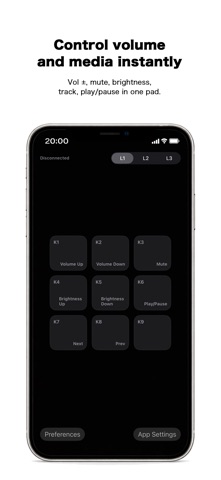

Description by YUTAKA MIMURA Written by the developer, not by AppBrain. Click to read.
By using your iOS device as a customizable control panel, you can trigger frequently used shortcuts, key combinations, and actions on your Mac/windows with a single tap. This helps streamline your workflow and reduces the need for complex keyboard input during work, presentations, or creative tasks.
KeyBindControl works together with a dedicated Helper app running on mac/windows.
https://www.atlascope.idatabase.info/app/keybindcontrol/en/how.html
Actions are executed only when explicitly triggered by the user from the iOS app. The Helper does not perform background automation or continuous monitoring.
Key Features
・Execute mac/windows shortcuts and keyboard actions from iOS
・Customizable macro pad layout for your workflow
・Secure connection with a mac/windows Helper app
・Local network communication only, no unnecessary external data transfer
Privacy
KeyBindControl is designed to operate solely for transmitting user-initiated commands to mac/windows.It does not collect personal information or send data to external servers.
Privacy Policy:https://www.keybindcontrol.idatabase.info/en/privacy.html
Terms of Use
Please review the Terms of Use below for details about usage conditions and disclaimers.
Terms of Use:https://www.keybindcontrol.idatabase.info/en/terms.html