

Keyboard Clipboard: Snippets
Keyboard Clipboard: Snippets is made and published by Hemal Modi. AppBrain is an independent app data site and isn't affiliated with Hemal Modi. The app name, icon, screenshots and description belong to Hemal Modi and are shown as published on the App Store.
AppBrain's verdict
- Rating on App Store
- 4.40
- 5 ratings
- Last updated
- October 8, 2026
It doesn't have enough ratings yet to judge what users think.
Rankings
App Store top chartsApp Store Rankings for Keyboard Clipboard: Snippets
Competitors
Similar apps and more from Hemal ModiMore from Hemal Modi






Releases
Updates seen on the App Store- Version
- 5.6.2
- Launched
- December 2024
No changelog data
User feedback
Ratings and reviews on the App StoreComments on Keyboard Clipboard: Snippets for iOS
We don't have enough comments to show example comments. Please check back later.
Technology
Found in the app by AppBrain- Price
- $0.99
- App size
- 5.91 MB
- Content rating
- Everyone
Technologies used by Keyboard Clipboard: Snippets
About the app and developer
About Keyboard Clipboard: Snippets
Keyboard Clipboard: Snippets is an utilities app developed by Hemal Modi.
User Ratings
Keyboard Clipboard: Snippets is rated 4.40 out of 5 stars. The rating is based on 5 ratings.
App Information
Keyboard Clipboard: Snippets costs $0.99. The app size is 5.91 MB. The latest version available is 5.6.2. The last update was on October 8, 2026.
Technical Requirements
The app has a content rating of Everyone. The app has been available on the App Store since December 2024.
Developer information for Hemal Modi
Address:
Store listing
By Hemal Modi, from the App Store



Description by Hemal Modi Written by the developer, not by AppBrain. Click to read.
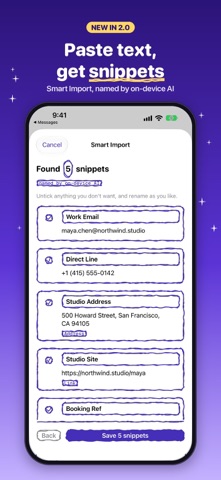
NEW IN 2.0: SMART IMPORT
Paste an email signature, a booking confirmation or a contact card and Smart Import pulls out every email, phone number, link, address and reference number, ready to save as snippets. On devices with Apple Intelligence, on-device AI gives each one a sensible name. On every other device, quick detection does the job offline. Nothing you paste leaves your device.
HOW IT WORKS
1. Save your snippets in the app, by hand or with Smart Import.
2. Turn on the Keyboard Clipboard keyboard in Settings and allow Full Access so it can read the snippets you saved.
3. In any app, switch to the keyboard and tap a snippet to type it.
FEATURES
• One-tap snippets in any app, color-coded and labelled (Address, Document, Link).
• Pinned favorites stay at the front of the keyboard.
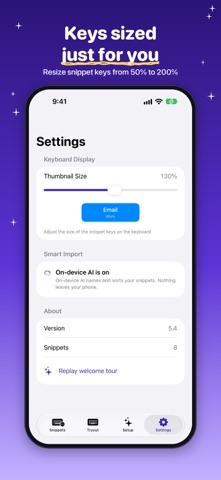
• Filter the keyboard by label, and make the keys bigger or smaller.
• Siri and Shortcuts: copy a snippet, add a new one or run Smart Import by voice or from the Shortcuts app. Snippet names show up in Spotlight.
• Try the keyboard inside the app before you use it for real.
• A distinctive hand-drawn design, with full light and dark mode support.
PRIVACY
Your snippets are stored on your device, in a container shared only with the Keyboard Clipboard keyboard. The keyboard has no network code and never records or sends what you type. Full Access is needed only so the keyboard can read the snippets you saved in the app.
Terms of use: https://doc-hosting.flycricket.io/docukeys-terms-of-use/635916ce-768c-4705-9e94-a7496126e7ee/terms