

KeyCorder is made and published by Yongdae Park. AppBrain is an independent app data site and isn't affiliated with Yongdae Park. The app name, icon, screenshots and description belong to Yongdae Park and are shown as published on the App Store.
AppBrain's verdict
- Last updated
- September 8, 2026
Rankings
App Store top chartsApp Store Rankings for KeyCorder
Competitors
Similar apps and more from Yongdae ParkAlternatives to KeyCorder


Releases
Updates seen on the App Store- Version
- 1.0.4
- Launched
- August 2026
No changelog data
User feedback
Ratings and reviews on the App StoreComments on KeyCorder for iOS
We don't have enough comments to show example comments. Please check back later.
Technology
Found in the app by AppBrain- Price
- Free
- App size
- 16.4 MB
- Content rating
- Everyone
Technologies used by KeyCorder
About the app and developer
About KeyCorder
KeyCorder is an utilities app developed by Yongdae Park.
User Ratings
The app has no ratings yet.
App Information
KeyCorder is freely available from the App Store. The app size is 16.40 MB. The latest version available is 1.0.4. The last update was on September 8, 2026.
Technical Requirements
The app has a content rating of Everyone. The app has been available on the App Store since August 2026.
Developer information for Yongdae Park
Address:
Frequently asked questions about KeyCorder
Is KeyCorder free?
Yes. KeyCorder is free on the App Store.
Is KeyCorder still available?
Yes. KeyCorder is on the App Store, and the last update we saw was on September 8, 2026.
How large is KeyCorder?
KeyCorder is 16.40 MB.
Is KeyCorder suitable for children?
App Store rates the content of KeyCorder as suitable for everyone.
Who made KeyCorder?
KeyCorder was developed by Yongdae Park. It is listed in the utilities category on the App Store.
What are the best alternatives to KeyCorder?
People looking at KeyCorder also look at these utilities apps: PipeFit Pro: Pipe Calculator, 단자음키, 쿠키키보드, HanKey - Korean Keyboard, 키보드으.
Store listing
By Yongdae Park, from the App Store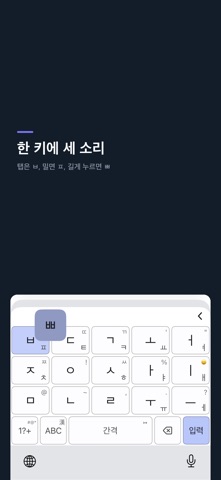



Description by Yongdae Park Written by the developer, not by AppBrain. Click to read.
One key holds the plain, aspirated and tense consonants,
so the whole layout fits in five columns — and the keys get bigger.
Nothing you type leaves your device.
■ One key, three sounds
· Tap → plain (ㅂ)
· Slide → aspirated (ㅍ)
· Hold → tense (ㅃ)
Tap twice quickly and it picks the right one from context.
■ Same key twice? It works it out
On layouts where one key carries several letters, a repeat tap is
ambiguous: is ㄱㄱ the single letter ㅋ, or a final ㄱ followed by an
initial ㄱ? Usually you have to break it up yourself with a slide or a pause.
KeyCorder decides from a dictionary instead.
· 5-key, 7-key, full QWERTY — picks between ㅋ and final+initial
· Simple-vowel — decides between the tense ㄲ and two separate letters
· Cheonjiin — type straight through even when a final and the next
initial share a key (장마, 안녕), no slide needed
If it read you wrong, one tap on the suggestion bar switches it.
■ Features
· 5-key Korean input, repeat-tap auto-resolution tuned per layout
· Word suggestions — next-word prediction, initial-consonant search, emoji hints
· Emoji, symbols and Hanja conversion
· Clipboard history with pinning
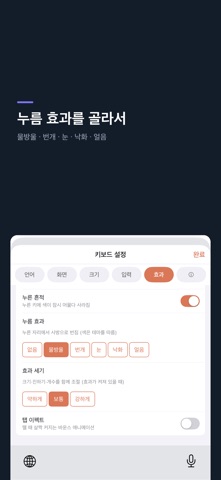
· Press effects (ripple, bolt, snow, petal, ice) that react to touch
· 16 themes, bundled fonts, your photo as keyboard background
· Key size, font size, weight and border — all adjustable
· Learned-word manager: review and delete what it learned
· Typing stats with weekly speed graph
· Split keyboard & one-handed mode
· Number-only fields open a large number pad automatically
· Layouts: 5-key, 7-key, full QWERTY, simple-vowel, Cheonjiin
· Korean + English
On first launch you pick a layout and a look (calm, vivid, neon, elegant);
theme, font and press effect are set together. Reopen it anytime.
■ Privacy by default
No data collection, no servers, no ads or trackers.
The keyboard sends nothing you type anywhere, and learned data
is even excluded from iCloud backup.
Full Access is used only for clipboard history, haptic feedback,
and sharing settings between the app and the keyboard.
Clipboard history stays on-device, is excluded from iCloud backup,
and can be disabled or cleared at any time from the keyboard panel.
Every feature is free.
Feedback: https://corderlabs.com/keycorder/feedback