

Keyda: AI Keyboard & Assistant
Keyda: AI Keyboard & Assistant is made and published by Nikhil Ryan. AppBrain is an independent app data site and isn't affiliated with Nikhil Ryan. The app name, icon, screenshots and description belong to Nikhil Ryan and are shown as published on the App Store.
AppBrain's verdict
- Last updated
- October 18, 2026
- Size
- 52.6 MB
User feedback
Ratings and reviews on the App StoreComments on Keyda: AI Keyboard & Assistant for iOS
We don't have enough comments to show example comments. Please check back later.
Store listing
By Nikhil Ryan, from the App Store

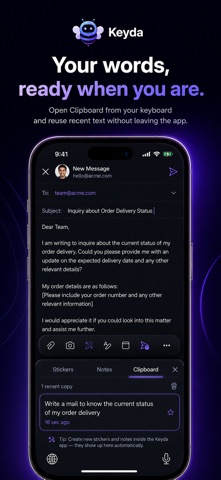
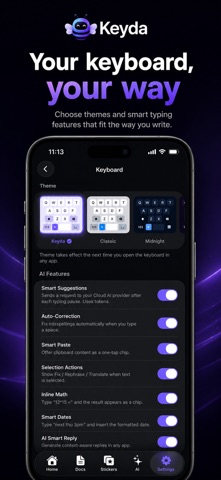
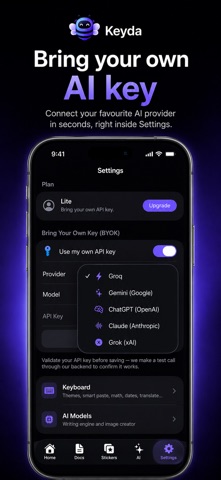
Description by Nikhil Ryan Written by the developer, not by AppBrain. Click to read.
Write smarter, speak to type, and create images — without ever leaving the app you're in.
Keyda is an AI-powered keyboard that works everywhere you type on iPhone and iPad. Whether you're on WhatsApp, replying to email, posting to social, taking notes or filling a form, Keyda brings AI, your voice and an image studio directly into your keyboard.
Most AI tools make you leave your app: open a chatbot, copy, paste, generate, switch back. Keyda removes that. Fixing a sentence that used to take seven steps and nearly a minute takes three — and you stay exactly where you are.
IMAGE STUDIO — NEW
Describe a picture and Keyda draws it. A watercolour of a rainy street, a logo concept, a birthday card, a product mockup — ready in seconds, in whatever shape you need.
• Start from your own photo and have Keyda build on it
• Your description is expanded into a fuller prompt automatically, so the result matches what you meant
• Every image is saved to your account and waiting on your other devices
• Lite includes 25 images a month, Pro includes 50, the free trial includes 5
TALK TO TYPE — VOICE TYPING & VOICE ASSISTANT
Tap the mic and speak. It's a full assistant, not just dictation:
• Speak to type in any app
• Change settings by voice — "switch to dark mode," "turn off haptics"
• Pull up a saved note — "paste my meeting notes"
• Create reminders and notes hands-free
• Ask the AI out loud — "write a polite reply declining this invite"
Smart self-correction turns "my age is 29, oh sorry, 30" into "30." Dictation is free — no subscription required.
SMART ASSIST AI
Rewrite for clarity, fix grammar and spelling, shift tone from casual to professional, draft emails and messages, summarise long content, and expand rough notes into finished text — for work, study or everyday chat.
A PRODUCTIVITY WORKSPACE IN YOUR KEYBOARD
• Notes — ideas, prompts and reminders inside the keyboard
• Clipboard History — recent text, links and snippets, one tap away
• Translate on Paste — convert content before you send it
• Inline Math & Dates — calculate and convert without another app
• Conversation Memory — context carries forward, so you never re-explain
• Reply in Your Voice — suggestions that sound like you, not a template
PRIVATE BY DESIGN
Sensitive features are built to keep as much as possible on your device. Voice input is active only while you're recording, transcribed by Apple's Speech Recognition, and never stored by us. Stickers can be generated by a fully offline, on-device model (Lite/Pro, one-time download), or instantly in the cloud if you'd rather skip it. Photos never leave your device unless you attach one yourself. Sign out and every note, clipboard entry, API key and AI memory is wiped immediately.
MADE YOURS
Nine handcrafted themes — Classic, Midnight, Aurora, Coral, Forest, Ocean, Sunset, Rose and Carbon — sync across the app the moment you switch. However many smart features run in the background, typing stays fast and smooth.
Student, professional, creator, freelancer or business owner: Keyda cuts repetitive work every day — better emails, faster replies, instant translation, images on demand, organised notes and clipboard history you can actually find.
No app switching. No endless copy-pasting. No interruptions. Just a smarter keyboard that works, listens and draws — everywhere you type.
Made in India. Built for everyone.
Safety and technology
Found in the app by AppBrain- Price
- Free
- App size
- 52.6 MB
- Content rating
- Low
Technologies used by Keyda: AI Keyboard & Assistant
Releases
Updates seen on the App Store- Version
- 1.6.2
- Launched
- June 2026
No changelog data
Alternatives
Similar apps and more from Nikhil RyanAlternatives to Keyda: AI Keyboard & Assistant


More from Nikhil Ryan

Rankings
App Store top chartsApp Store Rankings for Keyda: AI Keyboard & Assistant
About the app and developer
About Keyda: AI Keyboard & Assistant
Keyda: AI Keyboard & Assistant is a productivity app developed by Nikhil Ryan.
User Ratings
The app has no ratings yet.
App Information
Keyda: AI Keyboard & Assistant is freely available from the App Store. The app size is 52.56 MB. The latest version available is 1.6.2. The last update was on October 18, 2026.
Technical Requirements
The app has a content rating of Low Maturity. The app has been available on the App Store since June 2026.
Developer information for Nikhil Ryan
Address: