




AppBrain's verdict
- Last updated
- November 7, 2026
- Size
- 7.67 MB
User feedback
Ratings and reviews on the App StoreComments on Keyfeel: Mechanical Keyboard for iOS
We don't have enough comments to show example comments. Please check back later.
Store listing
By Anh Phong, from the App StoreDescription by Anh Phong Written by the developer, not by AppBrain. Click to read.
PICK YOUR SWITCH
Choose from 8 switches across three kinds: linear (smooth all the way down), tactile (a soft bump, quieter) and clicky (a sharp, loud click). Each one sounds and feels different. Turn the sound and the haptic up or down on their own dials.
LIGHT IT UP
Four glow effects: Static, Wave, Reactive and Breathe. Light the board from under the keys or through the legends, pick a color or go rainbow, and set the brightness.
12 BOARDS
Keycap sets from soft Milk to dark Midnight. Three boards are free to keep. Pro opens all 12.
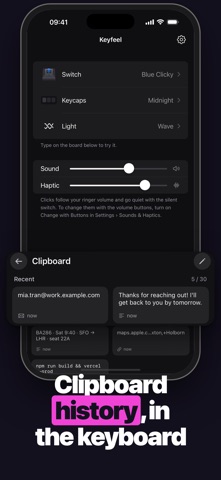
CLIPBOARD HISTORY, IN THE KEYBOARD
Tap Paste and Keyfeel keeps the clip. Open the clipboard panel to paste it again later, pin the ones you reuse, delete the rest. The free version keeps up to 60 clips, Pro keeps 200, and pinned clips always stay. Keyfeel never reads your clipboard until you tap Paste.
TYPE THE WAY YOU LIKE
Swipe to type, word suggestions, a one-handed mode for the left or right hand, emoji and kaomoji, and an optional number row.
PRIVATE BY DESIGN
No account, no ads, no analytics, and no network requests. Nothing you type leaves your iPhone. Try it in Airplane Mode.
Keyfeel works without Full Access: you can type, swipe and use suggestions with your chosen board. Allowing Full Access adds the switch sounds, haptics and clipboard history, because iOS only lets a keyboard play custom sound and haptics with Full Access.
KEYFEEL PRO
Pro opens all 12 boards and keeps up to 200 clips.
Yearly, with a 7-day free trial
Monthly
Lifetime, one-time purchase
Prices are shown in the App Store and vary by region.
Subscriptions renew automatically unless canceled at least 24 hours before the end of the current period. Manage or cancel them in your Apple Account settings.
Terms of Use: https://www.apple.com/legal/internet-services/itunes/dev/stdeula/
Privacy Policy: https://github.com/heocoi/privacy-policy/blob/main/keyfeel.md
Safety and technology
Found in the app by AppBrain- Price
- Free
- App size
- 7.67 MB
- Content rating
- Everyone
Technologies used by Keyfeel: Mechanical Keyboard
Releases
Updates seen on the App Store- Version
- 1.0.3
- Launched
- October 2026
No changelog data
Alternatives
Similar apps and more from Anh PhongAlternatives to Keyfeel: Mechanical Keyboard


More from Anh Phong


Rankings
App Store top chartsApp Store Rankings for Keyfeel: Mechanical Keyboard
About the app and developer
About Keyfeel: Mechanical Keyboard
Keyfeel: Mechanical Keyboard is an utilities app developed by Anh Phong.
What is the rating of Keyfeel: Mechanical Keyboard?
Keyfeel: Mechanical Keyboard has no ratings yet.
Is Keyfeel: Mechanical Keyboard free?
Keyfeel: Mechanical Keyboard is free. The app size is 7.67 MB. The latest version available is 1.0.3. The last update was on November 7, 2026.
What are the requirements for Keyfeel: Mechanical Keyboard?
The app has a content rating of Everyone. The app has been available on the App Store since October 2026.
Keyfeel: Mechanical Keyboard is made and published by Anh Phong. AppBrain is an independent app data site and isn't affiliated with Anh Phong. The app name, icon, screenshots and description belong to Anh Phong and are shown as published on the App Store.
Developer information for Anh Phong
Address:
Frequently asked questions about Keyfeel: Mechanical Keyboard
Is Keyfeel: Mechanical Keyboard free?
Yes. Keyfeel: Mechanical Keyboard is free on the App Store.
Is Keyfeel: Mechanical Keyboard still available?
Yes. Keyfeel: Mechanical Keyboard is on the App Store, and the last update we saw was on November 7, 2026.
How large is Keyfeel: Mechanical Keyboard?
Keyfeel: Mechanical Keyboard is 7.67 MB.
Is Keyfeel: Mechanical Keyboard suitable for children?
App Store rates the content of Keyfeel: Mechanical Keyboard as suitable for everyone.
Who made Keyfeel: Mechanical Keyboard?
Keyfeel: Mechanical Keyboard was developed by Anh Phong. It is listed in the utilities category on the App Store.
What are the best alternatives to Keyfeel: Mechanical Keyboard?
People looking at Keyfeel: Mechanical Keyboard also look at these utilities apps: Thockify: Keeb ASMR Keyboard, AspectKey, OmniKeys, PicKey: Photo Keyboard, ClipVault Keyboard.