

KeyFill
KeyFill is made and published by Mark Lester Edquilane. AppBrain is an independent app data site and isn't affiliated with Mark Lester Edquilane. The app name, icon, screenshots and description belong to Mark Lester Edquilane and are shown as published on the App Store.
AppBrain's verdict
- Last updated
- January 5, 2026
Rankings
App Store top chartsApp Store Rankings for KeyFill
Competitors
Similar apps and more from Mark Lester EdquilaneMore from Mark Lester Edquilane


Releases
Updates seen on the App Store- Version
- 1.7
- Launched
- January 2025
No changelog data
User feedback
Ratings and reviews on the App StoreComments on KeyFill for iOS
We don't have enough comments to show example comments. Please check back later.
Technology
Found in the app by AppBrain- Price
- Free
- App size
- 10.1 MB
- Content rating
- Everyone
Technologies used by KeyFill
About the app and developer
About KeyFill
KeyFill is a productivity app developed by Mark Lester Edquilane.
What is the rating of KeyFill?
KeyFill has no ratings yet.
Is KeyFill free?
KeyFill is free. The app size is 10.12 MB. The latest version available is 1.7. The last update was on January 5, 2026.
What are the requirements for KeyFill?
The app has a content rating of Everyone. The app has been available on the App Store since January 2025.
Developer information for Mark Lester Edquilane
Address:
Frequently asked questions about KeyFill
Is KeyFill free?
Yes. KeyFill is free on the App Store.
Is KeyFill still available?
Yes. KeyFill is on the App Store, and the last update we saw was on January 5, 2026.
How large is KeyFill?
KeyFill is 10.12 MB.
Is KeyFill suitable for children?
App Store rates the content of KeyFill as suitable for everyone.
Who made KeyFill?
KeyFill was developed by Mark Lester Edquilane. It is listed in the productivity category on the App Store.
Store listing
By Mark Lester Edquilane, from the App Store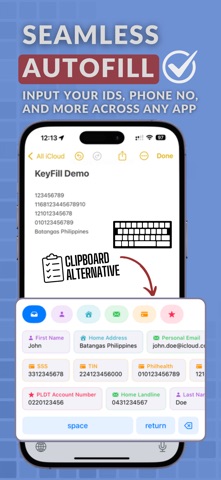


Description by Mark Lester Edquilane Written by the developer, not by AppBrain. Click to read.
Tired of repeatedly typing your ID numbers, email addresses, and other personal information? KeyFill is a secure and efficient keyboard extension that helps you quickly fill in frequently used information across any app on your iOS device. With features like reply with templates, allowing you to respond to messages or emails with pre-saved templates in just a single tap. Effortlessly paste information, including IDs, passports, emails, addresses and licenses, with quick access through our user-friendly interface. Designed for efficiency, our app allows manual entry a breeze, making it easier than ever to fill out forms. Your sensitive information is kept safe with secure data storage and local storage, ensuring privacy without relying on cloud services. KeyFill saves you time, keeps you organized, and ensures your data remains secure. Boost your productivity with the ultimate cross-platform keyboard extension!
Key Features:
• Custom Keyboard Extension - Access your saved items directly from any text field.
• Reply with Templates - Respond to messages or emails with pre-saved templates in just a single tap.
• Category Organization - Organize items into Personal Info, Address, Contact, ID Numbers, and Custom categories.
• Quick Access - Instantly fill in emails, addresses, phone numbers, and more with a single tap.
• Secure Storage - Your data is securely stored using iOS Keychain.
• Real-time Sync - Changes in the main app instantly reflect in the keyboard.
• Free Version - Store up to 5 items without any cost.
• Pro Version - Unlock unlimited item storage with a one-time purchase.
What KeyFill Can Do:
• Save and organize frequently used text snippets.
• Access saved items from any app's text field.
• Categorize items for better organization.
• Sync data between the main app and keyboard.
• Work offline without an internet connection.
• Secure data using iOS Keychain.
• Upgrade to unlimited items with the Pro version.
What KeyFill Cannot Do:
• Automatically detect or fill form fields.
• Store passwords or sensitive authentication data.
• Import/export data.
• Customize keyboard layout or appearance.
• Work with system password autofill.
• Access or modify the system clipboard.
Privacy & Security:
• No internet connection required.
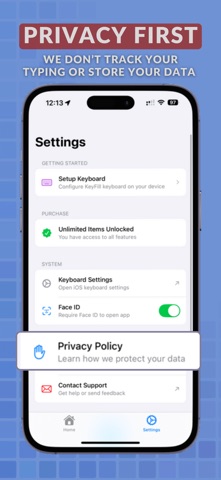
• All data stored locally on your device.
• Uses iOS Keychain for secure storage.
• No data collection or analytics.
• No third-party services used.