KeyPaste - Clipboard Manager is made and published by
杭 李.
AppBrain is an independent app data site and isn't affiliated with 杭 李.
The app name, icon, screenshots and description belong to 杭 李 and are shown as
published on the App Store.
About KeyPaste - Clipboard Manager
KeyPaste - Clipboard Manager is an utilities app developed by 杭 李.
What is the rating of KeyPaste - Clipboard Manager?
KeyPaste - Clipboard Manager has no ratings yet.
Is KeyPaste - Clipboard Manager free?
KeyPaste - Clipboard Manager is free. The app size is 48.03 MB. The latest version available is 1.14.0. The last update was on October 5, 2026.
What are the requirements for KeyPaste - Clipboard Manager?
The app has a content rating of Everyone. The app has been available on the App Store since February 2026.
Description by 杭 李(from the App Store)
Copied something important — and lost it to the very next copy? That paragraph from last week, that image: can you still find them?
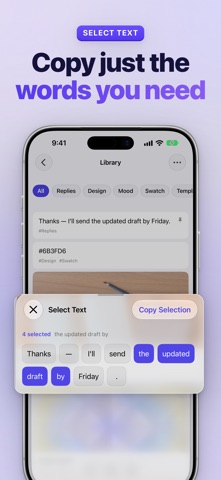
KeyPaste helps you collect, organize, and reuse clipboard content across iPhone, iPad, and Mac. Find saved text, rich text, images, and files in seconds, then use them wherever you need them.
YOUR CLIPBOARD CONTENT, READY TO COLLECT • Enable Auto-Collect to send new clipboard items to the Inbox while KeyPaste is open on iPhone or iPad, or running on Mac • Save text, rich text, images, and files supported by your device • Save from the share sheet, Shortcuts, Siri, widgets, and Control Center
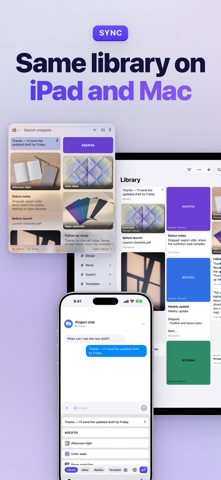
ONE LIBRARY, THREE DEVICES • Supported content stays up to date across your devices with iCloud sync • Keep KeyPaste within reach from the Mac menu bar; drag in to save and drag out to paste • KeyPaste Pro works on iPhone, iPad, and Mac
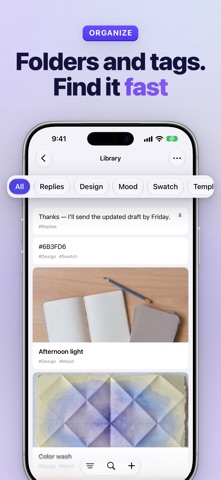
STORED IS GOOD — FOUND IS BETTER • Organize saved content with tags and folders, and keep frequent items close at hand • Full-text search helps you find the right item among hundreds in seconds • Tidy the Inbox as you go: save what matters as snippets and swipe away the rest
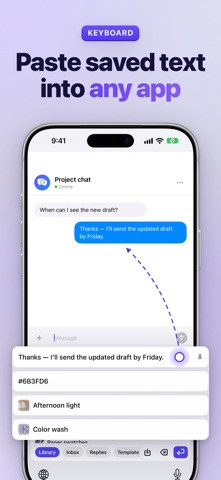
WHEN YOU NEED IT: ONE TAP • On iPhone and iPad, switch to the KeyPaste keyboard and tap to insert; long-press to preview • Browse and insert saved snippets without granting Full Access — you stay in control • On Mac, double-click in the Quick Panel to paste into the app you were using (Accessibility permission is required to press Command-V), or drag content straight into the target window
WHO IT’S FOR • Cross-device workers: find content on your Mac and paste it from your phone • Support and sales teams: keep replies, links, and quotes as snippets to respond faster • Collectors: save passages, ideas, and screenshots for later
YOUR DATA STAYS YOURS • Content is stored on your device and, for supported content, in your own iCloud • Clipboard items marked as sensitive, such as passwords from password managers, are skipped automatically • Export a full backup at any time for free — no lock-in • No ads and no tracking
ABOUT PRO The core features are free to try. KeyPaste Pro can be a monthly subscription, a yearly subscription, or a one-time purchase. All three remove the library capacity limit and offer higher Inbox limits on supported devices. You can cancel a subscription at any time. A lifetime purchase you already have stays unlocked.
Download KeyPaste and give useful clipboard content a place to live.
License Agreement This app uses Apple's standard Licensed Application End User License Agreement (EULA): https://www.apple.com/legal/internet-services/itunes/dev/stdeula/
Each subscription will automatically renew 3 days before the expiration date for
the same time period. Subscriptions can be cancelled at any time before the renewal.