




AppBrain's verdict
- Rating on App Store
- 5.00
- 1 ratings
- Last updated
- November 7, 2026
- Size
- 49.7 MB
It doesn't have enough ratings yet to judge what users think.
User feedback
Ratings and reviews on the App StoreComments on KiCad Viewer for iOS
We don't have enough comments to show example comments. Please check back later.
Store listing
By Mark Szente, from the App StoreDescription by Mark Szente Written by the developer, not by AppBrain. Click to read.
Open native KiCad files directly. No exporting, no converting — point it at your project, in Files, iCloud Drive or a network share, and it reads your .kicad_sch and .kicad_pcb files as-is.
Features:
- Interactive schematic — pinch to zoom and pan around the full drawing. Tap any component or net and it stays highlighted, so you never lose your place mid-solder.
- Cross-probing — select a part on the schematic and watch it light up on the board (and vice versa). Instantly find where R47 actually lives on your layout.
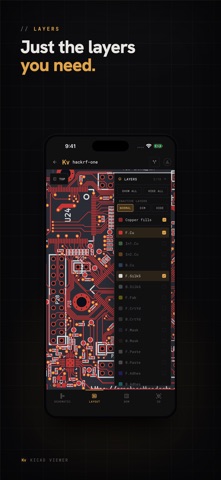
- PCB layout viewer — explore the board with smooth zoom and pan. Toggle copper, silkscreen, and other layers on and off, dim the ones you're not working on, or switch to KiCad's own colors.
- 3D view — turn the board to any angle, in perspective or isometric, tap a part to find it on the schematic, or put it on your desk at real size in AR.
- BOM list — every part grouped by value and footprint, with quantities and reference designators, plus search to find that one cap fast.
- Pull and merge request review — open a pull request from GitHub or Gitea, or a merge request from GitLab, and see every change on the schematic, board and BOM: parts added, removed or moved, traces rerouted, values edited. Flip between before, after and overlay, and step through the changes one by one. Paste a link to review a pull request without cloning the repo. A sample pull request is included, so you can try it right away.
- Log in and clone directly from GitHub, GitLab or Gitea — sign in once and pull your repositories straight onto your device, private repos included. Self-hosted GitLab, Gitea and Forgejo (Codeberg) work too. Pull new commits and switch branches from the app.
- Nested and hierarchical projects — opens multi-sheet schematics and projects buried in subfolders.
- Works offline — once a project is on your device, everything loads with no connection. Perfect for the workbench, the lab, or anywhere.
- Dark and Light modes — whichever you prefer.
- Legacy to modern — supports KiCad 5 through 10, so decade-old .sch schematics open right next to brand-new projects.
Designed from the ground up for touch, KiCad Viewer keeps your schematic, board, and parts list one tap away while your hands are busy.
Requires a one-time purchase or subscription. Free trial available.
Terms of use: https://www.apple.com/legal/internet-services/itunes/dev/stdeula/
Privacy policy: https://www.kicadviewer.com/privacy
KiCad Viewer is not affiliated with, or endorsed by, the KiCad project or its contributors. The app renders KiCad files with its own independent implementation, so some schematics or boards may not appear exactly as they would in KiCad. Please reach out to us if your design is not rendering correctly!
Safety and technology
Found in the app by AppBrain- Price
- Free
- App size
- 49.7 MB
- Content rating
- Everyone
Technologies used by KiCad Viewer
Releases
Updates seen on the App Store- Version
- 1.13.3
- Launched
- June 2026
No changelog data
Alternatives
Similar apps and more from Mark SzenteAlternatives to KiCad Viewer


More from Mark Szente


Rankings
App Store top chartsApp Store Rankings for KiCad Viewer
About the app and developer
About KiCad Viewer
KiCad Viewer is a productivity app developed by Mark Szente.
What is the rating of KiCad Viewer?
KiCad Viewer is rated 5.00 out of 5 stars, based on one rating ratings.
Is KiCad Viewer free?
KiCad Viewer is free. The app size is 49.66 MB. The latest version available is 1.13.3. The last update was on November 7, 2026.
What are the requirements for KiCad Viewer?
The app has a content rating of Everyone. The app has been available on the App Store since June 2026.
KiCad Viewer is made and published by Mark Szente. AppBrain is an independent app data site and isn't affiliated with Mark Szente. The app name, icon, screenshots and description belong to Mark Szente and are shown as published on the App Store.
Developer information for Mark Szente
Address:
Frequently asked questions about KiCad Viewer
Is KiCad Viewer free?
Yes. KiCad Viewer is free on the App Store.
Is KiCad Viewer still available?
Yes. KiCad Viewer is on the App Store, and the last update we saw was on November 7, 2026.
How large is KiCad Viewer?
KiCad Viewer is 49.66 MB.
Is KiCad Viewer suitable for children?
App Store rates the content of KiCad Viewer as suitable for everyone.
How do people rate KiCad Viewer?
KiCad Viewer has one rating of 5.00 stars on the App Store.
Who made KiCad Viewer?
KiCad Viewer was developed by Mark Szente. It is listed in the productivity category on the App Store.
What are the best alternatives to KiCad Viewer?
People looking at KiCad Viewer also look at these productivity apps: Materia AR: Diagram Overlay, Håndværker.dk PartnerLogin, DXF Viewer: CAD & Measure Tool, Oxmaint Work Order Maintenance, Jarvis - AI Chatbot & GPT.