AppBrain
AppBrain
  • Apps
  • Apps being viewed right now Trending apps today Most popular apps All-time most installed apps Top rated apps iPhone and iPad apps
  • Intelligence ▾
    Intelligence overview → Track any Android app or your whole market
    Track & analyze
    Keyword Tracker & OptimizerTrack & improve Play rankings App Performance ReportOne-off PDF for any app StatisticsFree Android & Play market stats
    Promote your app
    Featured Apps App Links
  • Intelligence
  • Pricing
  • Dashboard
  • Sign up
  • Log in
App Store Apps > Graphics & Design > Kinder Paint: Kids Drawing
Kinder Paint: Kids Drawing icon

Kinder Paint: Kids Drawing

1.5.0
StudyX G.K.
3.50
2 reviews
Free

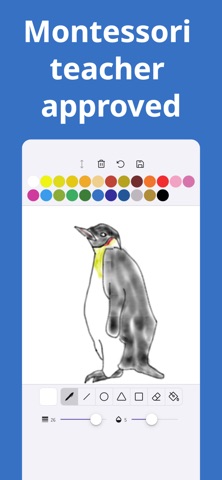
Kinder Paint: Kids Drawing Screenshot 1 of 5
Kinder Paint: Kids Drawing Screenshot 2 of 5
Kinder Paint: Kids Drawing Screenshot 3 of 5
Kinder Paint: Kids Drawing Screenshot 4 of 5
Kinder Paint: Kids Drawing Screenshot 5 of 5
Screenshots by StudyX G.K., from the the App Store listing
View on the App Store

AppBrain's verdict

Rating on App Store
3.50
2 ratings
Last updated
November 16, 2026
Size
53.0 MB

It doesn't have enough ratings yet to judge what users think.

Official page on the App Store

User feedback

Ratings and reviews on the App Store

Comments on Kinder Paint: Kids Drawing for iOS

We don't have enough comments to show example comments. Please check back later.

Store listing

By StudyX G.K., from the App Store
Description by StudyX G.K. Written by the developer, not by AppBrain. Click to read.
Kinder Paint was created by the developer for their own 3-year-old child.
Built around three pillars—safety, comfort, and expressive power—and developed under the guidance of an AMI Montessori teacher, it reflects Montessori principles and is designed as a high-performance creative tool that children can use easily anytime, anywhere.

Why kids love it
◎ Super simple UI they can use on their own
◎ Shapes tool: circles, squares, triangles, stars
◎ One-tap Fill (bucket) for fast coloring
◎ Realistic brushes: crayon, pencil, marker, etc.

Why parents love it
◎ No ads. No accounts. Works offline
◎ Quick Save to Camera Roll (Photos)
◎ Designed for independent play and creativity
◎ Made for iPhone and iPad

Features
◎ 7 brush types (including crayon, pencil, fountain pen, watercolor marker)
◎ 4 shape tools (line, circle, triangle, square)
◎ 3 color palettes, 48 colors total (Basic 12, Basic 24, Pastel 12)
◎ Create your own color palettes
◎ Fill tool
◎ Undo tool
◎ Apple Pencil support

Kinder Paint helps unlock children’s creativity.

■ Draw with multiple canvases
• Drawing canvas: a simple square canvas for quick drawing
• Paint canvas: layers for more serious artwork
• Sketch canvas: practice pencil sketching
• Manga canvas: great for drawing comics
• Dot canvas: great for pixel art

■ Lots of tracing lessons to get better (Paint Academy)
• Tracing lessons for geometric shapes
• Tracing lessons for animal portraits

■ Subscription Details (Kinder Paint Pro)
• Unlocks: Manga canvas, Dot (pixel-art) canvas, Paint Academy, and unlimited canvases
• Plans: Monthly / Annual
• Price: Displayed in the App Store purchase sheet (tax included)
• Billing: Charged to your Apple ID account upon purchase confirmation
• Auto-renewal: Your subscription automatically renews at the same price unless auto-renew is turned off at least 24 hours before the end of the current period
• Renewal charge: Applied within 24 hours prior to the end of the current period
• Management: After purchase, manage your subscription and turn off auto-renewal in your App Store account settings
• Cancellation: Cancel at least 24 hours before the next renewal date via your App Store account settings
• No refunds are given for unused portions of a subscription period (per Apple's policy)
You can keep using the core drawing features for free.

■ Legal
• Terms of Service: https://www.studyx.app/terms
• Privacy Policy: https://www.studyx.app/privacy

Safety and technology

Found in the app by AppBrain
Price
Free
App size
53.0 MB
Content rating
Everyone

Technologies used by Kinder Paint: Kids Drawing

Releases

Updates seen on the App Store
Version
1.5.0
Launched
November 2025

No changelog data

Alternatives

Similar apps and more from StudyX G.K.

Alternatives to Kinder Paint: Kids Drawing

Fuzi-Children Drawboard icon Fuzi-Children Drawboard
文彬 赵
4.5
Free
2 ratings
Baby AI Paint icon Baby AI Paint
SHENZHEN SHAOYOU TECH
5.0
Free
1 ratings
Droodle: Kids Drawing & Art icon Droodle: Kids Drawing & Art
Brightmode
4.4
Free
11 ratings
Magical Drawing & Coloring icon Magical Drawing & Coloring
凌云 蔡
5.0
Free
2 ratings
Nail Studio - Nail Salon icon Nail Studio - Nail Salon
Duc Le
0.0
Free
voilà kids: Coloring Book icon voilà kids: Coloring Book
Florian Preusner
5.0
Free
5 ratings
SnapVoxel: Bead Pattern Maker icon SnapVoxel: Bead Pattern Maker
原野 葛
0.0
Free
Intelligent Painting Tools icon Intelligent Painting Tools
湖妹 唐
5.0
Free
5 ratings

More from StudyX G.K.

Kinder Browser - Kids Safe Web icon Kinder Browser - Kids Safe Web
StudyX G.K.
2.9
$9.99
20 ratings
Sudoku365: 2 Player Sudoku icon Sudoku365: 2 Player Sudoku
StudyX G.K.
4.5
Free
6 ratings
MathCal: Mental Math for Kids icon MathCal: Mental Math for Kids
StudyX G.K.
4.6
Free
5 ratings
Math Gates: Number Puzzle icon Math Gates: Number Puzzle
StudyX G.K.
4.0
Free
4 ratings
ABC George: Read Real Books icon ABC George: Read Real Books
StudyX G.K.
5.0
Free
1 ratings
StudyX Smartpaper Letters icon StudyX Smartpaper Letters
StudyX G.K.
4.0
$9.99
1 ratings
BrainDojo: ADHD Brain Training icon BrainDojo: ADHD Brain Training
StudyX G.K.
5.0
Free
1 ratings
StudyX Japanese Letters Tracer icon StudyX Japanese Letters Tracer
StudyX G.K.
5.0
Free
1 ratings

Rankings

App Store top charts

App Store Rankings for Kinder Paint: Kids Drawing

This app is not ranked

About the app and developer

About Kinder Paint: Kids Drawing

Kinder Paint: Kids Drawing is a graphics & design app developed by StudyX G.K.

User Ratings

Kinder Paint: Kids Drawing is rated 3.50 out of 5 stars. The rating is based on 2 ratings.

App Information

Kinder Paint: Kids Drawing is freely available from the App Store. The app size is 52.96 MB. The latest version available is 1.5.0. The last update was on November 16, 2026.

Technical Requirements

The app has a content rating of Everyone. The app has been available on the App Store since November 2025.

Kinder Paint: Kids Drawing is made and published by StudyX G.K. AppBrain is an independent app data site and isn't affiliated with StudyX G.K. The app name, icon, screenshots and description belong to StudyX G.K. and are shown as published on the App Store.

Developer information for StudyX G.K.

StudyX G.K.

Address:

Share Kinder Paint: Kids Drawing

Today's trending apps Popular Graphics & Design Apps Price drops on Google Play Top new apps Apps other people are watching
Fuzi-Children Drawboard icon Fuzi-Children Drawboard
Baby AI Paint icon Baby AI Paint
Droodle: Kids Drawing & Art icon Droodle: Kids Drawing & Art
Magical Drawing & Coloring icon Magical Drawing & Coloring
Nail Studio - Nail Salon icon Nail Studio - Nail Salon
voilà kids: Coloring Book icon voilà kids: Coloring Book
SnapVoxel: Bead Pattern Maker icon SnapVoxel: Bead Pattern Maker
Intelligent Painting Tools icon Intelligent Painting Tools
Overview Alternatives Reviews Rankings Technology
AppBrain Intelligence premium content

Subscribe now to get full and unlimited access to AppBrain Intelligence. You'll have access to:

  • App Intelligence dashboard (performance timeline, competitor comparison, country rankings, insight cards)
  • Detailed ranking data per app
  • Full timeline per developer
  • Device market shares data per country
  • Unlimited keyword tracking
  • AI assistant access via MCP (Claude, Cursor or any MCP client)
1 Month

$75/mo
(billed every month)

SAVE 0%
Subscribe
3 Months

$65/mo
($195 billed every 3 months)

SAVE 13%
Subscribe
1 Year

$57.50/mo
($690 billed every year)

SAVE 23%
Subscribe
Each subscription will automatically renew 3 days before the expiration date for the same time period. Subscriptions can be cancelled at any time before the renewal.

AppBrain is an app data site, we track rankings, ratings, installs for all apps and games on Google Play and the App Store. AppBrain doesn't host app files or APKs, all install links go directly to the official store. All trademarks are owned by their respective owners.

More apps

  • Top Android apps being viewed
  • Loop Sort
  • Mova TV stats
  • Dream Road: Online Android App

App statistics

  • Android statistics
  • Google Play Developer stats
  • Trending Android Apps
  • Trending iOS apps
  • Top popular Apps
  • Buy the best Android phone
  • Buy & sell app businesses

About AppBrain

  • Contact
  • Privacy
  • Documentation
  • DMCA takedowns
  • Blog
  • Top Free Games Apps for your iPhone or iPad
© 2010-2026 - AppBrain