

KitFlow: Smart Home Scheduler
KitFlow: Smart Home Scheduler is made and published by Thomas Weschke. AppBrain is an independent app data site and isn't affiliated with Thomas Weschke. The app name, icon, screenshots and description belong to Thomas Weschke and are shown as published on the App Store.
AppBrain's verdict
- Last updated
- March 17, 2026
Rankings
App Store top chartsApp Store Rankings for KitFlow: Smart Home Scheduler
Competitors
Similar apps and more from Thomas WeschkeMore from Thomas Weschke


Releases
Updates seen on the App Store- Version
- 1.0.1
- Launched
- March 2026
No changelog data
User feedback
Ratings and reviews on the App StoreComments on KitFlow: Smart Home Scheduler for iOS
We don't have enough comments to show example comments. Please check back later.
Technology
Found in the app by AppBrain- Price
- $4.99
- App size
- 2.81 MB
- Content rating
- Everyone
Technologies used by KitFlow: Smart Home Scheduler
About the app and developer
About KitFlow: Smart Home Scheduler
KitFlow: Smart Home Scheduler is a lifestyle app developed by Thomas Weschke.
User Ratings
The app has no ratings yet.
App Information
KitFlow: Smart Home Scheduler costs $4.99. The app size is 2.81 MB. The latest version available is 1.0.1. The last update was on March 17, 2026.
Technical Requirements
The app has a content rating of Everyone. The app has been available on the App Store since March 2026.
Developer information for Thomas Weschke
Address:
Frequently asked questions about KitFlow: Smart Home Scheduler
Is KitFlow: Smart Home Scheduler free?
No. KitFlow: Smart Home Scheduler costs $4.99 on the App Store.
Is KitFlow: Smart Home Scheduler still available?
Yes. KitFlow: Smart Home Scheduler is on the App Store, and the last update we saw was on March 17, 2026.
How large is KitFlow: Smart Home Scheduler?
KitFlow: Smart Home Scheduler is 2.81 MB.
Is KitFlow: Smart Home Scheduler suitable for children?
App Store rates the content of KitFlow: Smart Home Scheduler as suitable for everyone.
Who made KitFlow: Smart Home Scheduler?
KitFlow: Smart Home Scheduler was developed by Thomas Weschke. It is listed in the lifestyle category on the App Store.
Store listing
By Thomas Weschke, from the App Store


Description by Thomas Weschke Written by the developer, not by AppBrain. Click to read.
The Home app limits each automation to a single trigger and one action. If you want lights at different brightness levels throughout the day, you normally need multiple separate automations.
KitFlow makes this simple. Create one schedule with multiple time segments and brightness levels, choose your lights, set the times, and save. One clear rule replaces multiple automations.
SCHEDULES
• Time-based brightness — Add segments such as 08:00 → 100%, 18:00 → 80%, 23:00 → 30%.
• Multiple lights — Apply one schedule across several lights in a single setup.
• Motion-aware — Add a motion sensor so brightness follows the active time segment automatically.
Schedules appear in your smart home setup, while KitFlow keeps everything organised in one place.
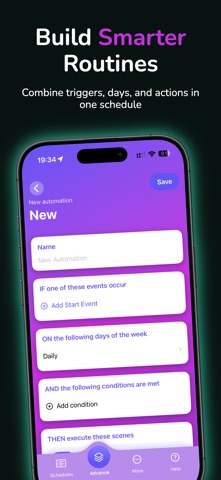
ADVANCED AUTOMATION
Create routines that go beyond a single trigger:
• IF one of several events occurs
• AND conditions are met
• THEN run selected scenes
Combine events, days, and time windows into a single, clear automation flow.
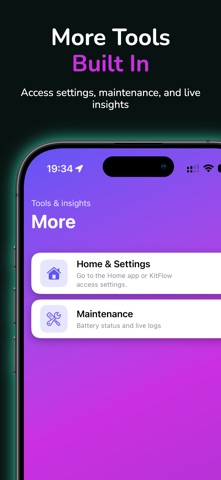
MAINTENANCE
• Battery overview — Check accessory battery levels and low-battery status.
• Live logs — Monitor events and accessory activity in real time.
Useful for maintenance, testing, and troubleshooting.
DESIGNED FOR SMART HOME CONTROL
KitFlow works directly with your existing smart home setup.
• No cloud accounts
• No extra hubs
• No tracking
• Local-first design
Requires a configured home and iOS 17 or later.
GET STARTED
1. Open KitFlow and grant home access
2. Choose your lights
3. Add time segments and brightness levels
4. Save your schedule
KitFlow makes daily lighting and automation clearer, faster, and easier to manage.