

KlutchShots AI is made and published by KlutchShots. AppBrain is an independent app data site and isn't affiliated with KlutchShots. The app name, icon, screenshots and description belong to KlutchShots and are shown as published on the App Store.
AppBrain's verdict
- Rating on App Store
- 4.18
- 11 ratings
- Last updated
- September 30, 2026
It doesn't have enough ratings yet to judge what users think.
Rankings
App Store top chartsApp Store Rankings for KlutchShots AI
Competitors
Similar apps and more from KlutchShotsAlternatives to KlutchShots AI


Releases
Updates seen on the App Store- Version
- 2.2.3
- Launched
- August 2024
No changelog data
User feedback
Ratings and reviews on the App StoreComments on KlutchShots AI for iOS
We don't have enough comments to show example comments. Please check back later.
Technology
Found in the app by AppBrain- Price
- Free
- App size
- 174.4 MB
- Content rating
- Everyone
Technologies used by KlutchShots AI
About the app and developer
About KlutchShots AI
KlutchShots AI is a sports app developed by KlutchShots.
User Ratings
KlutchShots AI is rated 4.18 out of 5 stars. The rating is based on 11 ratings.
App Information
KlutchShots AI is freely available from the App Store. The app size is 174.41 MB. The latest version available is 2.2.3. The last update was on September 30, 2026.
Technical Requirements
The app has a content rating of Everyone. The app has been available on the App Store since August 2024.
Developer information for KlutchShots
Address:
Frequently asked questions about KlutchShots AI
Is KlutchShots AI free?
Yes. KlutchShots AI is free on the App Store.
Is KlutchShots AI still available?
Yes. KlutchShots AI is on the App Store, and the last update we saw was on September 30, 2026.
How large is KlutchShots AI?
KlutchShots AI is 174.41 MB.
Is KlutchShots AI suitable for children?
App Store rates the content of KlutchShots AI as suitable for everyone.
How do people rate KlutchShots AI?
KlutchShots AI scores 4.18 out of 5 stars, from 11 ratings on the App Store.
Who made KlutchShots AI?
KlutchShots AI was developed by KlutchShots. It is listed in the sports category on the App Store.
What are the best alternatives to KlutchShots AI?
People looking at KlutchShots AI also look at these sports apps: Metro Prep Basketball League, Scorebird Fan, Mavs Academy Tournaments, Great American Shoot-Out, Athlete AI: Sports Reel Editor.
Store listing
By KlutchShots, from the App Store
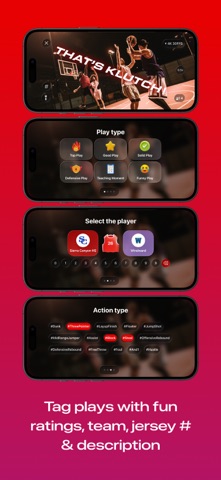
Description by KlutchShots Written by the developer, not by AppBrain. Click to read.
KlutchShots AI delivers Social Media ready, vertical, action tracked sports highlights in seconds using on-device Ai and Computer Vision.
All youth sports athletes and their family, friends and fans want high quality sports video highlights and they want them fast and easy.
In the past this was difficult to impossible, but with KlutchShots it’s fast and easy.
KlutchShots AI users shoot the game horizontally so they don’t miss any of the action and while they’re
Shooting the AI and Computer Vision zooms in, tracks the action and reframes the video for vertical Social Media sharing.
Key Features
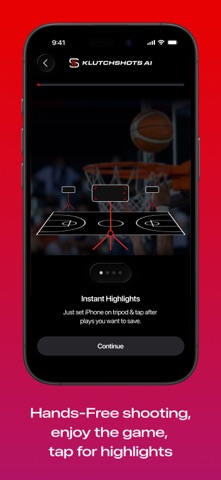
Instant Highlights - Just double tap your device screen or tap your Apple Watch and select the previous 5-20 seconds of video captured in 4k high resolution. Select the duration you want to capture for highlights and only get the highlights you want with no scrubbing through full games and editing on a laptop.
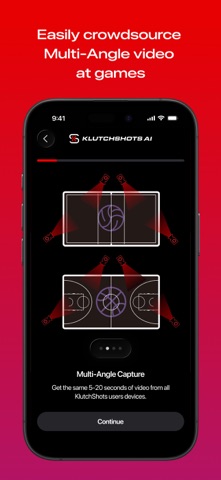
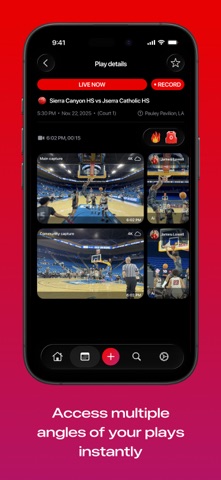
Crowd Capture - Get the 5-20 seconds of video from your device and all other KlutchShots users shooting the game. Get video from multiple angles and choose the best or do multi-angle highlights and hype reels.
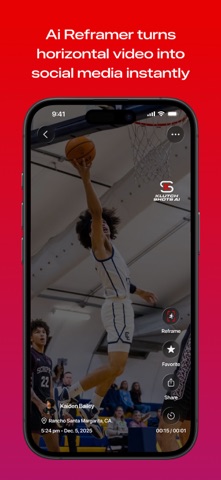
AI Re-framer - For supported sports KlutchShots AI Re-framer works while users are shooting the game to identify and track the action, zoom in and re-frame into a vertical aspect ratio for sharing on social media. Once you stop recording you see your re-framed KlutchShots on the Event page.
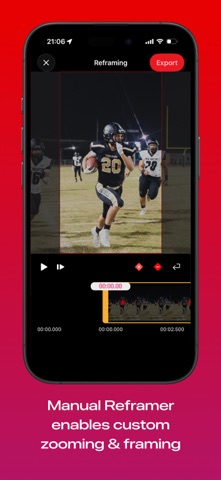
Manual Re-framer - For all sports KlutchShots Re-framer inputs the horizontal video into a vertical video frame and enables users to quickly and easily set key frames within the video so that it tracks the action exactly how they want. This is all done in seconds on the iPhone and just using finger and thumb movements everyone is used to.
Re-frame Existing Highlights - Most people have existing horizontal sports video highlights already and you can import those into KlutchShots AI to have the AI Re-framer turn them into KlutchShots if the sport is supported or use the Manual Re-framer for any sport to turn your low quality video highlight into a high quality highlight to share on social media.
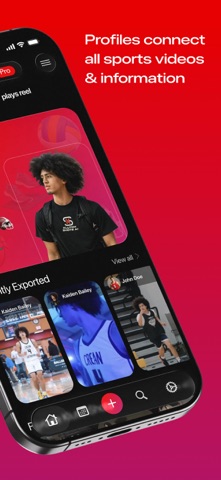
Events - These can be games, practices or training sessions and are simple to create individually in the app as well as for clubs, schools and tournaments to batch create. Events enable all users to see the event information while also being where all video highlights and KlutchShots are organized and stored in the cloud and accessible to all users.
Locker - This is each users personal house of highlights. Keep all of your favorite highlights and KlutchShots from all of your games in one organized location that doesn’t clog up your phone but is always accessible in cloud storage.
Branding Packs - KlutchShots enables users, teams, tournaments and sponsors to have videos watermarked with their logos. This is a great new way for viewers to easily see team and tournament information as well as for KlutchShots to provide clubs, schools and tournament organizers with massive video content distributed via many social accounts that is measurable and data can be used to broaden sponsorship opportunities.
EULA:
https://app.termly.io/policy-viewer/policy.html?policyUUID=a39bdbaf-7833-4310-aae5-bdc804663753