

KlyricX is made and published by Sung Bum Kim. AppBrain is an independent app data site and isn't affiliated with Sung Bum Kim. The app name, icon, screenshots and description belong to Sung Bum Kim and are shown as published on the App Store.
AppBrain's verdict
- Last updated
- April 18, 2026
Rankings
App Store top chartsApp Store Rankings for KlyricX
Competitors
Similar apps and more from Sung Bum KimAlternatives to KlyricX


Releases
Updates seen on the App Store- Version
- 1.2.0
- Launched
- January 2026
No changelog data
User feedback
Ratings and reviews on the App StoreComments on KlyricX for iOS
We don't have enough comments to show example comments. Please check back later.
Technology
Found in the app by AppBrain- Price
- Free
- App size
- 17.5 MB
- Content rating
- Everyone
Technologies used by KlyricX
About the app and developer
About KlyricX
KlyricX is an education app developed by Sung Bum Kim.
User Ratings
The app has no ratings yet.
App Information
KlyricX is freely available from the App Store. The app size is 17.53 MB. The latest version available is 1.2.0. The last update was on April 18, 2026.
Technical Requirements
The app has a content rating of Everyone. The app has been available on the App Store since January 2026.
Developer information for Sung Bum Kim
Address:
Frequently asked questions about KlyricX
Is KlyricX free?
Yes. KlyricX is free on the App Store.
Is KlyricX still available?
Yes. KlyricX is on the App Store, and the last update we saw was on April 18, 2026.
How large is KlyricX?
KlyricX is 17.53 MB.
Is KlyricX suitable for children?
App Store rates the content of KlyricX as suitable for everyone.
Who made KlyricX?
KlyricX was developed by Sung Bum Kim. It is listed in the education category on the App Store.
What are the best alternatives to KlyricX?
People looking at KlyricX also look at these education apps: LyriCue: Memorize Lyrics, Songlyo: Learn English, UtaNote – Learn with Music, MijnPortfolioPlus, Socrati: AI Course Creator.
Store listing
By Sung Bum Kim, from the App Store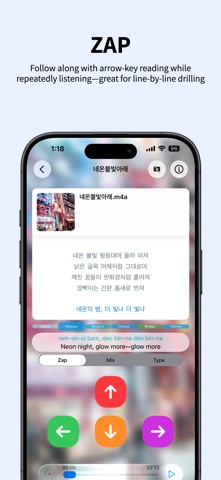


Description by Sung Bum Kim Written by the developer, not by AppBrain. Click to read.
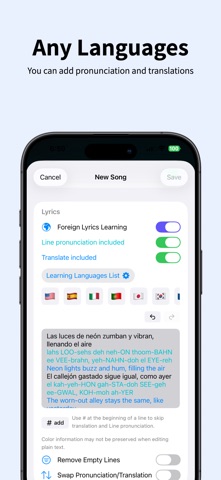
KlyricX is a lyric training app that helps you memorize songs more easily — in any language. Whether it’s K-pop, English pop, J-pop, or beyond, turn the songs you love into your personal study materials.
Using lyrics you enter yourself, KlyricX trains real recall through step-by-step modes: listening, guided display, puzzles, and typing. Built for anyone who wants to sing with confidence, practice efficiently, or enjoy music on a deeper level.
Learn with linked online media
Connect online media links (e.g. YouTube) and practice lyrics while the song plays. Repeat exactly the parts you need until they stick perfectly. (Also supports local media files from your device or iCloud Drive.)
Learning Modes
Tap Lyrics to Replay: Tap a line or word to instantly replay from there — perfect for quick repeats!
Second-Tap Slow Playback: Tap again to activate slow-motion playback and master pronunciation, rhythm, and timing in detail.
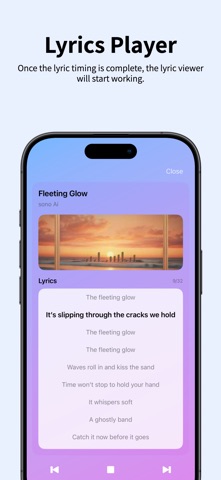
Timing Recording: Tap to record beat/segment timing while listening for ultra-precise practice
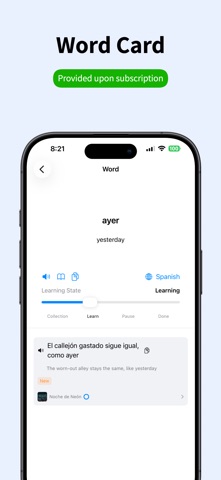
Word Highlight & Notes: Mark unfamiliar words + save pronunciation, meaning, and personal memos for review
Verse / Chorus / Bridge Labels: Organize lyrics by sections for fast navigation and targeted practice
ZAP Mode: Arrow-key guided reading while looping — perfect for line-by-line drilling
MIX Mode: Reorder shuffled lyrics to build stronger memory connections
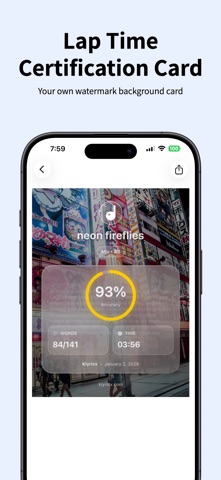
TYPE Mode: Type the lyrics yourself to test memorization accuracy and progress
Paid features (Subscription / In-App Purchase)
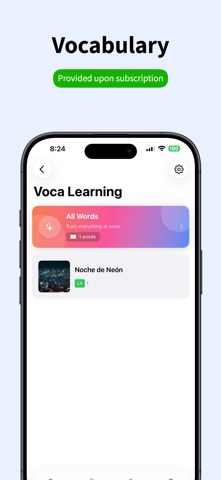
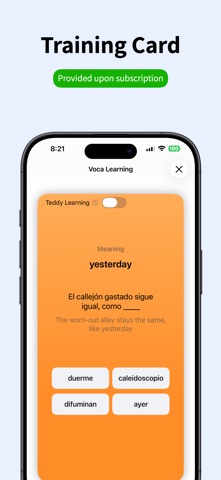
Powerful Voca: Vocabulary drills built from your own word notes (pronunciation/meaning/memo)
Remove Ads
Precision Slide Control: Finer slider control for precise seeking during learning/playback
From your own creations to all-time favorites and live must-sings — customize with artwork and turn them into your perfect personal songbook!
Terms of Use (EULA): https://www.apple.com/legal/internet-services/itunes/dev/stdeula/Local Media Kit: Link and play media files you own from your device and/or your personal iCloud Drive.