

Kmera is made and published by 小燕 谢. AppBrain is an independent app data site and isn't affiliated with 小燕 谢. The app name, icon, screenshots and description belong to 小燕 谢 and are shown as published on the App Store.
AppBrain's verdict
- Rating on App Store
- 5.00
- 3 ratings
- Last updated
- March 8, 2026
- Size
- 18.5 MB
It doesn't have enough ratings yet to judge what users think.
User feedback
Ratings and reviews on the App StoreComments on Kmera for iOS
We don't have enough comments to show example comments. Please check back later.
Store listing
By 小燕 谢, from the App Store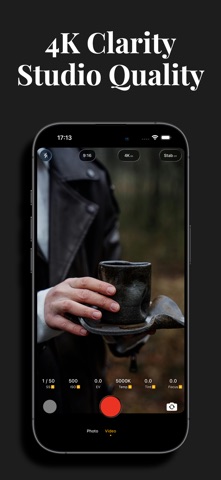
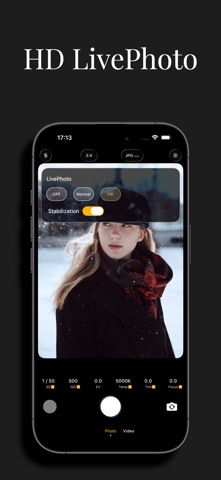

Description by 小燕 谢 Written by the developer, not by AppBrain. Click to read.
Elevate Your Mobile Photography to Pro Levels with Kmera
**
Forget clunky cameras and complicated gear — Kmera turns your smartphone into a professional photography powerhouse, designed for creators who refuse to compromise on quality. Whether you’re a seasoned photographer, a content creator, or an enthusiast chasing the perfect shot, this all-in-one tool puts DSLR-grade control and cinema-worthy results right in your pocket.
# Full Manual Control, Total Creative Freedom
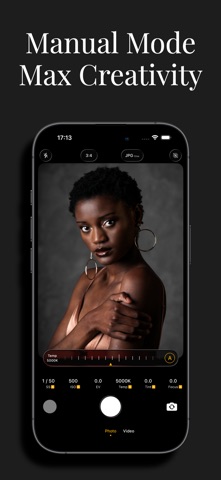
Take charge of every detail with Kmera’s intuitive manual mode:
Adjust ISO (100–6400) to nail exposure in any lighting — from bright daylight to low-light interiors.
Fine-tune shutter speed (1/10000s–30s) for crisp action shots or dreamy long exposures.
Lock focus manually or use peaking to ensure sharpness, even in tricky compositions.
Customize white balance (2000K–10000K) to match ambient light or create intentional color tones.
No more auto-mode limitations — tweak parameters in real time with a responsive interface that feels like using a professional camera, yet stays accessible for beginners.
# Capture Pro-Grade Files & Stunning Shots
Kmera’s advanced imaging engine delivers quality that rivals dedicated gear:
Shoot in RAW format (DNG) to preserve maximum detail for post-production — edit colors, exposure, and dynamic range without losing quality.
Master macro photography with precise focus control, revealing tiny textures and hidden details you’d miss with a standard camera app.
Nail long exposures for silky waterfalls, starry skies, or light trails — no tripod required (though recommended for best results).
Access professional shooting modes: HDR for balanced landscapes, Panorama for sweeping scenes, and Timer for group shots or self-portraits.
Every frame is optimized for sharpness, dynamic range, and color accuracy, so you can capture moments that stand out — whether you’re sharing on social media or printing for your portfolio.
# Intuitive Design for Every Skill Level
Kmera blends power with simplicity:
Clean, customizable interface — rearrange controls to match your workflow, hide advanced tools for quick shooting, or dive deep into settings for precision.
Gesture controls for fast adjustments — swipe to change ISO, tap to focus, and pinch to zoom (with optical zoom support on compatible devices).
Real-time histogram and level meter to ensure perfect exposure and straight horizons.
Save custom presets for your favorite shooting scenarios (e.g., “Portrait Mode,” “Night Sky,” “Macro”) — switch between setups in one tap.
Seasoned pros will appreciate the depth of control, while beginners can start with presets and gradually explore advanced features as their skills grow.
# Edit On-the-Go or Export for Post-Production
Kmera doesn’t stop at shooting — it empowers you to polish your work instantly:
Apply professional filters (Vivid, Cinematic, Monochrome, etc.) with adjustable intensity, no over-saturation or artificial effects.
Fine-tune exposure, contrast, and saturation with a built-in editor that preserves RAW quality.
Export files in JPEG, PNG, or DNG format — share directly to Instagram, TikTok, or cloud storage, or send to desktop software like Lightroom for further editing.
No need to switch between apps — shoot, edit, and share your masterpiece in minutes.
# Why Kmera?
- DSLR-grade control without the bulk
- Professional file quality (RAW, DNG)
- Versatile shooting modes for every scenario
- Intuitive design for pros and beginners
- No in-app purchases — all features unlocked from day one
Whether you’re shooting landscapes, portraits, street photography, or vlogs, Kmera gives you the tools to turn ordinary moments into extraordinary images. It’s not just a camera app — it’s your portable studio, your creative companion, and your ticket to pro-level mobile photography.
Download Kmera today and redefine what your phone can capture. Your next great shot is just a tap away.
Safety and technology
Found in the app by AppBrain- Price
- Free
- App size
- 18.5 MB
- Content rating
- Everyone
Technologies used by Kmera
Releases
Updates seen on the App Store- Version
- 1.3.0
- Launched
- January 2026
No changelog data
Alternatives
Similar apps and more from 小燕 谢Alternatives to Kmera


Rankings
App Store top chartsApp Store Rankings for Kmera
About the app and developer
About Kmera
Kmera is a photo & video app developed by 小燕 谢.
User Ratings
Kmera is rated 5.00 out of 5 stars. The rating is based on 3 ratings.
App Information
Kmera is freely available from the App Store. The app size is 18.47 MB. The latest version available is 1.3.0. The last update was on March 8, 2026.
Technical Requirements
The app has a content rating of Everyone. The app has been available on the App Store since January 2026.
Developer information for 小燕 谢
Address: