

KnowClock - Kids Clock is made and published by 中周 王. AppBrain is an independent app data site and isn't affiliated with 中周 王. The app name, icon, screenshots and description belong to 中周 王 and are shown as published on the App Store.
AppBrain's verdict
- Last updated
- July 30, 2026
Rankings
App Store top chartsApp Store Rankings for KnowClock - Kids Clock
Competitors
Similar apps and more from 中周 王Alternatives to KnowClock - Kids Clock



More from 中周 王


Releases
Updates seen on the App Store- Version
- 2.6.0
- Launched
- May 2026
No changelog data
User feedback
Ratings and reviews on the App StoreComments on KnowClock - Kids Clock for iOS
We don't have enough comments to show example comments. Please check back later.
Technology
Found in the app by AppBrain- Price
- Free
- App size
- 7.51 MB
- Content rating
- Everyone
Technologies used by KnowClock - Kids Clock
About the app and developer
About KnowClock - Kids Clock
KnowClock - Kids Clock is an education app developed by 中周 王.
What is the rating of KnowClock - Kids Clock?
KnowClock - Kids Clock has no ratings yet.
Is KnowClock - Kids Clock free?
KnowClock - Kids Clock is free. The app size is 7.51 MB. The latest version available is 2.6.0. The last update was on July 30, 2026.
What are the requirements for KnowClock - Kids Clock?
The app has a content rating of Everyone. The app has been available on the App Store since May 2026.
Developer information for 中周 王
Address:
Store listing
By 中周 王, from the App Store




Description by 中周 王 Written by the developer, not by AppBrain. Click to read.
Seven progressive learning levels: recognize clock parts, listen to time, match scenes with time, quiz challenge, set clock hands, find the time, calculate duration
Chinese Mandarin voice guidance throughout, kid-friendly narration, children can play independently
Age-adaptive difficulty: identify parts for ages 2-3, whole-hour recognition for ages 4-5, scene-based reasoning and time calculation for age 6
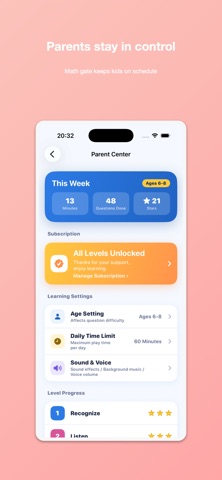
Parent Center: set usage time lock, review learning progress, manage subscription
Parent Gate: math question verification prevents children from accidentally accessing purchases or settings
Works offline: no network requests, no ads, no third-party SDKs, no user data collected
Kids Category compliant: meets all Apple Kids Category requirements
【Seven Core Game Levels】
Level 1 - Recognize: A friendly clock mascot points to clock parts (hour hand, minute hand, second hand). Voice announces "This is the minute hand." Children tap the correct part for feedback. Includes 20 questions.
Level 2 - Listen: Voice announces the current time. Children listen to Clockie speaking the time, then select the correct clock face from 4 candidates. Includes 30 questions, focusing on whole and half hours.
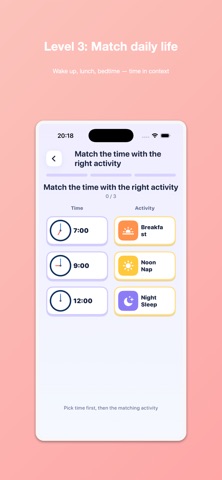
Level 3 - Match: Daily scene images (breakfast, going to kindergarten, nap time) shown above. Four clock faces below. Drag or tap to pair each scene with its matching time. Includes 20 questions.
Level 4 - Quiz: 10-question comprehensive challenge mixing all three previous level types. 3-life system. Rated 1-3 stars based on time and accuracy.
Level 5 - Set the Clock: Children drag the hour and minute hands to position them correctly according to the spoken time. Hands-on practice building time-reading intuition. Includes 6 questions.
Level 6 - Find the Time: Children see a written time description and choose the matching clock face from 4 options. Mixes reading-digital and memory-recall styles. Includes 8 questions.
Level 7 - Calculate Time: Two clocks show a start and end time. Children calculate the duration between them or figure out the end time by adding a duration. Prepares kids for real-life time problems. Includes 8 questions.
【Parent Features】
- Age group settings (ages 2-3 / 4-5 / age 6)
- Single-session time lock (15 / 30 / 60 minutes)
- Level unlock status and error review
- Restore purchases, privacy policy, contact us
【Who Is This For】
- Children aged 2-6 (to be used under parental guidance)
- Parents who want their children to systematically learn clock recognition
- Kindergarten teachers (preschool math)
【Contact Us】
If you have any questions or suggestions, please contact the developer through the App Store app page "Contact Developer".
Privacy Policy: https://github.com/wangzz/md-doc/blob/main/KnowClock/PRIVACY_POLICY.md
Terms of Use (EULA): https://www.apple.com/legal/internet-services/itunes/dev/stdeula/