

KnowGrove Voice Recorder
KnowGrove Voice Recorder is made and published by 晓洁 刘. AppBrain is an independent app data site and isn't affiliated with 晓洁 刘. The app name, icon, screenshots and description belong to 晓洁 刘 and are shown as published on the App Store.
AppBrain's verdict
- Last updated
- September 25, 2026
Rankings
App Store top chartsApp Store Rankings for KnowGrove Voice Recorder
Competitors
Similar apps and more from 晓洁 刘Alternatives to KnowGrove Voice Recorder


More from 晓洁 刘


Releases
Updates seen on the App Store- Version
- 1.2.1
- Launched
- August 2026
No changelog data
User feedback
Ratings and reviews on the App StoreComments on KnowGrove Voice Recorder for iOS
We don't have enough comments to show example comments. Please check back later.
Technology
Found in the app by AppBrain- Price
- Free
- App size
- 1.07 GB
- Content rating
- Everyone
Technologies used by KnowGrove Voice Recorder
About the app and developer
About KnowGrove Voice Recorder
KnowGrove Voice Recorder is a productivity app developed by 晓洁 刘.
What is the rating of KnowGrove Voice Recorder?
KnowGrove Voice Recorder has no ratings yet.
Is KnowGrove Voice Recorder free?
KnowGrove Voice Recorder is free. The app size is 1.07 GB. The latest version available is 1.2.1. The last update was on September 25, 2026.
What are the requirements for KnowGrove Voice Recorder?
The app has a content rating of Everyone. The app has been available on the App Store since August 2026.
Developer information for 晓洁 刘
Address:
Frequently asked questions about KnowGrove Voice Recorder
Is KnowGrove Voice Recorder free?
Yes. KnowGrove Voice Recorder is free on the App Store.
Is KnowGrove Voice Recorder still available?
Yes. KnowGrove Voice Recorder is on the App Store, and the last update we saw was on September 25, 2026.
How large is KnowGrove Voice Recorder?
KnowGrove Voice Recorder is 1.07 GB.
Is KnowGrove Voice Recorder suitable for children?
App Store rates the content of KnowGrove Voice Recorder as suitable for everyone.
Who made KnowGrove Voice Recorder?
KnowGrove Voice Recorder was developed by 晓洁 刘. It is listed in the productivity category on the App Store.
What are the best alternatives to KnowGrove Voice Recorder?
People looking at KnowGrove Voice Recorder also look at these productivity apps: VoiceBubble, VoiceTrace - Voice Recorder, ChocoBar: Task & Habit Tracker, iterate Remote, Remi - AI Reminders & To-Dos.
Store listing
By 晓洁 刘, from the App Store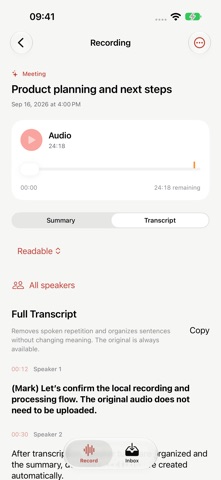



Description by 晓洁 刘 Written by the developer, not by AppBrain. Click to read.
No audio upload. No account required. From recording to transcription and summarization, your important content stays under your control.
Eligible new subscribers can try KnowGrove Pro free for 7 days. The monthly subscription renews at the App Store price after the trial unless canceled beforehand. A one-time lifetime purchase is also available.
ON-DEVICE RECORDING AND AI ORGANIZATION
• Start recording with one tap, then transcribe and organize automatically when you finish
• Run transcription and summarization locally on supported iPhones without sending the original recording to a developer server
• Identify different speakers and view or copy the words of a selected speaker
• Switch between readable and original transcripts, with improved sentence breaks and fewer distracting fillers or repetitions
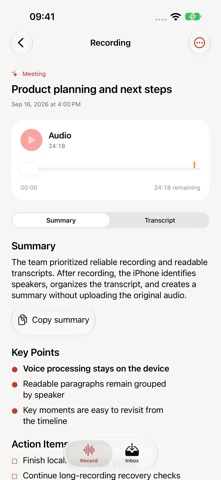
• Adapt the summary structure automatically for meetings, interviews, classes, ideas, and other recording types
• Extract key points, decisions, action items, and a concise title
• Copy the complete summary or transcript with one tap
START RECORDING ANYTIME
Use the “Record / Stop” Shortcut to start or finish a recording from the Shortcuts app, the Action Button, and other supported entry points.
While recording, you can:
• View recording status on the Lock Screen, in Live Activities, and in Dynamic Island
• Mark important moments and return to them from the timeline
• Continue recording while working in other apps
• Protect completed audio when a call or system audio interruption occurs
• Automatically attempt to resume the same recording after the call ends and iOS returns microphone access
Long recordings are protected in segments and merged into a complete audio file. If processing is interrupted, KnowGrove can continue from saved progress without requiring you to record again.
CAPTURE FROM THE WEB, CONTINUE IN OBSIDIAN
When you find an article, webpage, video, or other content worth keeping, share it to KnowGrove or paste its link or text directly.
• Create an independent Markdown document for every capture
• Choose separate folders for recordings and web captures
• Save files to locations you explicitly select
• Use iCloud Drive to make selected folders available on your Mac
• Open the folder in Obsidian and use the KnowGrove plugin to continue parsing, organizing, and developing the content into local notes
From quick capture on your iPhone to focused organization on your Mac, KnowGrove connects voice recordings, web content, and your personal knowledge base.
MADE FOR
• Meeting notes and action items
• Interviews and multi-speaker conversations
• Classes, lectures, and study notes
• Spoken ideas, reflection, and personal reviews
• Articles, webpages, and video links
• Obsidian and local Markdown workflows
PRIVACY FIRST
• No account required
• No ads
• No third-party analytics SDKs
• Original recordings and transcripts do not need to be uploaded to a developer server
• Files remain on your device and in folders you explicitly choose
• Manage your data through the Files app and iCloud Drive
On-device AI availability and processing speed depend on the iPhone model, recording length, device temperature, and available storage. Direct background recording from a Shortcut requires Live Activities to be enabled in Settings.
Terms of Use (EULA):
https://www.apple.com/legal/internet-services/itunes/dev/stdeula/