

KORAKU is made and published by Fuji Bit Inc. AppBrain is an independent app data site and isn't affiliated with Fuji Bit Inc. The app name, icon, screenshots and description belong to Fuji Bit Inc. and are shown as published on the App Store.
AppBrain's verdict
- Last updated
- May 15, 2026
Rankings
App Store top chartsApp Store Rankings for KORAKU
This app is not ranked
Competitors
Similar apps and more from Fuji Bit Inc.






Releases
Updates seen on the App Store- Version
- 5.0
- Launched
- March 2026
No changelog data
User feedback
Ratings and reviews on the App StoreComments on KORAKU for iOS
We don't have enough comments to show example comments. Please check back later.
Technology
Found in the app by AppBrain- Price
- Free
- App size
- 24.1 MB
- Content rating
- Everyone
Technologies used by KORAKU
About the app and developer
About KORAKU
KORAKU is an education app developed by Fuji Bit Inc.
What is the rating of KORAKU?
KORAKU has no ratings yet.
Is KORAKU free?
KORAKU is free. The app size is 24.07 MB. The latest version available is 5.0. The last update was on May 15, 2026.
What are the requirements for KORAKU?
The app has a content rating of Everyone. The app has been available on the App Store since March 2026.
Developer information for Fuji Bit Inc.
Address:
Store listing
By Fuji Bit Inc., from the App Store



Screenshots by Fuji Bit Inc., from the the App Store listing
Description by Fuji Bit Inc. Written by the developer, not by AppBrain. Click to read.
KORAKU is an interactive educational app for exploring optical phenomena through simulation.
The fourth in the series following SUUGAKU (Math), BUTURAKU (Physics), and HARAKU (Waves). This time the theme is "Light." From geometrical optics to quantum-scale phenomena, experience ten simulations of how light behaves.
[10 Simulations]
- Lens (Thin Lens)
Observe ray paths and image formation through convex and concave lenses in real time. Adjust focal length, object distance, and object height to experience the thin lens equation (1/f = 1/a + 1/b).
- Spherical Mirror
Toggle between concave and convex mirrors to visualize image formation. Move the object and change the radius of curvature to see real vs. virtual and upright vs. inverted images.
- Prism Dispersion
Simulate white light passing through a prism and separating into a rainbow spectrum, based on Snell's law and the Cauchy dispersion formula.
- Rainbow
Trace light entering a raindrop, refracting, reflecting internally, and exiting. Wavelength-dependent deviation reproduces the primary and secondary rainbows around the antisolar point.
- Diffraction Grating
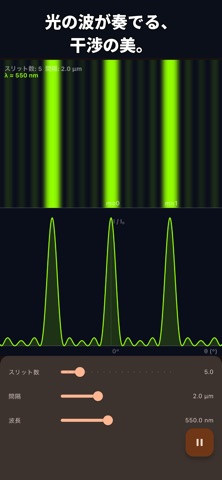
Visualize multi-slit interference patterns. Change slit spacing and wavelength to understand the diffraction condition d sin(θ) = mλ.
- Optical Fiber
Simulate light propagation by total internal reflection. Adjust the launch angle and refractive indices to learn the relationship between critical angle and numerical aperture (NA).
- Polarization
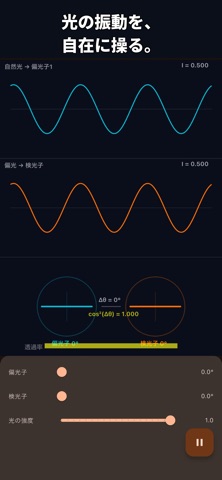
Change the angles of the polarizer and analyzer to observe transmitted light intensity following Malus's law (I = I₀cos²θ).
- Thin Film Interference
Reproduce the rainbow colors of soap bubbles and oil films. Adjust film thickness, refractive index, and incident angle to observe interference based on optical path difference.
- Color Mixing
Compare additive color mixing (RGB light) and subtractive color mixing (CMY pigments). Three channel sliders show the resulting RGB values in real time.
- Photoelectric Effect
Animate electrons being ejected from a metal by photons. Three sliders for frequency, intensity, and work function let you feel the relationships E = hf, Kₘₐₓ = hf − W, and threshold f₀ = W/h.
[Features]
- Adjust parameters in real time across all simulations
- Physics formulas and values displayed in real time
- Dark mode / Light mode support
- Japanese / English support
- iPhone / iPad support
[Pricing & In-App Purchases]
- The app itself is completely free
- No in-app purchases of any kind
- No subscriptions
- No paid additional content
- A small banner ad (Google AdMob) is shown at the bottom of the screen
- Ad personalization may use the iOS App Tracking Transparency permission (optional)
[Recommended For]
- Students studying optics in physics class
- Anyone who wants to intuitively understand the properties of light
- Teachers looking for teaching materials
- Anyone interested in optics
The fourth in the series following SUUGAKU (Math), BUTURAKU (Physics), and HARAKU (Waves). This time the theme is "Light." From geometrical optics to quantum-scale phenomena, experience ten simulations of how light behaves.
[10 Simulations]
- Lens (Thin Lens)
Observe ray paths and image formation through convex and concave lenses in real time. Adjust focal length, object distance, and object height to experience the thin lens equation (1/f = 1/a + 1/b).
- Spherical Mirror
Toggle between concave and convex mirrors to visualize image formation. Move the object and change the radius of curvature to see real vs. virtual and upright vs. inverted images.
- Prism Dispersion
Simulate white light passing through a prism and separating into a rainbow spectrum, based on Snell's law and the Cauchy dispersion formula.
- Rainbow
Trace light entering a raindrop, refracting, reflecting internally, and exiting. Wavelength-dependent deviation reproduces the primary and secondary rainbows around the antisolar point.
- Diffraction Grating
Visualize multi-slit interference patterns. Change slit spacing and wavelength to understand the diffraction condition d sin(θ) = mλ.
- Optical Fiber
Simulate light propagation by total internal reflection. Adjust the launch angle and refractive indices to learn the relationship between critical angle and numerical aperture (NA).
- Polarization
Change the angles of the polarizer and analyzer to observe transmitted light intensity following Malus's law (I = I₀cos²θ).
- Thin Film Interference
Reproduce the rainbow colors of soap bubbles and oil films. Adjust film thickness, refractive index, and incident angle to observe interference based on optical path difference.
- Color Mixing
Compare additive color mixing (RGB light) and subtractive color mixing (CMY pigments). Three channel sliders show the resulting RGB values in real time.
- Photoelectric Effect
Animate electrons being ejected from a metal by photons. Three sliders for frequency, intensity, and work function let you feel the relationships E = hf, Kₘₐₓ = hf − W, and threshold f₀ = W/h.
[Features]
- Adjust parameters in real time across all simulations
- Physics formulas and values displayed in real time
- Dark mode / Light mode support
- Japanese / English support
- iPhone / iPad support
[Pricing & In-App Purchases]
- The app itself is completely free
- No in-app purchases of any kind
- No subscriptions
- No paid additional content
- A small banner ad (Google AdMob) is shown at the bottom of the screen
- Ad personalization may use the iOS App Tracking Transparency permission (optional)
[Recommended For]
- Students studying optics in physics class
- Anyone who wants to intuitively understand the properties of light
- Teachers looking for teaching materials
- Anyone interested in optics