

Kuku - Goal Grid
Kuku - Goal Grid is made and published by Hiroyuki Hirata. AppBrain is an independent app data site and isn't affiliated with Hiroyuki Hirata. The app name, icon, screenshots and description belong to Hiroyuki Hirata and are shown as published on the App Store.
AppBrain's verdict
- Last updated
- September 13, 2026
Rankings
App Store top chartsApp Store Rankings for Kuku - Goal Grid
Competitors
Similar apps and more from Hiroyuki HirataAlternatives to Kuku - Goal Grid


More from Hiroyuki Hirata

Releases
Updates seen on the App Store- Version
- 2.2.0
- Launched
- July 2026
No changelog data
User feedback
Ratings and reviews on the App StoreComments on Kuku - Goal Grid for iOS
We don't have enough comments to show example comments. Please check back later.
Technology
Found in the app by AppBrain- Price
- Free
- App size
- 4.02 MB
- Content rating
- High
Technologies used by Kuku - Goal Grid
About the app and developer
About Kuku - Goal Grid
Kuku - Goal Grid is a productivity app developed by Hiroyuki Hirata.
What is the rating of Kuku - Goal Grid?
Kuku - Goal Grid has no ratings yet.
Is Kuku - Goal Grid free?
Kuku - Goal Grid is free. The app size is 4.02 MB. The latest version available is 2.2.0. The last update was on September 13, 2026.
What are the requirements for Kuku - Goal Grid?
The app has a content rating of High Maturity. The app has been available on the App Store since July 2026.
Developer information for Hiroyuki Hirata
Address:
Store listing
By Hiroyuki Hirata, from the App Store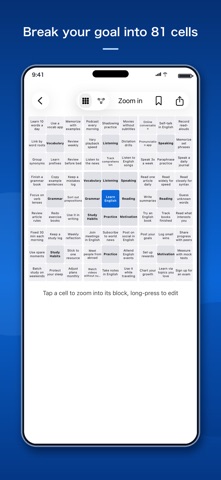


Description by Hiroyuki Hirata Written by the developer, not by AppBrain. Click to read.
■ Break your goal into 81 cells
From a central theme to 8 elements, and from each element to 8 concrete actions. Splitting a goal across the 9×9 grid turns "what should I look into?" into 81 starting points for research.
■ Follow associations, then search
In focus view, tap an element cell to drill into that element's own 9 cells. Tap a leaf cell (the theme or a sub-item) and Kuku opens an in-app web search built from the path you followed (theme → element → item). Step back to return to the level above. Purposeful research, always tied to your goal.
■ Bookmark the pages you find (free)
Save any individual page you open in the in-app browser. Kuku records which cell (which path) led you there, so you can revisit everything later from one list on the home screen.
■ Let AI help with the breakdown (two ways, combine freely)
- On-device AI (Apple Intelligence): free, offline drafting of all 8 elements × 64 items (supported devices only)
- Cloud AI (Kuku Pro): bring your own Claude / Gemini / OpenAI / Qwen API key for high-quality, web-grounded generation
Fill everything at once, one block at a time, or get a suggestion for a single cell. AI never overwrites cells you filled in yourself.
■ Privacy first
No ads, no tracking, no analytics. Charts stay on your device. API keys live only in your device's keychain and are sent, only when you generate, straight to the AI provider you chose with your own key — never through a developer server.
■ Kuku Pro (one-time, non-consumable purchase)
Unlimited charts (free version: 5) / Cloud AI generation / Mind map view (fully expanded, zoomable).
Note: Cloud AI requires your own API key and is billed by the provider you choose.