



AppBrain's verdict
- Last updated
- November 8, 2026
- Size
- 14.9 MB
User feedback
Ratings and reviews on the App StoreComments on KUMU - Photo Layout for iOS
We don't have enough comments to show example comments. Please check back later.
Store listing
By AKIRA SANO, from the App StoreDescription by AKIRA SANO Written by the developer, not by AppBrain. Click to read.
Combine photos, negative space, text, and graphic elements within a grid, and decide the composition with your own hands.
KUMU stays out of the way and helps you shape everything into place.
■ Compose photos freely
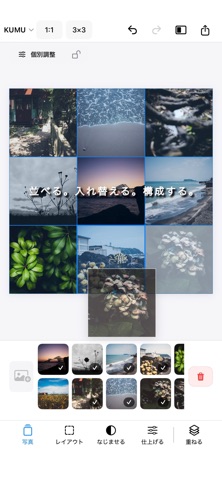
Place photos on a grid, move and swap them, adjust their scale, position, and crop.
You can use the same photo more than once, or let a single photo span multiple grid cells.
■ Combine photos, space, text, and overlays
Create layouts using photos, empty space, and color cells.
Text can be placed freely over your composition, with support for moving, scaling, and rotation. Adjust horizontal or vertical writing, fonts, colors, character spacing, and line spacing.
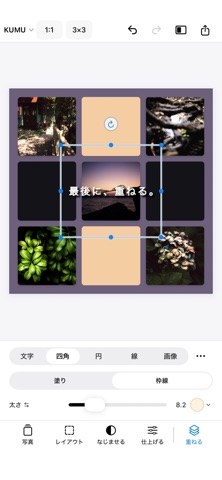
With Overlays, you can also add rectangles, circles, lines, and images on top of your composition.
■ Harmonize different photos
Use Harmonize to balance differences in brightness and color when several photos are combined into a single work.
You can let KUMU adjust them naturally, or choose one photo as a reference for the others.
Individual photo adjustments and finishing adjustments for the entire composition are also available.
■ Fine-tune your layout
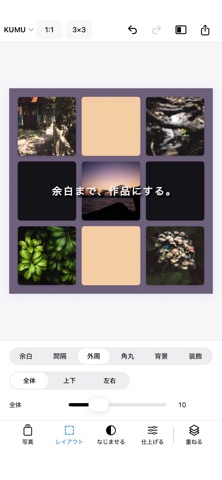
Adjust cell spacing, outer margins, backgrounds, corner radius, borders, shadows, feathering, and blending.
Editing grid guides are never included in the exported image, so you can work with structure while keeping the final result clean.
■ Save your works and continue later
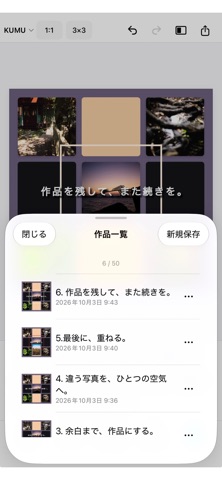
Your current editing state is automatically saved on your device, so you can continue where you left off the next time you open KUMU.
You can also save multiple named works and return to them later for further editing.
■ Made for iPhone and iPad
KUMU provides the same core editing experience on both iPhone and iPad.
On iPad, the larger workspace and grids up to 10×10 give you even more room to build detailed compositions.
■ KUMU Pro
The Free version includes KUMU’s core editing features.
KUMU Pro is a one-time purchase that unlocks:
・Up to 50 photos
・Grids up to 7×7 on iPhone and 10×10 on iPad
・All aspect ratios
・Up to 50 saved works
・High-resolution collage export up to 6000 px
・Export of original source photos used in a work
・Individual export of placed photos
You decide the composition.
KUMU helps bring it together.
Make your photos your own with KUMU.
Safety and technology
Found in the app by AppBrain- Price
- Free
- App size
- 14.9 MB
- Content rating
- Everyone
Technologies used by KUMU - Photo Layout
Releases
Updates seen on the App Store- Version
- 2.3.1
- Launched
- October 2026
No changelog data
Alternatives
Similar apps and more from AKIRA SANOAlternatives to KUMU - Photo Layout


More from AKIRA SANO

Rankings
App Store top chartsApp Store Rankings for KUMU - Photo Layout
About the app and developer
About KUMU - Photo Layout
KUMU - Photo Layout is a photo & video app developed by AKIRA SANO.
User Ratings
The app has no ratings yet.
App Information
KUMU - Photo Layout is freely available from the App Store. The app size is 14.91 MB. The latest version available is 2.3.1. The last update was on November 8, 2026.
Technical Requirements
The app has a content rating of Everyone. The app has been available on the App Store since October 2026.
KUMU - Photo Layout is made and published by AKIRA SANO. AppBrain is an independent app data site and isn't affiliated with AKIRA SANO. The app name, icon, screenshots and description belong to AKIRA SANO and are shown as published on the App Store.
Developer information for AKIRA SANO
Address: