

Kustos: Photo Cull & Cleanup
Kustos: Photo Cull & Cleanup is made and published by rocketbase.io software productions GmbH. AppBrain is an independent app data site and isn't affiliated with rocketbase.io software productions GmbH. The app name, icon, screenshots and description belong to rocketbase.io software productions GmbH and are shown as published on the App Store.
AppBrain's verdict
- Last updated
- September 22, 2026
Rankings
App Store top chartsApp Store Rankings for Kustos: Photo Cull & Cleanup
Competitors
Similar apps and more from rocketbase.io software productions GmbHAlternatives to Kustos: Photo Cull & Cleanup


Releases
Updates seen on the App Store- Version
- 1.0.0
- Launched
- August 2026
No changelog data
User feedback
Ratings and reviews on the App StoreComments on Kustos: Photo Cull & Cleanup for iOS
We don't have enough comments to show example comments. Please check back later.
Technology
Found in the app by AppBrain- Price
- Free
- App size
- 29.7 MB
- Content rating
- Everyone
Technologies used by Kustos: Photo Cull & Cleanup
About the app and developer
About Kustos: Photo Cull & Cleanup
Kustos: Photo Cull & Cleanup is a photo & video app developed by rocketbase.io software productions GmbH.
User Ratings
The app has no ratings yet.
App Information
Kustos: Photo Cull & Cleanup is freely available from the App Store. The app size is 29.72 MB. The latest version available is 1.0.0. The last update was on September 22, 2026.
Technical Requirements
The app has a content rating of Everyone. The app has been available on the App Store since August 2026.
Developer information for rocketbase.io software productions GmbH
Store listing
By rocketbase.io software productions GmbH, from the App Store



Description by rocketbase.io software productions GmbH Written by the developer, not by AppBrain. Click to read.
Your camera roll fills up with near-duplicates: bursts, three tries at the same moment, blurry frames, screenshots, clips forwarded from chat apps. Sorting that one thumbnail at a time on a phone screen is slow. Kustos puts the comparison on your laptop's big screen and hands you the keyboard.
How it works
1. Pick a mode in the app on your phone. Stars to rate, favorite and download. Delete to sort out quickly.
2. Open the address the app shows in your laptop browser. Compare series side by side, rate them, mark what should go.
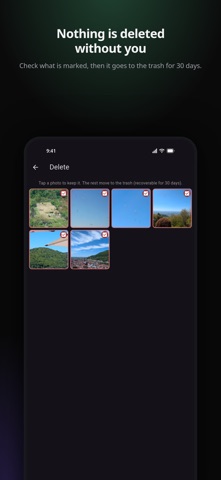
3. Delete on your phone. iOS asks for confirmation, and the photos land in the system trash, recoverable for 30 days.
What you get
• Automatic series: bursts and near-duplicates are grouped by visual fingerprint and lined up side by side, so you keep the best frame and drop the rest.
• Keyboard workflow: 1 to 5 to rate, 0 or X or Space to discard, arrow keys to move, N for the next series. Hundreds of photos in minutes.
• Photos and videos: play videos right in the browser and cull them like stills. Live Photos play back too (iPhone).
• Filters that cut the noise: jump straight to videos, screenshots, or photos from WhatsApp, Telegram and other apps. Or to what is still unseen, already rated, or marked for deletion.
• Batch curating: select many tiles at once and rate or mark the whole selection in one step.
• Month navigation: skip years back in a large library instead of scrolling.
• Full detail per shot: camera, lens, aperture, shutter speed, ISO, focal length, and where it was taken.
• Export your keepers: download the originals of everything at or above a star rating as a ZIP, EXIF intact, at full resolution. Better than pushing them through a chat app.
• Favorites (iPhone): mark everything at or above a rating as a favorite in your photo library.
• A last look before deleting: review everything marked on your phone and tap any shot to keep it.
Private by design
Kustos runs on your device and inside your own Wi-Fi. Photos, ratings and marks stay in a local index on your phone. Your photos are never uploaded and nothing is shared with third parties. There is no account, no login and no cloud sync. The laptop view is served by a small web server on your phone: only browsers you confirm on the phone can connect to it, and you can disconnect them again at any time. Image data goes directly from phone to laptop.
Kustos collects anonymous, aggregated usage statistics (EU-hosted, no personal data, no device profiles, no advertising) to improve the app. Your photos are never part of that.
Free and Pro
The free version indexes up to 1000 photos. Kustos Pro lifts the limit so you can curate your whole library. One-time purchase, no subscription.
Good to know
Phone and laptop need to be on the same Wi-Fi. Some guest and office networks block devices from reaching each other; the app explains how to work around that. Keep Kustos in the foreground while you curate, otherwise the system suspends the server.