

Lapser: Photo Timelapse
Lapser: Photo Timelapse is made and published by Downgate Labs LLC. AppBrain is an independent app data site and isn't affiliated with Downgate Labs LLC. The app name, icon, screenshots and description belong to Downgate Labs LLC and are shown as published on the App Store.
AppBrain's verdict
- Rating on App Store
- 5.00
- 3 ratings
- Last updated
- October 3, 2026
- Size
- 184.4 MB
It doesn't have enough ratings yet to judge what users think.
User feedback
Ratings and reviews on the App StoreComments on Lapser: Photo Timelapse for iOS
We don't have enough comments to show example comments. Please check back later.
Store listing
By Downgate Labs LLC, from the App Store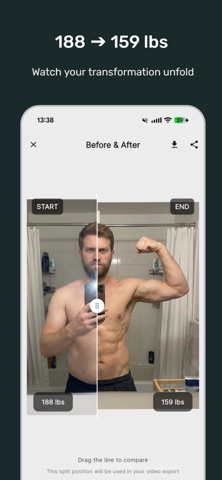



Description by Downgate Labs LLC Written by the developer, not by AppBrain. Click to read.
Track a weight loss journey with your stats displayed in the video. Document your child growing up across years. Watch a home renovation unfold. See your beard fill in week by week. Lapser handles multiple projects with precise photo alignment, then exports polished timelapse videos you'll actually want to share.
-----
WHAT SETS LAPSER APART
AI-POWERED ALIGNMENT
One tap and your photos align perfectly to the previous shot. Faces, bodies, landscapes, objects — anything. Manual controls always available if you prefer hands-on precision.
YOUR PHOTOS STAY YOURS
Local storage by default. No account needed. No ads, ever. Premium users back up to their own cloud storage — not our servers, yours. We never see your photos.
PROFESSIONAL EXPORTS
Before/after comparisons you can download, share, or include at the end of your video. Adjustable resolution and frame rates. Background music. Date labels burned into frames. Videos you'll actually want to share.
OPTIONAL DATA TRACKING
Premium users can attach weight, measurements, or custom data to photos. Your numbers appear right in the exported video alongside the visuals. Add milestone events (surgery date, goal reached, first steps) to your timeline.
-----
USE IT FOR
FACE & SELFIE TRACKING
Daily selfies, aging over time, beard growth, skincare progress, makeup transformations.
BODY & FITNESS TRANSFORMATION
Weight loss, muscle building, pregnancy, post-surgery recovery. Premium users can optionally track and display weight or measurements in their videos.
KIDS & FAMILY
Watch your child grow from newborn onward. The ghost overlay camera helps you line up shots consistently, even with a squirmy toddler.
LANDSCAPES, PROJECTS & MORE
Home renovations, garden changes across seasons, art projects, plant growth, construction. If it evolves over time, Lapser can track it.
-----
KEY FEATURES
- AI-assisted photo alignment for faces, bodies, landscapes and objects
- Ghost overlay camera to match your previous shot
- Before/after comparisons: download, share, or add to your video
- Photo editing: brightness, contrast, saturation and more (premium)
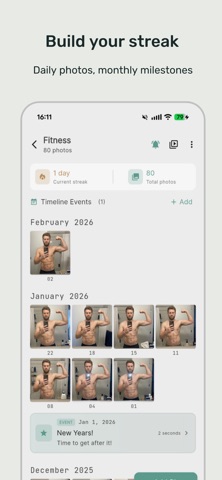
- Reminder notifications to keep your streak alive
- Date adjustment and automatic chronological ordering
- MP4 video export with resolution options, music, and date overlays
- Timeline milestone markers
- Optional data tracking (weight, measurements) in videos
- 100% ad-free, free and premium
-----
FREE VS PREMIUM
FREE (no account needed):
• One project: face, body, plant, landscape, anything
• Your first 10 automatic alignments, free
• Ghost overlay camera
• Reminder notifications
• Editable dates and timeline
• Video export with watermark
PREMIUM (subscribe monthly or yearly — or buy once, own it forever):
• Unlimited projects
• Unlimited AI alignment
• Photo editing (brightness, contrast, saturation and more)
• Full HD export, no watermark
• Before/after comparisons: download, share, or add to your video
• Background music in videos
• Cloud backup (your storage, your data)
• Batch image imports
• Custom data tracking displayed in video
• Timeline milestone events
• No subscription required — a one-time purchase unlocks everything for good
-----
START TODAY
Take your first photo. Do it again tomorrow. In a month you'll have a story worth watching. In a year you'll have something magical.
Change doesn't happen overnight, but with Lapser, you'll never miss a moment of it.
Questions? Feedback? Contact us at: downgatelabsllc@gmail.com
Terms of Use (EULA): https://www.apple.com/legal/internet-services/itunes/dev/stdeula/
Safety and technology
Found in the app by AppBrain- Price
- Free
- App size
- 184.4 MB
- Content rating
- Everyone
Technologies used by Lapser: Photo Timelapse
Releases
Updates seen on the App Store- Version
- 1.3.2
- Launched
- June 2026
No changelog data
Alternatives
Similar apps and more from Downgate Labs LLC


Rankings
App Store top chartsApp Store Rankings for Lapser: Photo Timelapse
About the app and developer
About Lapser: Photo Timelapse
Lapser: Photo Timelapse is a photo & video app developed by Downgate Labs LLC.
What is the rating of Lapser: Photo Timelapse?
Lapser: Photo Timelapse is rated 5.00 out of 5 stars, based on 3 ratings.
Is Lapser: Photo Timelapse free?
Lapser: Photo Timelapse is free. The app size is 184.38 MB. The latest version available is 1.3.2. The last update was on October 3, 2026.
What are the requirements for Lapser: Photo Timelapse?
The app has a content rating of Everyone. The app has been available on the App Store since June 2026.
Developer information for Downgate Labs LLC
Address:
Frequently asked questions about Lapser: Photo Timelapse
Is Lapser: Photo Timelapse free?
Yes. Lapser: Photo Timelapse is free on the App Store.
Is Lapser: Photo Timelapse still available?
Yes. Lapser: Photo Timelapse is on the App Store, and the last update we saw was on October 3, 2026.
How large is Lapser: Photo Timelapse?
Lapser: Photo Timelapse is 184.38 MB.
Is Lapser: Photo Timelapse suitable for children?
App Store rates the content of Lapser: Photo Timelapse as suitable for everyone.
How do people rate Lapser: Photo Timelapse?
Lapser: Photo Timelapse scores 5.00 out of 5 stars, from 3 ratings on the App Store.
Who made Lapser: Photo Timelapse?
Lapser: Photo Timelapse was developed by Downgate Labs LLC. It is listed in the photo & video category on the App Store.
What are the best alternatives to Lapser: Photo Timelapse?
People looking at Lapser: Photo Timelapse also look at these photo & video apps: PlantReels: Growth Journal, LUX Video Player – HD Media, Camera Organizer: Photos Video, Light Meter LuMe, AI Effects: Vye.