

Latch: Scan to Unlock
Latch: Scan to Unlock is made and published by Lukla Logic LLC. AppBrain is an independent app data site and isn't affiliated with Lukla Logic LLC. The app name, icon, screenshots and description belong to Lukla Logic LLC and are shown as published on the App Store.
AppBrain's verdict
New- Rating on App Store
- 5.00
- 7 ratings
- Last updated
- October 17, 2026
Latch: Scan to Unlock came out 23 days ago. It doesn't have enough ratings yet to judge what users think.
Rankings
App Store top chartsApp Store Rankings for Latch: Scan to Unlock
Competitors
Similar apps and more from Lukla Logic LLCAlternatives to Latch: Scan to Unlock


Releases
Updates seen on the App Store- Version
- 1.0.3
- Launched
- October 2026
No changelog data
User feedback
Ratings and reviews on the App StoreComments on Latch: Scan to Unlock for iOS
We don't have enough comments to show example comments. Please check back later.
Technology
Found in the app by AppBrain- Price
- Free
- App size
- 10.7 MB
- Content rating
- Everyone
Technologies used by Latch: Scan to Unlock
About the app and developer
About Latch: Scan to Unlock
Latch: Scan to Unlock is a productivity app developed by Lukla Logic LLC.
User Ratings
Latch: Scan to Unlock is rated 5.00 out of 5 stars. The rating is based on 7 ratings.
App Information
Latch: Scan to Unlock is freely available from the App Store. The app size is 10.66 MB. The latest version available is 1.0.3. The last update was on October 17, 2026.
Technical Requirements
The app has a content rating of Everyone. The app has been available on the App Store since October 2026.
Developer information for Lukla Logic LLC
Address:
Store listing
By Lukla Logic LLC, from the App Store


Description by Lukla Logic LLC Written by the developer, not by AppBrain. Click to read.
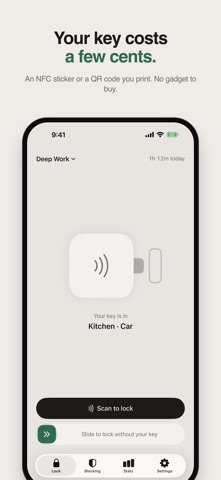
Pick the apps, categories and websites that pull you in, then slide the latch to lock them. To unlock, scan your key: a few-cent NFC sticker or a QR code you print at home. Keep it on the fridge, in the car or at your desk at work, and the few steps it takes to go get it are usually enough to change your mind.
Latch uses Apple's Screen Time (Family Controls) to block apps on your own iPhone. Your choices stay on your iPhone.
YOUR KEY, NO GADGET
• Use any NTAG213, NTAG215 or NTAG216 NFC sticker — a few cents each — or a QR code you print at home (the camera scans it)
• Tap the sticker with Latch closed, or scan it in the app
• Stickers are locked with a password after writing, so no one can write over them. Save the password in Apple's Passwords app
• Share one key with family or roommates — one sticker on the fridge for the whole house
• Tell Latch where each key lives, and the lock screen tells you where to walk
• One key works with all your iPhones
• A steps key (Pro): walk 500 to 20,000 steps to unlock, counted with Motion & Fitness
• On iPad, use a QR key. NFC stickers, the steps key and lock while driving need an iPhone
LOCKS BEFORE YOU THINK TO
• Built-in profiles — Work, Social and Bedtime — ready with the usual suspects
• Schedules (Pro): every weekday morning, or at bedtime until you scan your key
• Places: lock when you arrive at the office or the gym, and unlock when you leave (uses your location)
• Lock while driving (Pro): Latch notices a drive with your location and Motion & Fitness, locks the profile you choose, and unlocks after you park
• A Control Center toggle (iOS 18): tap to lock, tap again to open the scanner
• Siri: "Latch my phone", or "Latch my phone with Work". Also in Shortcuts and on the Action button
BUILT FOR THE DAYS YOU'D RATHER NOT
• Daily limits (Pro): give an app or category a few minutes a day while you're unlocked
• Commitment mode (Pro): stay locked for at least 30 minutes, or up to 8 hours
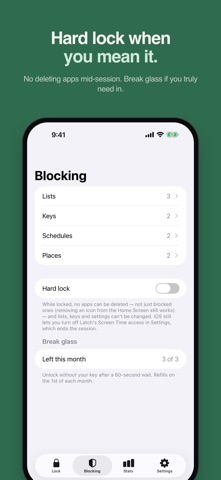
• Hard lock: choose to block deleting apps, installing apps and in-app purchases while you're locked
• Break glass: three times a month, open your apps for 5–15 minutes without your key; they lock again on their own
• Block explicit websites with Apple's filter, per profile
• Your own words on the block screen, like "Finish your work first"
SEE THE TIME YOU GOT BACK
• A daily locked-time goal and a streak to keep
• Your last 7 days, how they compare with the week before, and a Sunday recap
• How often you reached for a blocked app, and what broke your focus
• Month and all-time views (Pro)
• Lock Screen widgets and a Dynamic Island timer
• iCloud sync between your iPhones
PRIVATE BY DESIGN
Latch has no accounts, no ads and no analytics. Apple's Screen Time keeps your app choices and usage on your iPhone, so we never see them.
LATCH PRO — ONE-TIME PURCHASE
Free includes one key, three profiles, two places and seven days of stats. Pro unlocks unlimited keys, profiles and places, schedules, daily limits, commitment mode, lock while driving, key hours, a steps key and full history. No subscription.