

LC Music is made and published by Byung-woo Hwang. AppBrain is an independent app data site and isn't affiliated with Byung-woo Hwang. The app name, icon, screenshots and description belong to Byung-woo Hwang and are shown as published on the App Store.
AppBrain's verdict
- Last updated
- August 26, 2026
Rankings
App Store top chartsApp Store Rankings for LC Music
Competitors
Similar apps and more from Byung-woo HwangAlternatives to LC Music


More from Byung-woo Hwang


Releases
Updates seen on the App Store- Version
- 1.4
- Launched
- January 2026
No changelog data
User feedback
Ratings and reviews on the App StoreComments on LC Music for iOS
We don't have enough comments to show example comments. Please check back later.
Technology
Found in the app by AppBrain- Price
- Free
- App size
- 1.29 MB
- Content rating
- Everyone
Technologies used by LC Music
About the app and developer
About LC Music
LC Music is a music app developed by Byung-woo Hwang.
User Ratings
The app has no ratings yet.
App Information
LC Music is freely available from the App Store. The app size is 1.29 MB. The latest version available is 1.4. The last update was on August 26, 2026.
Technical Requirements
The app has a content rating of Everyone. The app has been available on the App Store since January 2026.
Developer information for Byung-woo Hwang
Address:
Frequently asked questions about LC Music
Is LC Music free?
Yes. LC Music is free on the App Store.
Is LC Music still available?
Yes. LC Music is on the App Store, and the last update we saw was on August 26, 2026.
How large is LC Music?
LC Music is 1.29 MB.
Is LC Music suitable for children?
App Store rates the content of LC Music as suitable for everyone.
Who made LC Music?
LC Music was developed by Byung-woo Hwang. It is listed in the music category on the App Store.
What are the best alternatives to LC Music?
People looking at LC Music also look at these music apps: FlipMyTunez, AM-Connect, UCranePlayer, SwiftTune, Songlist Copy.
Store listing
By Byung-woo Hwang, from the App Store


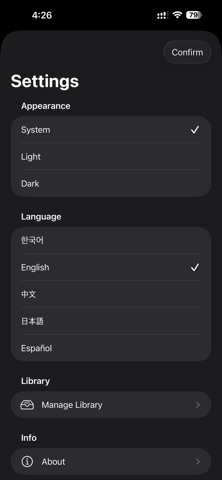
Description by Byung-woo Hwang Written by the developer, not by AppBrain. Click to read.
It’s designed to help you find tracks quickly, play instantly, and keep your playlists organized—without unnecessary complexity.
With Files app integration, you can import and play music files directly from the Files app. Use the sleep timer to stop playback automatically after a set time, and customize your listening flow with adjustable rewind/fast-forward controls by setting your preferred skip interval.
Key Features
• Play music files stored on your device
• Import and play music files directly from the Files app
• Manage and edit playlists (selection mode, select all, play selected)
• Sleep timer (auto-stop after a set duration)
• Custom rewind/fast-forward (adjustable skip interval)
• Manage music cache to optimize storage
• Clean UI for quick browsing and playback control
True Player focuses on a smooth listening experience with minimal friction. If you have questions or suggestions, please contact us via the support channel.