

LE Viewer is made and published by Michael Collins. AppBrain is an independent app data site and isn't affiliated with Michael Collins. The app name, icon, screenshots and description belong to Michael Collins and are shown as published on the App Store.
AppBrain's verdict
- Last updated
- September 18, 2026
Rankings
App Store top chartsApp Store Rankings for LE Viewer
Competitors
Similar apps and more from Michael CollinsMore from Michael Collins

Releases
Updates seen on the App Store- Version
- 2.0
- Launched
- June 2026
No changelog data
User feedback
Ratings and reviews on the App StoreComments on LE Viewer for iOS
We don't have enough comments to show example comments. Please check back later.
Technology
Found in the app by AppBrain- Price
- Free
- App size
- 4.32 MB
- Content rating
- Everyone
Technologies used by LE Viewer
About the app and developer
About LE Viewer
LE Viewer is a photo & video app developed by Michael Collins.
User Ratings
The app has no ratings yet.
App Information
LE Viewer is freely available from the App Store. The app size is 4.32 MB. The latest version available is 2.0. The last update was on September 18, 2026.
Technical Requirements
The app has a content rating of Everyone. The app has been available on the App Store since June 2026.
Developer information for Michael Collins
Address:
Store listing
By Michael Collins, from the App Store


Description by Michael Collins Written by the developer, not by AppBrain. Click to read.
Everything is read-only. Photos cannot be deleted, edited, or shared, no matter what is tapped. The library stays exactly as it was.
FOR THE VIEWER
- Albums, each with its cover photo and, if you choose, a color a non-reader can recognize
- Tap an album to see its photos; tap a photo to see it full screen
- Swipe between photos, pinch to zoom, and play videos and Live Photos
- Works on iPhone and iPad
FOR THE CAREGIVER
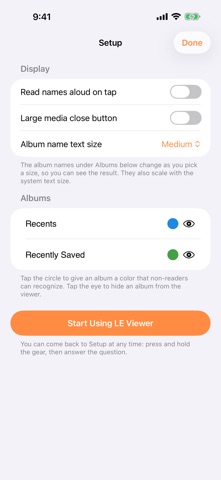
Setup is inside the app, behind a press-and-hold on the gear and a simple arithmetic question, so a child cannot reach it.
- Choose exactly which albums are visible; a hidden album is gone from the viewer entirely
- Give albums colors so they can be recognized without reading
- Pick the size of album names; it also follows the system text size
- Have album names and photo dates read aloud on tap
- Make the close button larger for anyone who finds it hard to hit
GUIDED ACCESS READY
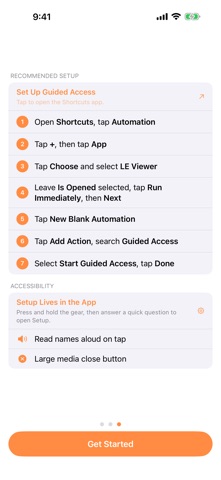
Pair LE Viewer with Guided Access to lock the device to this app. Onboarding walks you through a Shortcuts automation so Guided Access starts the moment LE Viewer opens.
LE Viewer is intentionally minimal. There are no extra menus, no sharing buttons and no editing tools: just the photos and videos you have chosen to show.