

Learn Bootstrap 5 Tutorials
Learn Bootstrap 5 Tutorials is made and published by Saqib Masood. AppBrain is an independent app data site and isn't affiliated with Saqib Masood. The app name, icon, screenshots and description belong to Saqib Masood and are shown as published on the App Store.
AppBrain's verdict
- Last updated
- July 19, 2026
- Size
- 29.4 MB
User feedback
Ratings and reviews on the App StoreComments on Learn Bootstrap 5 Tutorials for iOS
We don't have enough comments to show example comments. Please check back later.
Store listing
By Saqib Masood, from the App Store

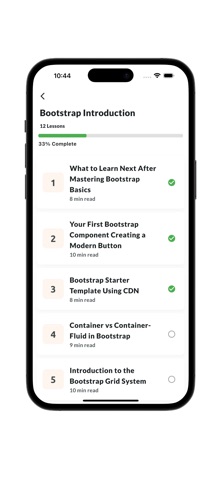


Description by Saqib Masood Written by the developer, not by AppBrain. Click to read.
Getting started with Bootstrap 5 is quick and easy, thanks to its comprehensive documentation and starter templates. In this chapter, we'll walk through the process of setting up a new project with Bootstrap 5, including installation, project structure, and basic usage. We'll also explore some common customization options and best practices for working with Bootstrap 5.
Bootstrap 5 introduces several improvements and new features compared to its predecessors, including:
Utility-First CSS: Bootstrap 5 embraces utility-first CSS, allowing developers to apply styles directly to HTML elements using predefined utility classes. This approach offers more flexibility and customization options while keeping the codebase lightweight.
No jQuery Dependency: Unlike previous versions, Bootstrap 5 no longer depends on jQuery for its JavaScript components. Instead, it utilizes modern JavaScript features and relies on libraries like Popper.js for tooltip and popover functionality.
Customizable Components: Bootstrap 5 provides a wide range of customizable components, including navigation bars, buttons, forms, cards, modals, and more. Developers can easily modify these components to suit their project requirements by overriding default styles or using utility classes.
Improved Grid System: The grid system in Bootstrap 5 has been enhanced to offer more flexibility and control over layout designs. It supports both flexbox and CSS grid layouts, allowing developers to create complex grid structures with ease.
Responsive Design: Bootstrap 5 emphasizes responsive design principles, ensuring that websites and applications look and function seamlessly across various devices and screen sizes. It includes responsive breakpoints and utility classes for building adaptive layouts.
Accessibility: Accessibility is a key focus in Bootstrap 5, with improvements made to ensure that components are accessible to users with disabilities. This includes proper semantic HTML markup, keyboard navigation support, and ARIA attributes.
Modular Architecture: Bootstrap 5 follows a modular architecture, allowing developers to include only the components they need in their projects. This helps reduce file sizes and improve page load times.
Understanding Bootstrap
Bootstrap is a free and open-source front-end framework for developing responsive and mobile-first websites. Developed by Mark Otto and Jacob Thornton at Twitter in 2011, Bootstrap was initially known as Twitter Blueprint. It was later renamed Bootstrap and released as an open-source project in 2011. The framework gained widespread popularity due to its simplicity, flexibility, and extensive collection of pre-designed components. With Bootstrap, developers can create beautiful and functional websites with minimal effort.
Bootstrap has undergone several major updates since its initial release. Each version introduced new features, improvements, and enhancements to make web development easier and more efficient. Bootstrap 5, the latest version of the framework, builds upon the success of its predecessors while introducing significant changes and improvements. In this chapter, we'll explore the evolution of Bootstrap from its early days to the cutting-edge features of Bootstrap 5.
Bootstrap 5 brings a host of new features and enhancements to the table. From a revamped grid system to utility-first CSS, Bootstrap 5 is packed with tools and utilities to streamline the web development process. In this chapter, we'll take a closer look at the key features of Bootstrap 5, including its grid system, typography, forms, buttons, navigation components, and more.
Safety and technology
Found in the app by AppBrain- Price
- $1.99
- App size
- 29.4 MB
- Content rating
- Everyone
Technologies used by Learn Bootstrap 5 Tutorials
Releases
Updates seen on the App Store- Version
- 7.0.0
- Launched
- May 2024
No changelog data
Alternatives
Similar apps and more from Saqib MasoodMore from Saqib Masood




Rankings
App Store top chartsApp Store Rankings for Learn Bootstrap 5 Tutorials
About the app and developer
About Learn Bootstrap 5 Tutorials
Learn Bootstrap 5 Tutorials is an education app developed by Saqib Masood.
User Ratings
The app has no ratings yet.
App Information
Learn Bootstrap 5 Tutorials costs $1.99. The app size is 29.37 MB. The latest version available is 7.0.0. The last update was on July 19, 2026.
Technical Requirements
The app has a content rating of Everyone. The app has been available on the App Store since May 2024.
Developer information for Saqib Masood
Address: