

AppBrain's verdict
- Last updated
- January 29, 2024
- Size
- 33.9 MB
User feedback
Ratings and reviews on the App StoreComments on Learn - Say It Out for iOS
We don't have enough comments to show example comments. Please check back later.
Store listing
By 秋生 廖, from the App StoreDescription by 秋生 廖 Written by the developer, not by AppBrain. Click to read.
Outstanding Features:
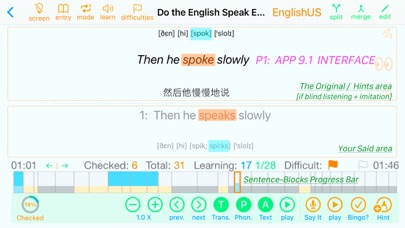
1. Learning Sentence by Sentence -> Becomes so easy: Drag in or add in an audio file and you are good to go [see App Preview: V1].
2. High-efficiency Blind Listening + Imitation Tool -> Each sentence starts with automatic continuous blind listening, and you can choose to imitate it directly and get individual letter-level hints when needed [V2].
3. Cross Play:Makes Pronunciation, Intonation Problems not only can be Seen, but also can be Heard [V3].
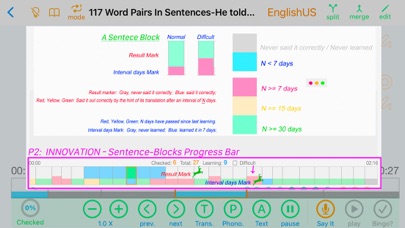
4. The innovative colorful and visible "Sentence Blocks Progress Bar" allows you to see Difficult Sentences, Learning Process and Results, etc. at a glance, and makes sentence by sentence learning super easy -> Every sentence you want to learn is so clear and visible that all you have to do is click on it.
5.Rich and Extensively sourced audio text books.
Main Function:
1. Listen: Auto-play repeatedly according to your choice:
1.1. Single Sentence [Step mode: Default] / All Sentences [normal] / Sentences marked with "Difficult" [normal + difficulties]
1.2. Original Soundtrack only
1.3. Your voice only
1.4. Cross play [you said, then the original]
2. Speak, Check and Hint:
2.1. Immediately display each word and phonetic symbol you say.
2.2. Automatically check each sentence and show the correct part of what you said in the original area.
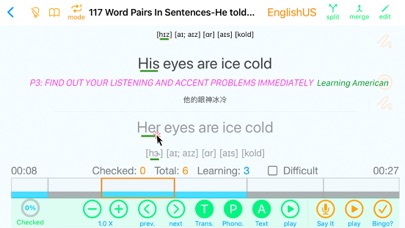
2.3 Letter-level hints.
3. Learning:
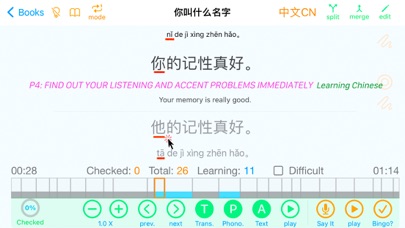
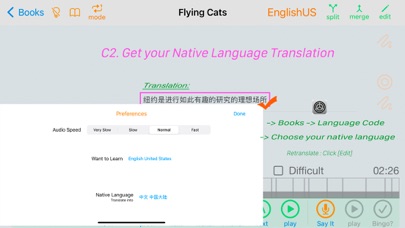
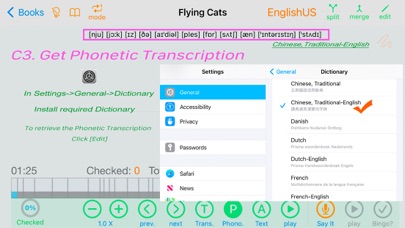
3.1 You can check the text, translation and phonetic symbols of each sentence at any time [P3, P4]
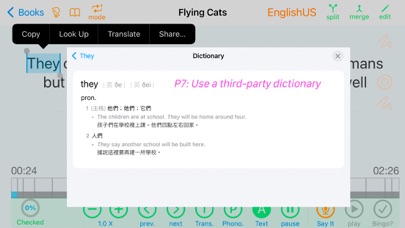
3.2 supports text right-click menus. So you can easily use third-party apps such as audio dictionaries, etc. [P7]
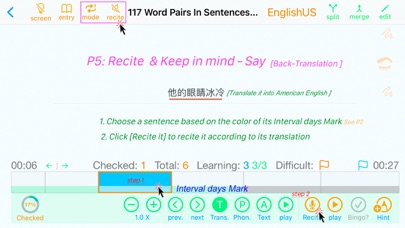
4. Recite and Bear in mind
4.1 In [Recite] mode: Choose a sentence that was correctly spoken before and see if you can still say it correctly in 7, 15, or 30 days only based on its translation? [P5]
5. Spelling/Back Translation
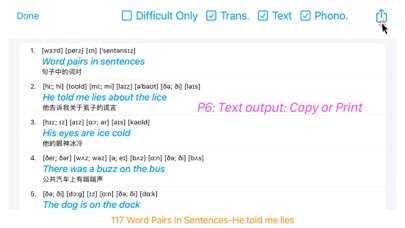
6. Browse, Copy, or Print Text, Phonetic Symbols and Translations. [P6]
7. Correct errors
Errors in text and phonetic symbols due to recording quality or teacher's accent or current network status, etc., can be corrected by:
7.1. Tap the "Edit" button to modify its text, phonetic symbols and translation.
7.2. Try to merge 2 sentences.
7.3. Try to split the sentence.
7.4. If you said it out correctly, tap the [Bingo? ] Button
7.5. Import the sio file shared by others
8. More
8.1. Auto starts learning from the last sentence you quit. [entry -> book]
8.2. The number of sentences on "Sentence Blocks Progress Bar" can be adjusted according to the speed of specific audio file.
8.3. Background playback and headphone control* enable you to learn anywhere, anytime.
.One click: play / pause
.Double Click: Play the next sentence
.Press 3 times: Play the previous sentence
8.4. Swipe Left / Right to choose Previous / Next sentence.
8.4 Multiple screen.
9. Settings & Select a Dictionary
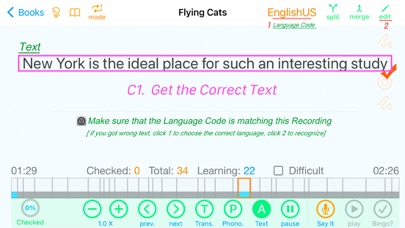
9.1. To get the correct text: Please make sure that the language code is consistent with the recording language you are learning.
9.2. To get your native language translation: In the preferences, set your native language to the language of the translation you want to get.
9.3. Get phonetic symbols*: Install one of the following dictionaries.
.New Oxford American Dictionary
.Oxford Dictionary of English
.Chinese, Traditional-English
.Oxford-Hachette French Dictionary
.Oxford German Dictionary
.No installation required for learning Chinese
*Currently only US, English, French, German and Chinese are supported.
10. Others
10.1. Requires iOS 14.0, MacOS 11.0 or above
10.2. Built in a Chinese and an American MP3, download to experience
10.3. 5 sentences free trial [any audio file], unlimited use on all Macs, iPads and iPhones for a total of only $2.99, support family sharing.
Safety and technology
Found in the app by AppBrain- Price
- Free
- App size
- 33.9 MB
- Content rating
- Everyone
Technologies used by Learn - Say It Out
Releases
Updates seen on the App Store- Version
- 9.6
- Launched
- August 2018
No changelog data
Alternatives
Similar apps and more from 秋生 廖Alternatives to Learn - Say It Out


Rankings
App Store top chartsApp Store Rankings for Learn - Say It Out
About the app and developer
About Learn - Say It Out
Learn - Say It Out is an education app developed by 秋生 廖.
User Ratings
The app has no ratings yet.
App Information
Learn - Say It Out is freely available from the App Store. The app size is 33.87 MB. The latest version available is 9.6. The last update was on January 29, 2024.
Technical Requirements
The app has a content rating of Everyone. The app has been available on the App Store since August 2018.
Learn - Say It Out is made and published by 秋生 廖. AppBrain is an independent app data site and isn't affiliated with 秋生 廖. The app name, icon, screenshots and description belong to 秋生 廖 and are shown as published on the App Store.
Developer information for 秋生 廖
Address: