

Learn Unity In 30 Days
Learn Unity In 30 Days is made and published by Usamedin Eljusovski. AppBrain is an independent app data site and isn't affiliated with Usamedin Eljusovski. The app name, icon, screenshots and description belong to Usamedin Eljusovski and are shown as published on the App Store.
AppBrain's verdict
- Rating on App Store
- 4.94
- 16 ratings
- Last updated
- May 18, 2026
- Size
- 1.48 GB
It doesn't have enough ratings yet to judge what users think.
User feedback
Ratings and reviews on the App StoreComments on Learn Unity In 30 Days for iOS
We don't have enough comments to show example comments. Please check back later.
Store listing
By Usamedin Eljusovski, from the App Store




Description by Usamedin Eljusovski Written by the developer, not by AppBrain. Click to read.
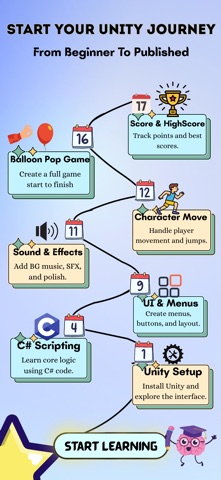
Day 1 - Unity Setup & Interface
Get started with Unity installation, layout, and essential tools.
Day 2 - 2D GameObjects
Work with Sprites, Colliders, and Parenting.
Day 3 - 3D GameObjects
Learn about Models, Materials, and Physics interactions.
Day 4 - C# Scripting Basics
Understand Variables, Functions, and Debugging.
Day 5 - UI Design
Build buttons, canvases, and responsive layouts.
Day 6 - Smooth Scrolling
Design custom scroll lists and grids.
Day 7 - Volume Sliders & Loading Bars
Add dynamic UI elements with live progress and audio control.
Day 8 - Timers
Create countdowns and gameplay triggers.
Day 9 - Main Menus
Add scene navigation and cool animations.
Day 10 - Prefabs
Reuse 3D assets efficiently.
Day 11 - Audio
Implement sound effects, music, and 3D sound.
Day 12 - Character Movement
Code 2D/3D movement, jumping, and player control.
Day 13 - New Input System
Support keyboard, gamepad, and mobile input.
Day 14 - Animations
Use Animator Controllers, transitions.
Day 15 - Cinemachine
Create smooth dynamic camera systems.
Day 16 - Balloon Pop Mini Game
Make your first full game - tap detection, random spawns, scoring.
Day 17 - Save High Score
Store and retrieve data using PlayerPrefs.
Day 18 - Build for Mobile
Test with Unity Remote, USB debugging, and export builds.
Day 19 - Build for iOS
Set up Xcode, signing, and deployment.
Day 20 - Publish Your Game
Prepare assets and optimize your release.
Day 21 - Publish to iOS App Store
Complete submission, metadata, and testing.
Day 22 - Ads with AdMob
Learn how to monetize your game with ads using AdMob.
Day 23 – Unity Ads
Create Ad Units, initialize Unity Ads, and test formats correctly.
Day 24 – In-App Purchases
A purchase button that lets users buy non-consumables, consumables, and subscriptions.
Day 25 - In-App Update / In-App Review
Learn how to prompt users to update your app and request ratings or reviews.
Day 26 - Local Notifications & Daily Reminders
Schedule local notifications and daily reminders for Android and iOS.
Day 27 - Saving Your Project with Git
Learn how to back up your Unity project, track changes, and use Git correctly.
Day 28 - Publish to Web
Build your Unity project for WebGL and upload it to platforms like itch.io.
Day 29 - Haptics
Add vibration feedback for buttons, collisions, hits, and important game moments.
Day 30 - Real-World App Developer Tips
Learn how to improve your app, get downloads, monetize, retain users, and grow as a developer.
And More Lessons Coming Soon!
Features
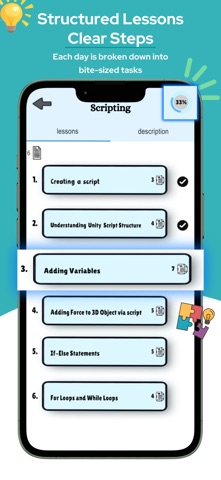
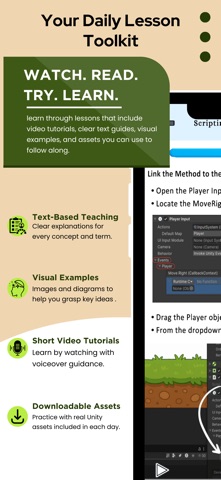
Daily bite-sized lessons
Interactive code and video tutorials
2D & 3D mini-projects
Offline learning support
Perfect for beginners game developers
Have questions?
Reach us at: learnunityin30days@gmail.com
Safety and technology
Found in the app by AppBrain- Price
- Free
- App size
- 1.48 GB
- Content rating
- Everyone
Technologies used by Learn Unity In 30 Days
Releases
Updates seen on the App Store- Version
- 4.1
- Launched
- May 2025
No changelog data
Alternatives
Similar apps and more from Usamedin EljusovskiAlternatives to Learn Unity In 30 Days


Also available on Google Play

Rankings
App Store top chartsApp Store Rankings for Learn Unity In 30 Days
About the app and developer
About Learn Unity In 30 Days
Learn Unity In 30 Days is an education app developed by Usamedin Eljusovski.
What is the rating of Learn Unity In 30 Days?
Learn Unity In 30 Days is rated 4.94 out of 5 stars, based on 16 ratings.
Is Learn Unity In 30 Days free?
Learn Unity In 30 Days is free. The app size is 1.48 GB. The latest version available is 4.1. The last update was on May 18, 2026.
What are the requirements for Learn Unity In 30 Days?
The app has a content rating of Everyone. The app has been available on the App Store since May 2025.
Developer information for Usamedin Eljusovski
Address:
Frequently asked questions about Learn Unity In 30 Days
Is Learn Unity In 30 Days free?
Yes. Learn Unity In 30 Days is free on the App Store.
Is Learn Unity In 30 Days still available?
Yes. Learn Unity In 30 Days is on the App Store, and the last update we saw was on May 18, 2026.
How large is Learn Unity In 30 Days?
Learn Unity In 30 Days is 1.48 GB.
Is Learn Unity In 30 Days suitable for children?
App Store rates the content of Learn Unity In 30 Days as suitable for everyone.
How do people rate Learn Unity In 30 Days?
Learn Unity In 30 Days scores 4.94 out of 5 stars, from 16 ratings on the App Store.
Who made Learn Unity In 30 Days?
Learn Unity In 30 Days was developed by Usamedin Eljusovski. It is listed in the education category on the App Store.
What are the best alternatives to Learn Unity In 30 Days?
People looking at Learn Unity In 30 Days also look at these education apps: Unity Learning App, Learn C# - .NET Programming, C# Tutorial, Series 7 Exam -, Learn to Code in Rust.