

Leef Fit is made and published by Leef Ltd. AppBrain is an independent app data site and isn't affiliated with Leef Ltd. The app name, icon, screenshots and description belong to Leef Ltd. and are shown as published on the App Store.
AppBrain's verdict
- Last updated
- May 15, 2023
Rankings
App Store top chartsApp Store Rankings for Leef Fit
This app is not ranked
Competitors
Similar apps and more from Leef Ltd.








Releases
Updates seen on the App Store- Version
- 1.8.0
- Launched
- August 2022
No changelog data
User feedback
Ratings and reviews on the App StoreComments on Leef Fit for iOS
We don't have enough comments to show example comments. Please check back later.
Technology
Found in the app by AppBrain- Price
- Free
- App size
- 100.9 MB
- Content rating
- Everyone
Technologies used by Leef Fit
About the app and developer
About Leef Fit
Leef Fit is a health & fitness app developed by Leef Ltd.
What is the rating of Leef Fit?
Leef Fit has no ratings yet.
Is Leef Fit free?
Leef Fit is free. The app size is 100.95 MB. The latest version available is 1.8.0. The last update was on May 15, 2023.
What are the requirements for Leef Fit?
The app has a content rating of Everyone. The app has been available on the App Store since August 2022.
Developer information for Leef Ltd.
Address:
Store listing
By Leef Ltd., from the App Store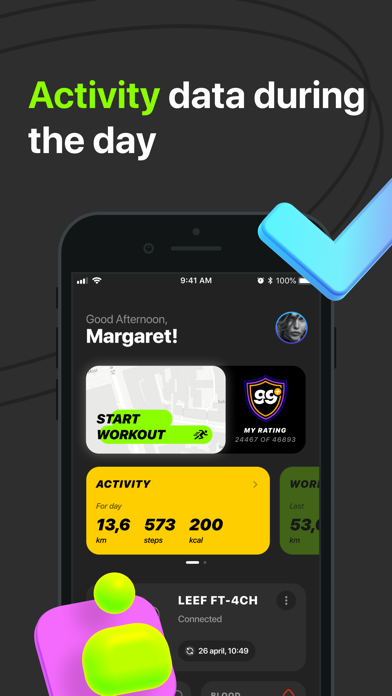


Screenshots by Leef Ltd., from the the App Store listing
Description by Leef Ltd. Written by the developer, not by AppBrain. Click to read.
LEEF FIT is an application that helps to take care of your health and maintain daily physical activity.
Training modes in LEEF FIT give you the opportunity to engage in various sports, and the history of indicators to analyze the results. The application allows you to configure notifications on the device, turn on the training mode on the map, monitor physical indicators, etc., it all depends on the number of functions supported by the device itself.
The following functions are implemented in the application:
• "Activity"
"Movement" – the number of steps, distance and burned calories.
"Heart rate" - data on heart rate (beats per minute)
"Blood pressure" - data on blood pressure are given in the format of the ratio of values "Upper/Lower" (systolic/diastolic) in millimeters of mercury.
"Sleep" - sleep time data
ATTENTION!
LEEF devices are not medical measuring devices, the heart rate and blood pressure readings are for reference only and may differ from the true values. Infrared photoplethysmography (PPG sensor) is used to calculate the heart rate and blood pressure values.
• "Training"
When starting the "Training" mode, data on the route, the pace of training, data on the target indicators of the distance traveled and heart rate are transmitted to the Application from a smartphone or bracelet.
• "Menu"
This section contains Device settings, notification settings, and the technical support window.