

LeLink Security
LeLink Security is made and published by K SOLUTION LLC. AppBrain is an independent app data site and isn't affiliated with K SOLUTION LLC. The app name, icon, screenshots and description belong to K SOLUTION LLC and are shown as published on the App Store.
AppBrain's verdict
- Rating on App Store
- 1.00
- 1 ratings
- Last updated
- January 6, 2022
It doesn't have enough ratings yet to judge what users think.
Rankings
App Store top chartsApp Store Rankings for LeLink Security
Competitors
Similar apps and more from K SOLUTION LLCAlternatives to LeLink Security





More from K SOLUTION LLC








Releases
Updates seen on the App Store- Version
- 1.0
- Launched
- January 2022
No changelog data
User feedback
Ratings and reviews on the App StoreComments on LeLink Security for iOS
We don't have enough comments to show example comments. Please check back later.
Technology
Found in the app by AppBrain- Price
- Free
- App size
- 19.0 MB
- Content rating
- Everyone
Technologies used by LeLink Security
About the app and developer
About LeLink Security
LeLink Security is an utilities app developed by K SOLUTION LLC.
What is the rating of LeLink Security?
LeLink Security is rated 1.00 out of 5 stars, based on one rating ratings.
Is LeLink Security free?
LeLink Security is free. The app size is 18.99 MB. The latest version available is 1.0. The last update was on January 6, 2022.
What are the requirements for LeLink Security?
The app has a content rating of Everyone. The app has been available on the App Store since January 2022.
Developer information for K SOLUTION LLC
Address:
Frequently asked questions about LeLink Security
Is LeLink Security free?
Yes. LeLink Security is free on the App Store.
Is LeLink Security still available?
Yes. LeLink Security is on the App Store, and the last update we saw was on January 6, 2022.
How large is LeLink Security?
LeLink Security is 18.99 MB.
Is LeLink Security suitable for children?
App Store rates the content of LeLink Security as suitable for everyone.
How do people rate LeLink Security?
LeLink Security has one rating of 1.00 stars on the App Store.
Who made LeLink Security?
LeLink Security was developed by K SOLUTION LLC. It is listed in the utilities category on the App Store.
What are the best alternatives to LeLink Security?
People looking at LeLink Security also look at these utilities apps: PaloView, Device Configuration, CB Radio Box, OBD2 Report, Mobijet Admin.
Store listing
By K SOLUTION LLC, from the App Store


Description by K SOLUTION LLC Written by the developer, not by AppBrain. Click to read.
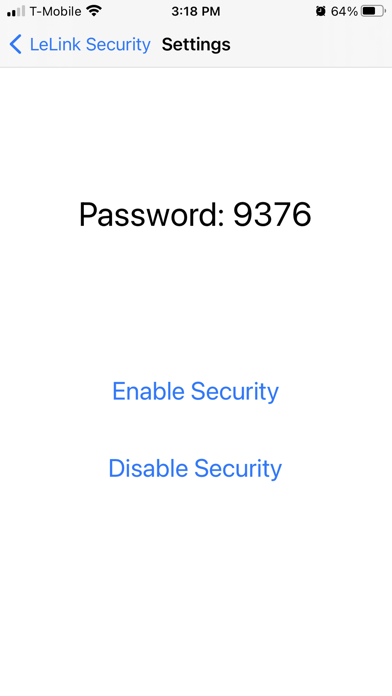
The app can enable/disable the password protection of the LeLink OBDII adapter manufactured after 2021. When the protection is enabled, user will be asked to enter pairing password to use LeLink's OBDII functions.
How to use
You can only configure LeLink within 4 minutes after it powers on. Please unplug and replug to power-cycle the LeLink if it has been on for more than 4 minutes.
The app will scan and display a list of the LeLink devices. Click the item to configure.
The app does not need the pairing password. If you are asked to enter password, you may choose cancel to skip.
Please record the pairing password if you enable password protection. Without correct password the LeLink will not perform OBDII functions.
After enable/disable the password protection, you should power-cycle the LeLink to make the change effective.
If you need help
Online FAQ page at http://www.outdoor-apps.com/enginelink.html
Send us email at support@ksolution.org