

Lemur is made and published by MIDI Kinetics. AppBrain is an independent app data site and isn't affiliated with MIDI Kinetics. The app name, icon, screenshots and description belong to MIDI Kinetics and are shown as published on the App Store.
AppBrain's verdict
- Rating on App Store
- 2.93
- 15 ratings
- Last updated
- August 30, 2026
- Size
- 29.4 MB
It doesn't have enough ratings yet to judge what users think.
User feedback
Ratings and reviews on the App StoreComments on Lemur for iOS
We don't have enough comments to show example comments. Please check back later.
Store listing
By MIDI Kinetics, from the App Store






Description by MIDI Kinetics Written by the developer, not by AppBrain. Click to read.
In the film studio, Lemur has become a beloved tool for professional music composers, serving as the central hub for composing templates—managing sample libraries, keyswitches, mix automations, and DAW key commands.
With its extensive collection of built-in widgets, and powerful programming language, if you can dream it, Lemur can build it. Lemur has even been used to make games!
----
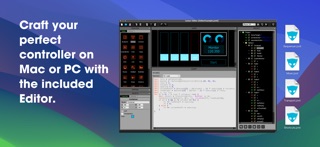
Creating Projects - The Lemur Desktop Software Suite (free) includes the Lemur Editor for macOS and Windows, providing a powerful editor for designing and scripting your controller, as well as the Lemur Daemon, enabling seamless MIDI and OSC connectivity across your entire setup via USB or WiFi.
Connectivity - Simply connect your iPad/iPhone to your computer via Wi-Fi or USB/Thunderbolt and make the connection! Lemur also supports CoreMIDI, allowing you to use any class-compliant hardware MIDI interface. With 8 ports of MIDI/OSC connectivity, you can even control up to 8 computers from one device!
----
Latest Features:
Version 5.0 introduces the incredible new Canvas, Image, and Sequencer family of features with rock solid timing.
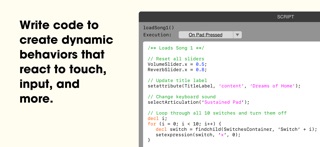
Canvas - A brand-new object that lets you script custom widgets with full multitouch support. Adapted from the HTML5 Canvas element, it allows you to design vector-based widgets featuring shapes, animations, shadows, and transparency. With Canvas, you are no longer limited to Lemur’s collection of built-in widgets—you can create entirely custom controls that precisely match the demands of your project. Polygons, waveforms, circular objects, and infinitely more are all possible with Canvas, opening the door to a completely new Lemur experience.
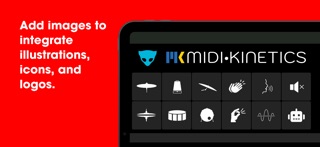
Image - The new Image widget allows you to add custom PNG images directly to your project, opening up possibilities for incorporating image assets that are too complex to create with vector code in the Canvas widget. Whether you’re designing detailed graphics, branding your project with logos, or adding custom button icons, the Image widget makes it easy to enhance your templates with rich visual elements.
Sequencer - Lemur 5.0 introduces a family of new features for tight sequencing, including three new objects: StepNote, StepSwitch, and StepSlider. Each offers a unique style of sequencing, ready to use right out of the box. These objects utilize the new "On Clock" execution mode, enabling high-precision synchronization to external MIDI clock. Simply add them to your template, and they’ll handle the hard work of controlling your MIDI instruments with perfect timing.
In-App Editor (iPad Only) - Lemur now supports editing projects directly in the app. Virtually every function of the desktop editor is now accessible through an intuitive system of iOS menus and widgets. Best of all – it’s easier to use than ever, offering a smaller learning curve and an immediate initial experience. Any basic configuration, such as a bank of faders, or modifying a script can now be created with familiar taps and gestures.
Skins - Lemur features three new skins, in addition to the classic look. Choose the look that fits your style and sparks your creativity.
----
Join the Lemur Community Forum!
Now in its 10th year! Connect with others to ask questions, troubleshoot, share solutions, and explore Lemur programming with a community tailored to your needs.
----
Purchase a Perpetual Lifetime License or Subscribe Today!
Access to Lemur requires a perpetual lifetime license or active paid subscription, available as an in-app purchase. Both give you full access to all features.
----
Safety and technology
Found in the app by AppBrain- Price
- Free
- App size
- 29.4 MB
- Content rating
- Everyone
Technologies used by Lemur
Releases
Updates seen on the App Store- Version
- 5.8.1
- Launched
- January 2025
No changelog data
Alternatives
Similar apps and more from MIDI KineticsAlternatives to Lemur


Rankings
App Store top chartsApp Store Rankings for Lemur
About the app and developer
About Lemur
Lemur is a music app developed by MIDI Kinetics.
User Ratings
Lemur is rated 2.93 out of 5 stars. The rating is based on 15 ratings.
App Information
Lemur is freely available from the App Store. The app size is 29.43 MB. The latest version available is 5.8.1. The last update was on August 30, 2026.
Technical Requirements
The app has a content rating of Everyone. The app has been available on the App Store since January 2025.
Developer information for MIDI Kinetics
Address: