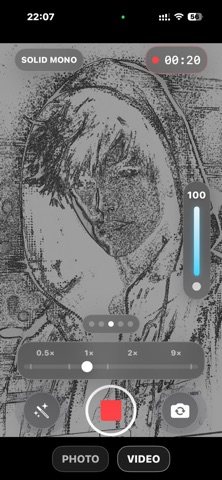
Lens: Real-Time Camera Effects
Lens: Real-Time Camera Effects is made and published by Vladislav Poliakov. AppBrain is an independent app data site and isn't affiliated with Vladislav Poliakov. The app name, icon, screenshots and description belong to Vladislav Poliakov and are shown as published on the App Store.
AppBrain's verdict
- Last updated
- April 6, 2026
Rankings
App Store top chartsApp Store Rankings for Lens: Real-Time Camera Effects
Competitors
Similar apps and more from Vladislav PoliakovAlternatives to Lens: Real-Time Camera Effects
Releases
Updates seen on the App Store- Version
- 1.1
- Launched
- March 2026
No changelog data
User feedback
Ratings and reviews on the App StoreComments on Lens: Real-Time Camera Effects for iOS
We don't have enough comments to show example comments. Please check back later.
Technology
Found in the app by AppBrain- Price
- Free
- App size
- 7.06 MB
- Content rating
- Everyone
Technologies used by Lens: Real-Time Camera Effects
About the app and developer
About Lens: Real-Time Camera Effects
Lens: Real-Time Camera Effects is a photo & video app developed by Vladislav Poliakov.
What is the rating of Lens: Real-Time Camera Effects?
Lens: Real-Time Camera Effects has no ratings yet.
Is Lens: Real-Time Camera Effects free?
Lens: Real-Time Camera Effects is free. The app size is 7.06 MB. The latest version available is 1.1. The last update was on April 6, 2026.
What are the requirements for Lens: Real-Time Camera Effects?
The app has a content rating of Everyone. The app has been available on the App Store since March 2026.
Developer information for Vladislav Poliakov
Address:
Frequently asked questions about Lens: Real-Time Camera Effects
Is Lens: Real-Time Camera Effects free?
Yes. Lens: Real-Time Camera Effects is free on the App Store.
Is Lens: Real-Time Camera Effects still available?
Yes. Lens: Real-Time Camera Effects is on the App Store, and the last update we saw was on April 6, 2026.
How large is Lens: Real-Time Camera Effects?
Lens: Real-Time Camera Effects is 7.06 MB.
Is Lens: Real-Time Camera Effects suitable for children?
App Store rates the content of Lens: Real-Time Camera Effects as suitable for everyone.
Who made Lens: Real-Time Camera Effects?
Lens: Real-Time Camera Effects was developed by Vladislav Poliakov. It is listed in the photo & video category on the App Store.
What are the best alternatives to Lens: Real-Time Camera Effects?
People looking at Lens: Real-Time Camera Effects also look at these photo & video apps: LayPic – Photo Collage Maker, Stellar – Timelapse Camera, Facett, WiFiPhoto, Crop Craft: Contour & SVG.
Store listing
By Vladislav Poliakov, from the App StoreDescription by Vladislav Poliakov Written by the developer, not by AppBrain. Click to read.
Choose a look, see it instantly, and capture the final result without moving to a separate editor.
Lens is built for creators, visual experimenters, and anyone who wants a more expressive camera on iPhone.
Fully free to use
All camera effects, photo and video capture features are currently available without subscriptions or paywalls.
Create, record, and share without limitations.
What you can do with Lens:
• Shoot with real-time visual effects
• Record video with effects applied during capture
• Take photos with the active look
• Preview the result immediately after shooting
• Save or instantly share your content to Instagram, TikTok, YouTube, Telegram and other social platforms
Built for social sharing
Share in seconds without extra editing.
Live effects while you shoot
Lens applies visual effects in real time instead of adding them later in post-production.
This makes the creative process faster, more direct, and more fun.
Depth-based effects on supported devices
On compatible devices, Lens uses scene depth to power spatial visual effects.
Selected looks react to foreground and background separation for more dimensional results.
Built with a fast rendering pipeline
Lens is designed for smooth real-time performance, responsive controls, and fast switching between styles while shooting photos and videos.
Designed for creative capture
Use Lens for:
• Short-form videos
• Social content
• Stylized portraits
• Experimental clips
• Visual studies and artistic shooting
Fast camera workflow
1. Open Lens
2. Choose an effect
3. Shoot photo or video
4. Preview the result
5. Save or share instantly
Key features
• Real-time camera effects
• Photo and video capture
• Instant preview after shooting
• Effect intensity control
• Smooth zoom workflow
• Depth-based effects on supported devices
• Fast save and share flow
Device support
Some features may vary depending on your device.
Depth-based effects require supported hardware.
Privacy
Lens uses camera, microphone, photo library, and speech recognition permissions only for app functionality.