

LensFlow Scanner
LensFlow Scanner is made and published by Huabo Zhang. AppBrain is an independent app data site and isn't affiliated with Huabo Zhang. The app name, icon, screenshots and description belong to Huabo Zhang and are shown as published on the App Store.
AppBrain's verdict
- Last updated
- September 15, 2026
- Size
- 6.05 MB
User feedback
Ratings and reviews on the App StoreComments on LensFlow Scanner for iOS
We don't have enough comments to show example comments. Please check back later.
Store listing
By Huabo Zhang, from the App Store

Description by Huabo Zhang Written by the developer, not by AppBrain. Click to read.
USED MICROSOFT LENS?
Microsoft retired the Lens app in early 2026. LensFlow gives you the same scan-to-searchable-PDF workflow — documents, whiteboards, and business cards — with your files kept on your device, no account, and no cloud required.
Point your camera at any page and LensFlow captures it with automatic edge detection and perspective correction. Text recognition runs entirely on your device, and every export is a real searchable PDF — the words are embedded under the image, so you can find, select, and copy text in any PDF reader.
SCAN
• Continuous multi-page capture with automatic edge detection
• Automatic perspective correction as you shoot
• Append new pages to any existing document at any time
EDIT — ALWAYS NON-DESTRUCTIVE
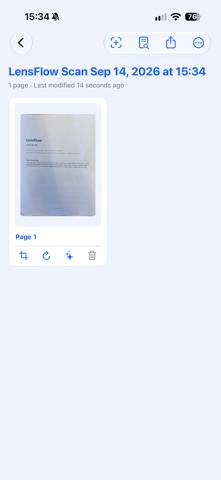
• Four-corner perspective crop with draggable handles
• Rotate pages in 90° steps
• Five filters: Original, Color, Grayscale, Black & White, and Whiteboard
• Every edit re-renders from the original capture, so nothing is ever lost — reset any page back to its original scan
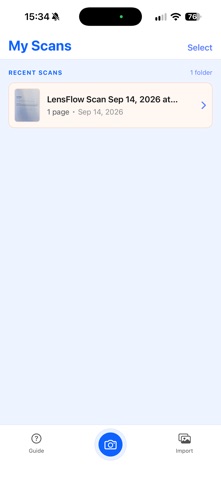
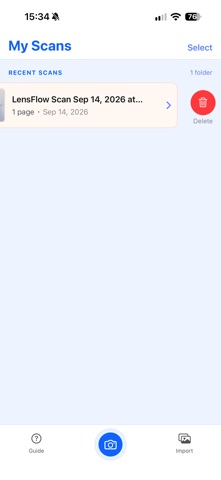
• Reorder pages by drag and drop, delete pages, rename projects
RECOGNIZE
• On-device OCR powered by Apple Vision — no server, no upload
• Automatic language detection
• Text position is preserved, so PDF search highlights land exactly on the right words in the page image
SMALL, PRINT-READY PDFs
• Every page is exported as a standard A4-size page — no more giant pixel-sized pages in viewers or on the printer
• Images are resized and optimised automatically (about 200 DPI), so a typical document is a few hundred KB per page: easy to email, sharp to read
• Your original scans stay at full resolution inside LensFlow
SHARE
• Export any document as a searchable PDF
• Select multiple documents on the home screen and share all their PDFs at once
• Select individual pages inside a document and share just those pages as one PDF
• Send anywhere iOS can share: Mail, AirDrop, Messages, Files, and more
PRIVATE BY DESIGN
• Everything stays on your iPhone — scans, text recognition, and PDFs never leave your device
• No account, no sign-in, no ads, no tracking, no analytics
• The camera is used only while you are scanning
LensFlow is built natively with SwiftUI and Apple Vision for iOS 17 and later, with a clean, focused interface.
Scan it once. Find it forever.
Microsoft Lens is a trademark of Microsoft Corporation. LensFlow is an independent app and is not affiliated with, endorsed by, or sponsored by Microsoft.
Safety and technology
Found in the app by AppBrain- Price
- Free
- App size
- 6.05 MB
- Content rating
- Everyone
Technologies used by LensFlow Scanner
Releases
Updates seen on the App Store- Version
- 1.1.0
- Launched
- September 2026
No changelog data
Alternatives
Similar apps and more from Huabo ZhangAlternatives to LensFlow Scanner


Rankings
App Store top chartsApp Store Rankings for LensFlow Scanner
About the app and developer
About LensFlow Scanner
LensFlow Scanner is a productivity app developed by Huabo Zhang.
What is the rating of LensFlow Scanner?
LensFlow Scanner has no ratings yet.
Is LensFlow Scanner free?
LensFlow Scanner is free. The app size is 6.05 MB. The latest version available is 1.1.0. The last update was on September 15, 2026.
What are the requirements for LensFlow Scanner?
The app has a content rating of Everyone. The app has been available on the App Store since September 2026.
Developer information for Huabo Zhang
Address:
Frequently asked questions about LensFlow Scanner
Is LensFlow Scanner free?
Yes. LensFlow Scanner is free on the App Store.
Is LensFlow Scanner still available?
Yes. LensFlow Scanner is on the App Store, and the last update we saw was on September 15, 2026.
How large is LensFlow Scanner?
LensFlow Scanner is 6.05 MB.
Is LensFlow Scanner suitable for children?
App Store rates the content of LensFlow Scanner as suitable for everyone.
Who made LensFlow Scanner?
LensFlow Scanner was developed by Huabo Zhang. It is listed in the productivity category on the App Store.
What are the best alternatives to LensFlow Scanner?
People looking at LensFlow Scanner also look at these productivity apps: okLens - Document Scanner, ScanFree - Scanner PDF, Scanmint: PDF Document Scanner, Video2PDF, SagesGov Field Assistant.