Levee Hospitality is made and published by
Levee Labs Incorporated.
AppBrain is an independent app data site and isn't affiliated with Levee Labs Incorporated.
The app name, icon, screenshots and description belong to Levee Labs Incorporated and are shown as
published on the App Store.
About Levee Hospitality
Levee Hospitality is a business app developed by Levee Labs Incorporated.
User Ratings
The app has no ratings yet.
App Information
Levee Hospitality is freely available from the App Store. The app size is 365.26 MB. The latest version available is 2.0. The last update was on October 12, 2026.
Technical Requirements
The app has a content rating of Everyone. The app has been available on the App Store since September 2024.
Description by Levee Labs Incorporated(from the App Store)
Levee Hospitality is the inspection app for hotel teams that use Levee. Sign in with your Levee account, pick a room, and work through its checklist with the camera and your voice. It is built for housekeeping inspectors, supervisors and property leaders who need every room checked the same way, every time.
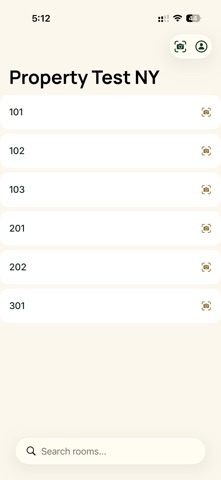
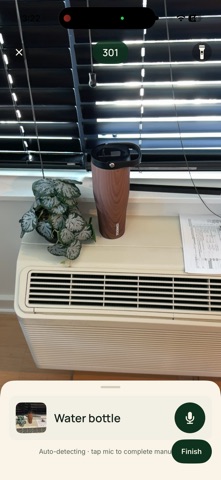
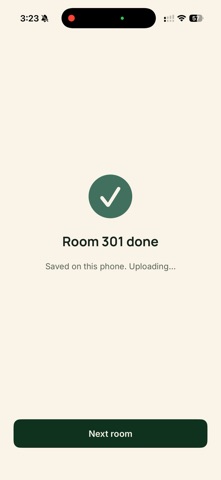
HOW AN INSPECTION WORKS • Choose your property, then pick a room from the list, search for it, or point the camera at the door sign to identify it. • The checklist shows one item at a time. Point the camera at an object; when Levee finds it, the list moves on. • For a task, such as a made bed, show it on camera, tap the mic and say yes. • For a count, tap the mic and say how many you see. • Finish, walk the room once more so the floor plan can be captured, and a done page confirms the room is saved and uploaded. Each item's result and photo are in your property's Levee web portal.
WORKS WITHOUT SIGNAL Keep inspecting when the connection drops. The room is saved on the phone and sends itself later, including in the background. A Pending Uploads screen shows what is still on the device and lets you retry or discard it.
A RECORD OF THE ROOM While you inspect, Levee captures the room's shape with the iPhone's depth sensors and uploads it with the inspection, so the property keeps a spatial record of each room alongside the checklist results.
TEACH LEVEE YOUR PROPERTY Touch and hold a room in the list to add labelled reference photos of its objects. They help Levee recognise your property's own fixtures and finishes.
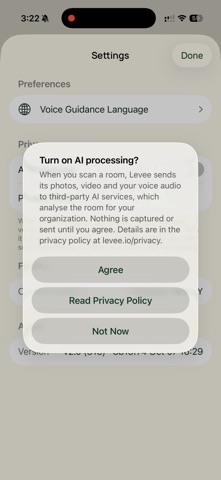
YOUR CHOICE ON AI Before your first scan, Levee asks whether photos, video and voice audio from scans may go to third-party AI services for analysis. You can turn AI processing off at any time in Settings.
ACCOUNT AND SECURITY Levee requires a Levee account provided by your property; there is no in-app sign-up. Camera frames, voice notes and room captures are sent to Levee to complete the inspection. The Privacy Policy and Delete Account are one tap away in the account menu.
REQUIREMENTS An iPhone with a LiDAR scanner (iPhone 12 Pro or a later Pro model) running iOS 17 or later.
Each subscription will automatically renew 3 days before the expiration date for
the same time period. Subscriptions can be cancelled at any time before the renewal.






 Gawi Crane


