

Libreta: A NoteBook App
Libreta: A NoteBook App is made and published by Darian Iraola. AppBrain is an independent app data site and isn't affiliated with Darian Iraola. The app name, icon, screenshots and description belong to Darian Iraola and are shown as published on the App Store.
AppBrain's verdict
- Rating on App Store
- 5.00
- 2 ratings
- Last updated
- July 13, 2026
It doesn't have enough ratings yet to judge what users think.
Rankings
App Store top chartsApp Store Rankings for Libreta: A NoteBook App
Competitors
Similar apps and more from Darian IraolaAlternatives to Libreta: A NoteBook App


Releases
Updates seen on the App Store- Version
- 1.0
- Launched
- July 2026
No changelog data
User feedback
Ratings and reviews on the App StoreComments on Libreta: A NoteBook App for iOS
We don't have enough comments to show example comments. Please check back later.
Technology
Found in the app by AppBrain- Price
- Free
- App size
- 5.69 MB
- Content rating
- Everyone
Technologies used by Libreta: A NoteBook App
About the app and developer
About Libreta: A NoteBook App
Libreta: A NoteBook App is a productivity app developed by Darian Iraola.
What is the rating of Libreta: A NoteBook App?
Libreta: A NoteBook App is rated 5.00 out of 5 stars, based on 2 ratings.
Is Libreta: A NoteBook App free?
Libreta: A NoteBook App is free. The app size is 5.69 MB. The latest version available is 1.0. The last update was on July 13, 2026.
What are the requirements for Libreta: A NoteBook App?
The app has a content rating of Everyone. The app has been available on the App Store since July 2026.
Developer information for Darian Iraola
Address:
Store listing
By Darian Iraola, from the App Store

Description by Darian Iraola Written by the developer, not by AppBrain. Click to read.
A SHELF OF BOOKS
• Keep up to 20 books on your shelf, each with its own title and look.
• Books grow thicker as you add pages — a quick glance shows how full each one is.
• Name every page and flip through them in order.
MAKE IT YOURS
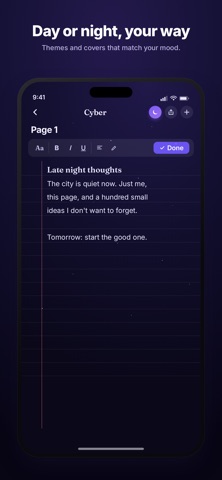
• Design custom covers — pick colors, fonts, and spine styles, or use your own photo for the cover or the whole book.
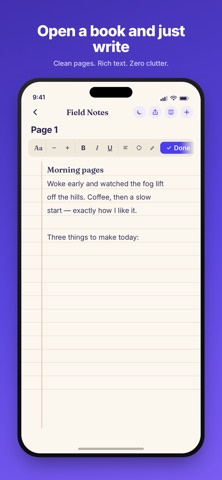
• Choose page styles: ruled notebook paper, picture pages, or a custom colored background.
WRITE THE WAY YOU LIKE
• Rich text with fonts, sizes, colors, bold, italics, highlights, and alignment.
• Draw and handwrite with Apple Pencil or your finger.
• Add photos, PDFs, and documents right onto the page — your text flows around them.
• Scan documents with the camera and keep them with the book.
• Record or import voice memos, with on-demand transcripts.
• Turn any line into a checklist reminder, and tap to complete it.
YOURS AND PRIVATE
• Your notes live on your device and sync privately through your own iCloud.
• No ads. No tracking. No accounts required — sign in only if you want syncing.
Works on iPhone, iPad, and Mac.