

Lichtblick - Photo Editor
Lichtblick - Photo Editor is made and published by Mathias Oysmueller. AppBrain is an independent app data site and isn't affiliated with Mathias Oysmueller. The app name, icon, screenshots and description belong to Mathias Oysmueller and are shown as published on the App Store.
AppBrain's verdict
- Last updated
- September 18, 2026
Rankings
App Store top chartsApp Store Rankings for Lichtblick - Photo Editor
Competitors
Similar apps and more from Mathias OysmuellerAlternatives to Lichtblick - Photo Editor


More from Mathias Oysmueller


Releases
Updates seen on the App Store- Version
- 1.0.1
- Launched
- August 2026
No changelog data
User feedback
Ratings and reviews on the App StoreComments on Lichtblick - Photo Editor for iOS
We don't have enough comments to show example comments. Please check back later.
Technology
Found in the app by AppBrain- Price
- Free
- App size
- 2.53 MB
- Content rating
- Everyone
Technologies used by Lichtblick - Photo Editor
About the app and developer
About Lichtblick - Photo Editor
Lichtblick - Photo Editor is a photo & video app developed by Mathias Oysmueller.
User Ratings
The app has no ratings yet.
App Information
Lichtblick - Photo Editor is freely available from the App Store. The app size is 2.53 MB. The latest version available is 1.0.1. The last update was on September 18, 2026.
Technical Requirements
The app has a content rating of Everyone. The app has been available on the App Store since August 2026.
Developer information for Mathias Oysmueller
Address:
Frequently asked questions about Lichtblick - Photo Editor
Is Lichtblick - Photo Editor free?
Yes. Lichtblick - Photo Editor is free on the App Store.
Is Lichtblick - Photo Editor still available?
Yes. Lichtblick - Photo Editor is on the App Store, and the last update we saw was on September 18, 2026.
How large is Lichtblick - Photo Editor?
Lichtblick - Photo Editor is 2.53 MB.
Is Lichtblick - Photo Editor suitable for children?
App Store rates the content of Lichtblick - Photo Editor as suitable for everyone.
Who made Lichtblick - Photo Editor?
Lichtblick - Photo Editor was developed by Mathias Oysmueller. It is listed in the photo & video category on the App Store.
What are the best alternatives to Lichtblick - Photo Editor?
People looking at Lichtblick - Photo Editor also look at these photo & video apps: PhotoRepair: Erase & Retouch, Little Edit, Glow: Selfie Photo Editor, FADED - Film & Vintage, Oriole : Clean Beauty Camera.
Store listing
By Mathias Oysmueller, from the App Store

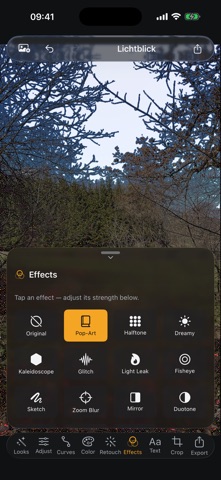


Description by Mathias Oysmueller Written by the developer, not by AppBrain. Click to read.
Edit non-destructively: your original is always preserved, every step is undoable, and you can start over anytime.
BUILT-IN LOOKS
• 21 handcrafted looks in categories (Trend, Classic, Warm, Cool, Black & White)
• One tap to apply, then keep fine-tuning
• Save your own presets and share them as a file
PRO COLOR TOOLS
• Exposure, contrast, highlights, shadows, whites/blacks, temperature, tint
• Tone curves (RGB + individual channels)
• HSL per color band — hue, saturation, luminance
• Clarity, sharpen, noise reduction, vignette, film grain
• .cube LUT import (Adobe/DaVinci) with an intensity slider
CROP & STRAIGHTEN
• Fixed aspect ratios, rotate, flip
• Straighten ±45° with automatic edge fill
RETOUCH
• Healing brush: remove blemishes and objects seamlessly
• Smoothing brush for soft skin
• Clone stamp with a source point you choose
• One-tap red-eye correction
PORTRAIT & SUBJECT (on supported devices)
• Cut out the subject, blur or replace the background
• Smooth skin, tint lips, whiten teeth, enhance eyes
• Face filters: eyes, face shape, eye color, blush
CREATIVE & FUN
• Effects: pop art, halftone, glitch, light leak, fisheye, duotone and more
• Color pop and aura glow
• Text & stickers: fonts, effects, all emoji, frames
CAPTURE & SHARE
• Take a photo or selfie and edit it right away
• Export as JPEG, HEIF or PNG
• Save as a NEW photo — originals stay untouched
PRIVACY BY DESIGN
Lichtblick collects no data. There are no servers, no analytics, no accounts. Photo library access is only for saving new images, camera only for capture — both stay on device.