

LiDAR Room Scanner Floor Plan
LiDAR Room Scanner Floor Plan is made and published by Claudius Kristmann. AppBrain is an independent app data site and isn't affiliated with Claudius Kristmann. The app name, icon, screenshots and description belong to Claudius Kristmann and are shown as published on the App Store.
AppBrain's verdict
- Last updated
- October 26, 2026
- Size
- 23.4 MB
User feedback
Ratings and reviews on the App StoreComments on LiDAR Room Scanner Floor Plan for iOS
We don't have enough comments to show example comments. Please check back later.
Store listing
By Claudius Kristmann, from the App Store




Description by Claudius Kristmann Written by the developer, not by AppBrain. Click to read.
LiDAR Room Scanner uses Apple RoomPlan and the LiDAR sensor in iPhone Pro and iPad Pro to capture room geometry in minutes. Walk through a space, watch walls, doors, windows, and furniture appear live, and save a 3D model and a 2D floor plan with real measurements.
FOR REAL ESTATE AGENTS
• Properties: group scans with address, property type, status, client, notes and energy certificate, organized by floor
• Living area per room and in total, according to the German WoFlV, Austrian and Swiss rules, ANSI Z765 (US/Canada) or as a simple sum
• Room photos from the camera or your library, pinned to the floor plan
• Exposé: a multi-page PDF with cover photo, property data, floor plans, room table, photos and a 3D view
• Your branding (logo, company details, accent color, disclaimer) on floor plans and exposés
• Share your agent profile with colleagues as a file
OBJECT & SURFACE CAPTURE
• Capture real objects and surfaces as 3D models with the camera and LiDAR
• On-device photogrammetry builds a textured USDZ you can preview and share
• Two modes: a guided object scan or free-form surface capture
• Option to isolate the object from its surroundings
BUILDING STUDIO
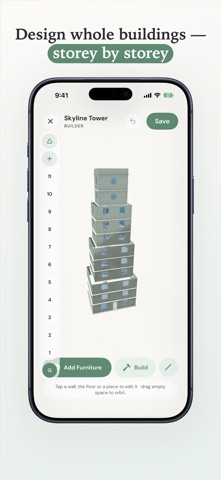
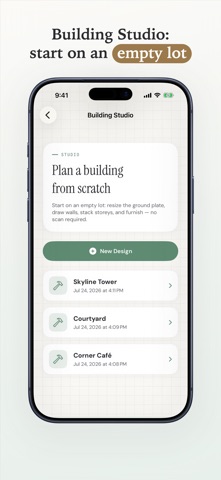
• Design a home from scratch — no scan or LiDAR hardware needed
• Draw floors and walls, then furnish rooms from a 3D furniture catalog
• Move between a 2D plan and interactive 3D, add a gable roof, and build up storeys
FLOOR PLANS
• Drawn like an architectural plan: walls, door swings and window symbols
• Edit geometry, labels, and furniture with full undo/redo
• Grid snapping aligned to your longest wall, with compass indicator
• Area and dimension metrics in metric or imperial units
SCAN LIBRARY
• All scans stored on your device — offline and private
• 3D preview (USDZ) and 2D plan for every scan
• Rename, organize, and revisit scans anytime
• Search, sort and filter scans and properties
EXPORT & SHARE
• USDZ 3D models and RoomPlan JSON
• Floor plans as PDF, SVG, DXF, PNG and CSV (Pro)
• Exposé PDF for properties (Pro)
• GPS location data in exports (Pro)
• Import scans from other devices (Pro)
PRO SUBSCRIPTION
The free version includes 3 scans (rooms and objects combined), Building Studio, the floor plan editor, properties with living area calculation, and a preview of every export. Pro unlocks unlimited scanning, sharing floor plan exports (PDF, SVG, DXF, PNG, CSV) and exposés, GPS data in exports, and scan import. Available as a monthly or annual subscription — cancel anytime.
REQUIREMENTS
Room scanning requires a device with a LiDAR sensor (iPhone 12 Pro or a later Pro model, or iPad Pro from 2020). Object Capture requires iPhone 12 Pro or a later Pro model, or iPad Pro from 2021. Building Studio works on any supported device.
Everything stays on your device — no account, no cloud upload, no tracking.
Privacy Policy: https://www.lidarscanneriphone.com/privacy
Terms of Use (EULA): https://www.apple.com/legal/internet-services/itunes/dev/stdeula/
Safety and technology
Found in the app by AppBrain- Price
- Free
- App size
- 23.4 MB
- Content rating
- Everyone
Technologies used by LiDAR Room Scanner Floor Plan
Releases
Updates seen on the App Store- Version
- 1.4
- Launched
- July 2026
No changelog data
Rankings
App Store top chartsApp Store Rankings for LiDAR Room Scanner Floor Plan
About the app and developer
About LiDAR Room Scanner Floor Plan
LiDAR Room Scanner Floor Plan is a productivity app developed by Claudius Kristmann.
What is the rating of LiDAR Room Scanner Floor Plan?
LiDAR Room Scanner Floor Plan has no ratings yet.
Is LiDAR Room Scanner Floor Plan free?
LiDAR Room Scanner Floor Plan is free. The app size is 23.41 MB. The latest version available is 1.4. The last update was on October 26, 2026.
What are the requirements for LiDAR Room Scanner Floor Plan?
The app has a content rating of Everyone. The app has been available on the App Store since July 2026.
Developer information for Claudius Kristmann
Address:
Frequently asked questions about LiDAR Room Scanner Floor Plan
Is LiDAR Room Scanner Floor Plan free?
Yes. LiDAR Room Scanner Floor Plan is free on the App Store.
Is LiDAR Room Scanner Floor Plan still available?
Yes. LiDAR Room Scanner Floor Plan is on the App Store, and the last update we saw was on October 26, 2026.
How large is LiDAR Room Scanner Floor Plan?
LiDAR Room Scanner Floor Plan is 23.41 MB.
Is LiDAR Room Scanner Floor Plan suitable for children?
App Store rates the content of LiDAR Room Scanner Floor Plan as suitable for everyone.
Who made LiDAR Room Scanner Floor Plan?
LiDAR Room Scanner Floor Plan was developed by Claudius Kristmann. It is listed in the productivity category on the App Store.