

LifeCue – Smart Reminders
LifeCue – Smart Reminders is made and published by Sanjay Korde. AppBrain is an independent app data site and isn't affiliated with Sanjay Korde. The app name, icon, screenshots and description belong to Sanjay Korde and are shown as published on the App Store.
AppBrain's verdict
- Last updated
- September 16, 2026
- Size
- 4.93 MB
User feedback
Ratings and reviews on the App StoreComments on LifeCue – Smart Reminders for iOS
We don't have enough comments to show example comments. Please check back later.
Store listing
By Sanjay Korde, from the App Store


Description by Sanjay Korde Written by the developer, not by AppBrain. Click to read.
Create simple reminders for tasks, events, deadlines, follow-ups, school activities, appointments, and anything else you don't want to forget.
LifeCue gives you more than a basic reminder. Organize reminders around the people and contexts that matter to you, keep useful notes alongside them, and optionally connect a reminder to an upcoming calendar event.
Download free. Unlock LifeCue Pro once for photo capture, repeating reminders, Forward, and Backup. No subscription. No account.
What you get (free)
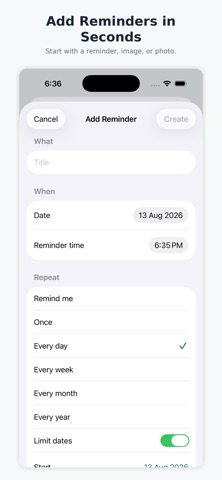
• Quick reminders: Create reminders with a title, date, and time in just a few steps.
• Custom reminder timing: Choose when LifeCue should remind you, including options such as before the scheduled time.
• People: Associate reminders with people who matter to you. For example, keep track of something you need to do for a family member, child, friend, or colleague.
• Contexts: Organize reminders by context such as school, work, home, travel, appointments, or other areas of your life.
• Calendar integration: Optionally connect a reminder to an upcoming calendar event so the reminder stays connected to the event it relates to.
• Notes: Add additional information to a reminder without cluttering the reminder title.
• Search: Quickly find reminders using the reminder search feature.
• Calendar view: See your reminders across a monthly calendar and quickly understand what is coming up.
• Reminder details: Open any reminder to see its schedule, person, context, and other information in one place.
• Snooze: Snooze a reminder when you need more time.
• Complete reminders: Mark reminders as complete when you're done.
• Delete reminders: Remove reminders you no longer need.
LifeCue Pro (lifetime unlock)
• Photo and image reminders: Capture a document or note with your camera, or upload an image and extract information from it to help create a reminder.
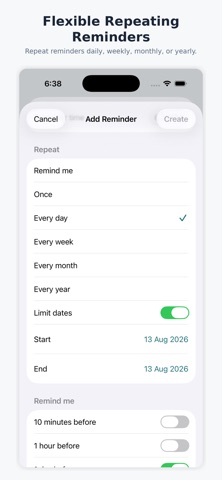
• Flexible scheduling: Set reminders to repeat every day, week, month, or year.
• Limit repeating reminders: Set start and end dates for recurring reminders so they automatically stop when the period is complete.
• Forward: Share reminder text using the iOS share sheet.
• Backup and restore: Export a portable backup of your LifeCue reminders, People, and Contexts. Import a previous backup when restoring your data or moving to another device.
LifeCue is designed to keep your reminders organized without making everyday planning complicated.
Remember less. Live more.
LifeCue.
Safety and technology
Found in the app by AppBrain- Price
- Free
- App size
- 4.93 MB
- Content rating
- Everyone
Technologies used by LifeCue – Smart Reminders
Releases
Updates seen on the App Store- Version
- 1.1
- Launched
- August 2026
No changelog data
Alternatives
Similar apps and more from Sanjay KordeAlternatives to LifeCue – Smart Reminders


More from Sanjay Korde


Rankings
App Store top chartsApp Store Rankings for LifeCue – Smart Reminders
About the app and developer
About LifeCue – Smart Reminders
LifeCue – Smart Reminders is a productivity app developed by Sanjay Korde.
User Ratings
The app has no ratings yet.
App Information
LifeCue – Smart Reminders is freely available from the App Store. The app size is 4.93 MB. The latest version available is 1.1. The last update was on September 16, 2026.
Technical Requirements
The app has a content rating of Everyone. The app has been available on the App Store since August 2026.
Developer information for Sanjay Korde
Address: