

LifeOS - Self Observatory
LifeOS - Self Observatory is made and published by Ryota Kimura. AppBrain is an independent app data site and isn't affiliated with Ryota Kimura. The app name, icon, screenshots and description belong to Ryota Kimura and are shown as published on the App Store.
AppBrain's verdict
- Last updated
- September 15, 2026
Rankings
App Store top chartsApp Store Rankings for LifeOS - Self Observatory
Competitors
Similar apps and more from Ryota KimuraAlternatives to LifeOS - Self Observatory


More from Ryota Kimura


Releases
Updates seen on the App Store- Version
- 2.17
- Launched
- December 2025
No changelog data
User feedback
Ratings and reviews on the App StoreComments on LifeOS - Self Observatory for iOS
We don't have enough comments to show example comments. Please check back later.
Technology
Found in the app by AppBrain- Price
- Free
- App size
- 14.1 MB
- Content rating
- Everyone
Technologies used by LifeOS - Self Observatory
About the app and developer
About LifeOS - Self Observatory
LifeOS - Self Observatory is a productivity app developed by Ryota Kimura.
User Ratings
The app has no ratings yet.
App Information
LifeOS - Self Observatory is freely available from the App Store. The app size is 14.06 MB. The latest version available is 2.17. The last update was on September 15, 2026.
Technical Requirements
The app has a content rating of Everyone. The app has been available on the App Store since December 2025.
Developer information for Ryota Kimura
Address:
Frequently asked questions about LifeOS - Self Observatory
Is LifeOS - Self Observatory free?
Yes. LifeOS - Self Observatory is free on the App Store.
Is LifeOS - Self Observatory still available?
Yes. LifeOS - Self Observatory is on the App Store, and the last update we saw was on September 15, 2026.
How large is LifeOS - Self Observatory?
LifeOS - Self Observatory is 14.06 MB.
Is LifeOS - Self Observatory suitable for children?
App Store rates the content of LifeOS - Self Observatory as suitable for everyone.
Who made LifeOS - Self Observatory?
LifeOS - Self Observatory was developed by Ryota Kimura. It is listed in the productivity category on the App Store.
What are the best alternatives to LifeOS - Self Observatory?
People looking at LifeOS - Self Observatory also look at these productivity apps: MAY OS: Personal Assistant, LifeOS Coach, MyLifeOS, LifeOS: Calm Habit Coach, PaperAI.
Store listing
By Ryota Kimura, from the App Store


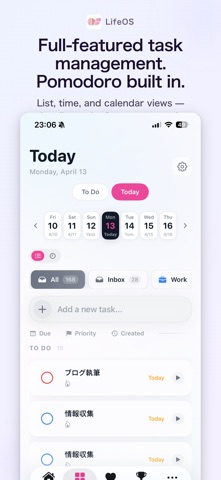

Description by Ryota Kimura Written by the developer, not by AppBrain. Click to read.
Five small practices that decide how today's you should move.
Observe → Select → Act → Notice → Restore
LifeOS is the best implementation of this method.
You could practice it on paper. But for connecting sleep, activity, tasks, focus, and reflection into one place, LifeOS is the most natural fit.
The more you continue, the more the data starts to return "your strengths and habits."
Morning deep worker. Monday starter. The way your focus drops on the third session.
LifeOS gives you back the final fruit of observation.
"I feel off today." But you don't know why.
Tasks pile up. Some days motivation just isn't there. But without knowing the cause, you repeat the same cycle.
LifeOS - Self Observatory turns that vague feeling into a number.
Your sleep, activity, and focus data become a daily energy score from 0 to 100.
Tasks are suggested with reasons matched to your condition.
The more you use it, the more your winning patterns emerge.
A behavioral insight OS that tells you the best way to move through your day.
Your companion for upgrading not just work, but life itself.
Your Strengths + Your Observations (new in v2.5)
After 14+ days of focus data, your strength type emerges — morning deep worker, evening sprinter, steady type, monday starter, evolving. Habit observations are delivered as findings, not judgments. Strengths needing more data are previewed as "unlocking in N days."
Today's Power
Your daily energy, scored from sleep, activity, and calendar data. Know at a glance whether today is a day to push hard or take it easy. AI generates personalized advice that changes every day.
Today's 3
Tasks recommended with reasons matched to your energy. Switch by day with the date calendar. Toggle between "To Do" and "Today" modes. Tasks abandoned 30+ days get one-tap triage. Type "tomorrow 6pm" or "every Monday" — AI parses dates and recurrence automatically.
Your Day Guide
3 tips based on your patterns, displayed every day. Auto-adapts to Power state, time of day, meeting load, and sleep.
Insights
"On 7+ hour sleep nights, your focus is 42% longer." Sleep vs focus, steps vs task completion, auto-correlated. The more you use it, the more your own patterns emerge.
AI Monthly Review (Pro)
At the start of each month, AI analyzes your previous month — winning patterns, trends, and next-month suggestions.
Reset Protocol
NOT (what to avoid), GO (where you're heading), DO (today's actions). A guided reflection to regain direction. Results stay on your dashboard at all times.
Pomodoro Timer
Every focus session feeds your Insights. Control from Live Activity, Dynamic Island, or Apple Watch.
Apple Watch + Complications
Power score displayed on your watch face. Know today's state with a glance at your wrist.
Weather + Power
Detects approaching low pressure and factors it into your Power score. Now you know why you feel off.
Life Goals
Your bucket list, visualized. Track long-term goal progress.
Complete Privacy
All data processed on-device only. Nothing sent to external servers.
Cross-Device Sync
Seamlessly sync across iPhone, Mac, and Apple Watch via iCloud. No re-onboarding when you add a new device.
LifeOS Pro unlocks AI Monthly Review, correlation analysis, long-term trends, unlimited tasks, and unlimited Reset Protocol via an auto-renewable subscription (monthly or yearly).
Pricing varies by region and is shown in the App Store. Payment is charged to your Apple ID on purchase. The subscription auto-renews unless turned off at least 24 hours before the current period ends. Renewal is charged within 24 hours of period end. Manage and cancel in your App Store account settings.
Privacy Policy:
https://rkpg.net/lifeos/privacy-policy-en.html
Terms of Use:
https://www.apple.com/legal/internet-services/itunes/dev/stdeula/
Available in Japanese and English.