

LifeToolkit: Expense & Habits
LifeToolkit: Expense & Habits is made and published by Kubra Nur AKIN. AppBrain is an independent app data site and isn't affiliated with Kubra Nur AKIN. The app name, icon, screenshots and description belong to Kubra Nur AKIN and are shown as published on the App Store.
AppBrain's verdict
- Last updated
- October 13, 2026
Rankings
App Store top chartsApp Store Rankings for LifeToolkit: Expense & Habits
Competitors
Similar apps and more from Kubra Nur AKINAlternatives to LifeToolkit: Expense & Habits


 Auto Tapper Assistant App

More from Kubra Nur AKIN


Also available on Google Play

Releases
Updates seen on the App Store- Version
- 2.2.8
- Launched
- May 2026
No changelog data
User feedback
Ratings and reviews on the App StoreComments on LifeToolkit: Expense & Habits for iOS
We don't have enough comments to show example comments. Please check back later.
Technology
Found in the app by AppBrain- Price
- Free
- App size
- 40.3 MB
- Content rating
- Everyone
Technologies used by LifeToolkit: Expense & Habits
About the app and developer
About LifeToolkit: Expense & Habits
LifeToolkit: Expense & Habits is a productivity app developed by Kubra Nur AKIN.
User Ratings
The app has no ratings yet.
App Information
LifeToolkit: Expense & Habits is freely available from the App Store. The app size is 40.27 MB. The latest version available is 2.2.8. The last update was on October 13, 2026.
Technical Requirements
The app has a content rating of Everyone. The app has been available on the App Store since May 2026.
Developer information for Kubra Nur AKIN
Address:
Frequently asked questions about LifeToolkit: Expense & Habits
Is LifeToolkit: Expense & Habits free?
Yes. LifeToolkit: Expense & Habits is free on the App Store.
Is LifeToolkit: Expense & Habits still available?
Yes. LifeToolkit: Expense & Habits is on the App Store, and the last update we saw was on October 13, 2026.
How large is LifeToolkit: Expense & Habits?
LifeToolkit: Expense & Habits is 40.27 MB.
Is LifeToolkit: Expense & Habits suitable for children?
App Store rates the content of LifeToolkit: Expense & Habits as suitable for everyone.
Who made LifeToolkit: Expense & Habits?
LifeToolkit: Expense & Habits was developed by Kubra Nur AKIN. It is listed in the productivity category on the App Store.
What are the best alternatives to LifeToolkit: Expense & Habits?
People looking at LifeToolkit: Expense & Habits also look at these productivity apps: SkoolTech Solutions School App, PDF Compressor Offline, Password Manager: Vault Safe, Chat Bot Creator: AI Assistant, TuneBoss ECU.
Store listing
By Kubra Nur AKIN, from the App Store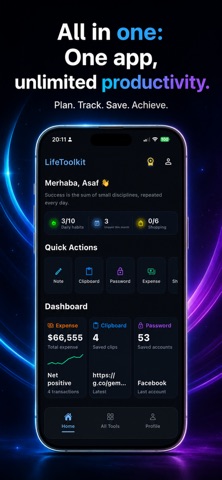




Description by Kubra Nur AKIN Written by the developer, not by AppBrain. Click to read.
WHY LIFETOOLKIT
• All-in-one home: Bottom navigation (Home, All Tools, Profile), customizable quick actions, and dashboard cards for expenses, notes, and passwords—launch IBAN Vault, Quick Notes, Password Manager, Reminders, Shopping List, Expense Tracker, Daily Habits, SubTracker, Location Saver, and Clipboard History from one place.
• Built for speed: Clean layouts, copy-friendly fields, swipe actions, and a refreshed interface so you can check off tasks in seconds.
• At-a-glance summaries: See habit progress, upcoming subscription due dates, pending reminders, and shopping list status on your home screen.
TOOLS AT A GLANCE
• IBAN Vault — Store labeled bank details and copy IBANs instantly for transfers and forms.
• Quick Notes — Keep short reminders, codes, and snippets in one tidy list.
• Reminders — Schedule time-sensitive alerts for critical dates like passport renewals, birthdays, or daily tasks, with local notifications that repeat when you need them.
• Password Manager — Save accounts, generate strong passwords, and copy secrets from a vault with lock protection.
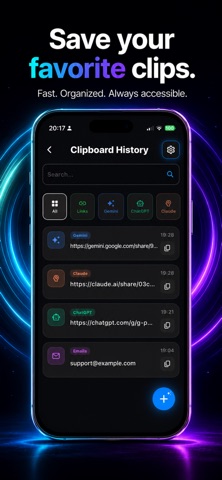
• Clipboard History — Save and categorize copied text (links, codes, addresses), search your history, and reuse snippets quickly.
• Shopping List — Maintain an active grocery list with simple add/remove flows.
• Expense Tracker — Log income and spending, organize transactions by category, and track your balance from the home dashboard.
• Daily Habits — Log routines and follow streak-style progress to stay consistent.
• SubTracker — Record subscriptions, estimate monthly spend, and track renewal dates (your subscription log stays on device).
• Location Saver — Bookmark favorite spots with quick access when you are on the move.
SECURITY & PRIVACY
Sensitive lists, scheduled reminders, and vault entries stay on your device using local storage on your iPhone—no separate account is required to start. Face ID, Touch ID, or your device passcode can protect selected tools; optional app lock settings help you control when tools re-lock. Clipboard history and other sensitive data are stored locally on your device. Location saving uses Apple’s location permission only when you choose to add or open a saved place.
EVERYDAY USE CASES
Use LifeToolkit as a lightweight personal organizer: grocery planning, expense and budget tracking, banking helpers, clipboard reuse, a mini password generator and vault, subscription tracking, habit tracking, custom alerts for birthdays and passport expirations, and a pocket notebook for anything you need to remember fast.
FOR IPHONE
Designed for iPhone with a dark, focused interface that keeps attention on your tasks—not on clutter.
OPTIONAL IN-APP PURCHASES
You can start with the free experience; an optional subscription unlocks higher limits across tools. Terms appear at purchase in the app.
Terms of Use (EULA): https://www.learnablegames.com/terms-of-service/
Privacy Policy: https://www.learnablegames.com/privacy-policy/