

Liftframe is made and published by Spmaker. AppBrain is an independent app data site and isn't affiliated with Spmaker. The app name, icon, screenshots and description belong to Spmaker and are shown as published on the App Store.
AppBrain's verdict
- Last updated
- March 31, 2026
Rankings
App Store top chartsApp Store Rankings for Liftframe
Competitors
Similar apps and more from SpmakerAlternatives to Liftframe





More from Spmaker







Releases
Updates seen on the App Store- Version
- 1.0
- Launched
- March 2026
No changelog data
User feedback
Ratings and reviews on the App StoreComments on Liftframe for iOS
We don't have enough comments to show example comments. Please check back later.
Technology
Found in the app by AppBrain- Price
- Free
- App size
- 1.52 MB
- Content rating
- Everyone
Technologies used by Liftframe
About the app and developer
About Liftframe
Liftframe is a photo & video app developed by Spmaker.
User Ratings
The app has no ratings yet.
App Information
Liftframe is freely available from the App Store. The app size is 1.52 MB. The latest version available is 1.0. The last update was on March 31, 2026.
Technical Requirements
The app has a content rating of Everyone. The app has been available on the App Store since March 2026.
Developer information for Spmaker
Address:
Store listing
By Spmaker, from the App Store



Description by Spmaker Written by the developer, not by AppBrain. Click to read.
Transform any photo into a stunning composite with just a few taps. Liftframe lets you lift subjects from photos and place them on any background — solid colors, your own photos, or custom canvases.
● What makes Liftframe special
Powered by iOS's built-in subject-lift technology, Liftframe seamlessly extracts people, pets, objects, and more from any photo. No masking tools. No complicated selections. Just long-press the subject and it's done.
● Key Features
• Subject Lift (iOS 17+): Long-press any subject on your foreground image and iOS automatically extracts it with a clean, natural edge.
• Edge Trim: Smooth away fringe pixels left behind after extraction. Fine-tune the trim amount with a dedicated slider.
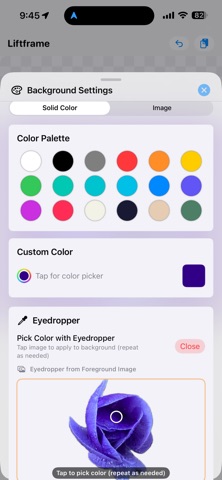
• Flexible Backgrounds: Use any solid color (with palette, custom picker, or eyedropper), or load a photo from your album.
• Eyedropper: Sample any color from your foreground or background image and apply it as the background color instantly.
• Canvas Sizing: Scale the canvas as a ratio of the foreground's natural size, or set exact pixel dimensions. Presets for Instagram, X (Twitter), and more.
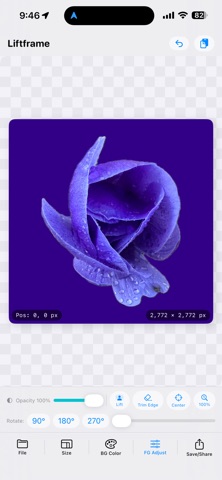
• Foreground Adjustments: Move (drag), resize (pinch), rotate (90° presets or free slider), and control opacity.
• Layer & Composite: Use "Set Current Image as Background" to flatten your composite and keep adding more subjects on top — perfect for collages.
• Multiple Export Formats: Save as JPG (composited), PNG with background, or transparent PNG (foreground only). Share via AirDrop, Mail, and more.
• Undo: Up to 20 steps of undo history — experiment freely without worry.
• Clipboard Support: Paste images directly from other apps.
● How to use
1. Open the File menu and load a foreground image from your album, or paste from the clipboard.
2. In iOS Photos, long-press a subject to copy it, then paste it into Liftframe for an instant cut-out.
3. Set your background color or photo.
4. Position, resize, and rotate the subject to taste.
5. Save as JPG or PNG, or share via AirDrop.